Customizing a Standard perimeter
Standard perimeters are stored in the Perimeters > Standard Perimeters folder.
It is not recommended to modify these standard perimeters.
Instead, you must create a custom perimeter, which inherits from the standard perimeter you want to customize and configure this custom perimeter.
To modify a standard perimeter:
1. Create a perimeter, see Creating a perimeter.
2. Expand the perimeter concerned.
3. Right-click the Inherited Perimeter folder and select Connect > _Operator.
4. Select the perimeter you wanted to modify and click Connect.
For example: “Standard for comparison” _Operator.
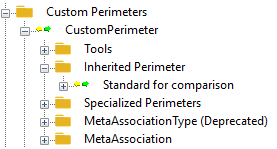
5. Customize your perimeter, see Configuring a perimeter.