Describing a Business Functional Area
 A Business functional area is a set of business functions and their associated value streams on the conjunction of two main criteria: their need in accomplishing one or more business capabilities and the common skills and functionalities required to accomplish these business capabilities.
Accessing the business functional area list
To access the business functional area list:
1. In the Inventories navigation menu, click Business Architecture > Business Functions.
The tree of business functional areas appears.
The properties of a business functional area
The Characteristics properties page of a functional area provides access to:
• its Name,
• its Owner, by default on creation of the business functional area, the current enterprise.
• the text of its Description.
• its Owned Realizations
 For more details on creating a business capability, see Creating Fulfillment of a Business Capability.
With HOPEX IT Business Management , a business functional area is described in the following pages:
• the Structure page, which provides access to the list of components of the business functional area.
For more information on the components of a business functional area, see Describing a business functional area diagram.• the Performed Process page, which provides access to the value streams executed in the context of the business functional area.
Describing a business functional area diagram
A business functional area diagram describes the service interactions between the main internal components of the architecture described. It thus describes:
• the uses of the business functional area,
A Business functional area is a set of business functions and their associated value streams on the conjunction of two main criteria: their need in accomplishing one or more business capabilities and the common skills and functionalities required to accomplish these business capabilities.In this example, the history functional area is based on the business functional areas for selling, delivering and command.
For more information on the use of a business functional area, see Creating an internal or external business functional architecture area.• the business components.
A business function is a conceptual unit of the division of responsibilities in an enterprise. It is used to structure the management of information processing, energy, and equipment produced or used. Business functions define the skills and the functionalities necessary to the enterprise to fulfill its mission.For more details on business functions, see Describing Business Functions.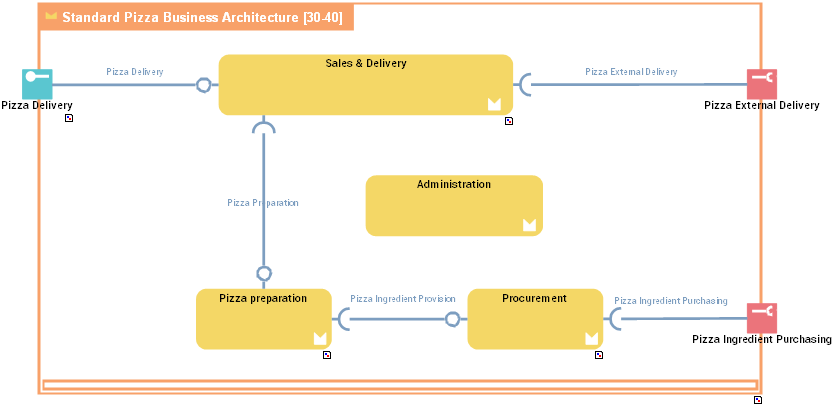
With HOPEX IT Business Management , communications are based on:
• access points: service points and request points.
A service point is a point of exchange by which an agent offers a service to potential customers.A request point is a point of exchange by which an agent requests a service from potential suppliers.For more details on service interactions between components, see Managing service points and request points.• service interactions
A Service Interaction represents an interaction for service purpose between entities in a specific context inside or outside a company. These entities can be enterprise org-units, applications, activities or processes, as well as external org-units. The content of this interaction is described in a service interface.For more details on service interactions between components, see Managing Service Interactions.Managing service points and request points
A business business functional area is created to ensure one or more services. These services are represented by service points. The service is requested according to precise terms defined by an service interface assigned to the service point.
A service point is a point of exchange by which an agent offers a service to potential customers.A Service Interface is a template of a contract between entities (organizational, IT …). The contract is described by available operations which can be triggered trough messages exchanged by roles (vendor, buyer..).A request point is used to represent the use of an external service.
A request point is a point of exchange by which an agent requests a service from potential suppliers.The service is requested according to specific terms that are defined by a service interface assigned to the request point.
Components that issue a request are linked to the request point by a service interaction.
In the example, the request point that represents the "External delivery" is linked to the "Sales and deliveries" business functional area by a service interaction.
Creating a service point or a request point
The process for creating a service point or request point is identical.
To create a service point:
1. In the diagram insert toolbar, click Service Point.
2. Position the object at the edge of the architecture frame.
A creation dialog box opens.
3. Click the arrow to the right of the Service Interface field to define the service interface enabling activation of this service point, and select, for example, Connect Service interface.
A query window opens.
4. Select the service interface associated with this service point.
5. Click Next.
A dialog box opens proposing a list of the service interface roles that can be associated with the service point.
This second dialog box is not proposed if there is only one candidate role that can be associated with the service point.6. Select the role that interests you and click OK.
The service point appears in the diagram.
To change the service point name:
1. Click the name of the service point and press key F2.
2. Enter the new name used when specifying service interaction points.
Managing Service Interactions
A Service Interaction represents the exchange of information between architecture components.
A Service Interaction represents an interaction for service purpose between entities in a specific context inside or outside a company. These entities can be enterprise org-units, applications, activities or processes, as well as external org-units. The content of this interaction is described in a service interface.The content of a service interaction is described by an service interface.
A Service Interface is a template of a contract between entities (organizational, IT …). The contract is described by available operations which can be triggered trough messages exchanged by roles (vendor, buyer..).Creating a Service interaction
To create a service interaction:
1. In the objects toolbar of the diagram, click Service interaction.
2. Draw a link between the two communication entities.
3. In the Add service interaction window, specify the service interface you wish to use.
You can also create a new service interface, see Creating a service interface from a service interaction.4. Click OK.
Creating a service interface from a service interaction
You can create a service interface:
• from a library,
• from a service interaction in a diagram.
To create a service interface, in a diagram, from a service interaction:
1. In the objects toolbar of the diagram, click Service interaction.
2. Draw a link between the two communication entities.
3. In the Add service interaction window, click the arrow at the right of the field Service interface and select New.
The creation window appears.
4. Enter the service interface name in the Name field.
5. Click OK.
The service interaction and the service interface are created.