Describing the data of a Business Capability
Combined with HOPEX Data Architecture or HOPEX Data Governance, the HOPEX IT Business Management solution can be used to define the data used at the business capability level.
Creating a Concept Domain Diagram on the Business Capability
Describing the data used in a business capability involves creating a concept domain diagram. You can create this diagram from the business capability concerned.
The concept domain diagram presents business data, their properties and their relationships.
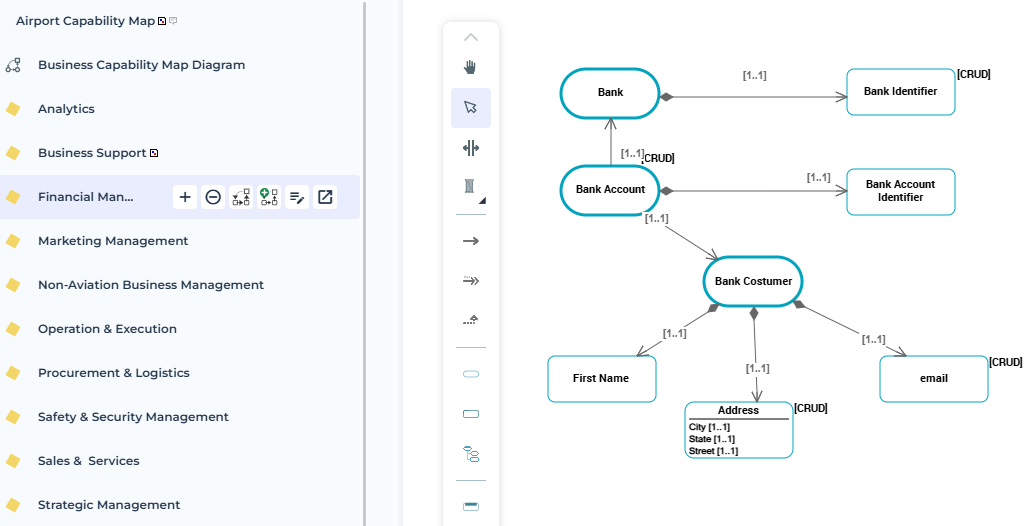
To create the concept domain diagram for a business capability:
1. Open the properties dialog box of the business capability.
2. Click the Diagrams page.
3. Click Create a diagram.
4. Select the “Concept Domain” diagram type.
The diagram is displayed in edit mode.
Diagram Data
A concept domain includes or references a set of business data.
The data described in the diagram and defined as “components” of the concept domain is visible in the business capability properties, in the Characteristics page, in the Business data section.
 The Business Data section can be hidden by default. To display it, click the Manage sections button and select Business data.
To connect an element of the diagram to the list of components for a concept domain:
1. Right-click the object to open its pop-up menu.
2. Select Add to “Current concept domain (name").
For more information on creating diagram elements, see: