Attributes (Information) - Merise
Properties
Entities and associations can be characterized by attributes:
These attributes can be found by studying the content of messages circulating within the company.
 An attribute is the most basic data saved in the enterprise information system. An attribute is a property when it describes an entity or association, and an identifier when selected as a means of identification of each instance of an entity.
A property characterizes an association when the property depends on all the classes participating in the association.
In the diagram below, the “Role” that a “Consultant” plays in a “Contract” depends on the consultant and on the contract, and therefore on the “Intervene” association.
Examples of attributes:
"Client Name" (property of the client entity).
“Client No.” (identifier of the client entity).
“Account Balance” (property of the account entity).
Identifier

Customer number 2718 executes Reservation number 314159.
Each entity has a unique identifier whose value can be used to find each of its instances.
The metamodel defines language structure used in models.By default, associations do not have their own identifiers: an association is identified by the identifiers of the linked entities.
Creating Attributes
Attributes are created in the properties dialog boxes of associations and entities.
The Attributes tab of this dialog box shows attributes already linked to the entity or association.
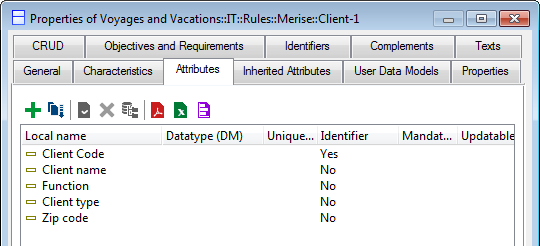
To create an attribute:
 Click the New button
  and enter the name of the attribute.
 You can specify its characteristics (see Attribute Description for further details).
You can specify its Length, if necessary complemented by the number of Decimals; it should be noted that the number of decimals is not added to the length; an information of length 5 with two decimals being presented in the form " 999.99 ".When you have completed this, close the properties dialog box.