Refining Data Model Specification (Merise)
During specification, it is often necessary to complement the data model.
Complements to the specification consist of:
• Specifying Length and Decimal characteristics and documenting attributes.
In the data model, it is also possible to specify:
• Sub-type entities.
• Constraints that must be respected by data in documentary terms. These constraints are imposed by checks carried out during data update processing.
Ordering Attributes
The initial order of attributes is their order of creation (or of creation of the link with the entity or association).
To modify this order:
1. In the Attributes of the properties dialog box of the object, click the  Reorder.
Reorder.The Order Modification dialog box appears.
To reorder attributes:
1. Select the attribute to be moved by clicking its name with the left mouse button.
2. Move the cursor to the desired position; it takes the following shape: 
The attribute is placed in the desired position, and the order of the link with the entity is modified.
This order will be used to generate the order of columns and tables. It will also be used in the document associated with the data model.
Attribute Description
Attributes can be described in two ways:
• By entering this description in the various fields of the list presented in the Attributes tab.
• In the properties dialog box of each attribute. This dialog box is opened by selecting Properties in the attribute pop-up menu.
You can enter the attribute characteristics values in the corresponding fields.
• The Data Type which is the class used to specify the attribute type.
• The Identifier field indicates if the attribute forms part of the entity identifier.
• The Mandatory field enables indication of whether or not entry of a value for this attribute is mandatory.
• The Uniqueness field enables indication of whether or not two instances of this entity can have the same value for this attribute.
• The Updatable field enables indication of whether or not the value of this attribute can be modified after it has been entered.
Participations or cardinalities
To modify the participations or cardinalities of an association:
1. Open the properties window of the association.
2. Click the Characteristics tab.
3. Enter participation (cardinality) values.
 A cardinality is the minimum (or maximum) number of times an entity "participates" in an association (see also multiplicity).
Cardinalities or participations most commonly used are:
• 0 or 1 for minimum cardinality (optional or mandatory minimum participation).
• 1 or N for maximum cardinality (unique or not unique maximum participation).
Different values are permitted.
When several roles, ie. several links, exist between an entity and an association, the cardinalities are defined for each role.
Cardinality of an entity in an association can also be defined as follows:
• For a binary association, it is the minimum (or maximum) number of instances of the other entity in the association that can be linked to the initial entity.
• For a ternary association, it is the number of pairs of other entities in the association that can be linked to the initial entity.
• For a quaternary association, it is the number of triplets, etc.
If expression of cardinalities is not sufficient to describe the link that exists between an entity and an association, for example when a cardinality depends on an organizational context, it is possible to use cardinality constraints, which enable more precise description.Examples
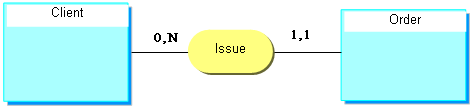
0,N : The client can issue no order, can issue a maximum of N orders (N indeterminate).
1.1: The order must be issued by one and only one client.
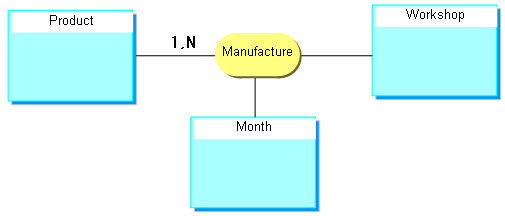
1,N : A product must be manufactured at minimum in 1 workshop over a period of 1 month. It can be manufactured in several workshops and/or over a period of several months (several workshop-month pairs).