Data Validation Workflow
HOPEX Data Architecture includes a standard workflow to manage the progress of the design of information assets, from their creation to the end of their validation.
The workflow definition is provided by default on the data lineage, data domain and data map, for the business, logical and physical layers.
The workflow can be extended to other data items.
By default, the instantiation of this workflow is optional and not automatic. You can select and decide on which object you want to create a workflow instance.
Validation workflow steps
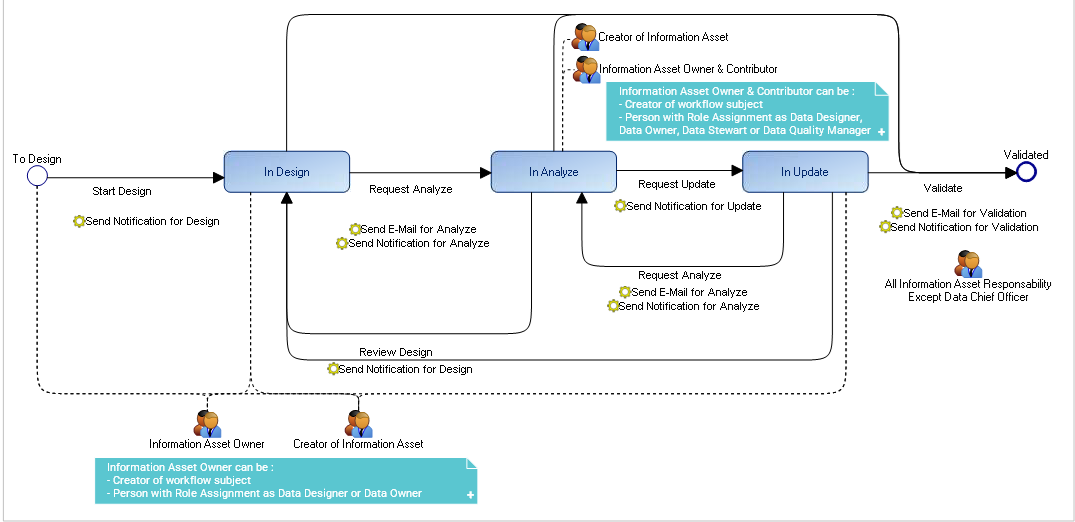
Workflow instantiation can be performed by the data designer or the owner of the object data. In addition, all other persons assigned as Data Asset Manager, Data Steward, Data Quality Manager and Data Chef Officer can use the "Data Contributor" profile to connect to HOPEX data and trigger the validation steps.
For each transition triggered, a notification or e-mail is sent to the assigned person on the subject of the workflow.
For more details on workflows, see Using Workflows.
For more details on business roles, see Business Roles of HOPEX Data Architecture.
Generating a workflow report
Workflow reports are available on the different types of objects (data lineage, data domains, etc.); they display the number of objects located at each step of the workflow (number of objects in design, in analyze, etc.).
To generate a workflow report:
1. Click the navigation menu then click Dashboard.
2. Click + to add a report.
3. Expand the Information Architecture folder, then the Design Status sub-folder.
4. Select the report concerned.
The report appears in your dashboard.