Logical Denormalization
Logical denormalization applies to data model entities (or classes) and attributes.
Running Logical Denormalization
To denormalize logical formalism:
1. Right-click the database with which the data model is associated and select Denormalize.
A wizard opens.
2. Select the type of denormalization concerned (logical) and follow the instructions of the wizard. See Logical Denormalization Wizards.
Logical denormalization example
Suppose that you wish to transform the "Order line" entity to an association.
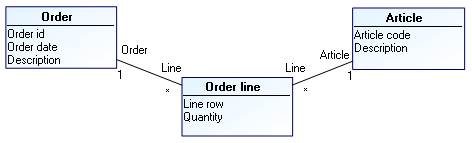
To transform this entity to an association:
1. Right-click the "Order management" database which contains this entity and select Denormalize.
A wizard opens.
2. Select the Logical denormalization.
3. Click Next.
4. In the Select the denormalization type field, select "Transform an entity to an association".
5. Click Next.
6. In the editor tree, select the Scope column opposite the "Order line" entity check box.
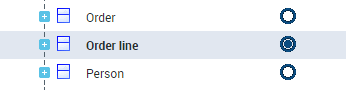
 You can select several entities at denormalization.
7. Click Next.
Denormalization options appear. Mapping transfer and source object deletion are activated by default. This means that the "Order line" entity will be deleted and the mapping link with the "Order line" table will be transferred to the association which replaces it.
8. Click Next.
The editor displays changes produced by this denormalization. You can see that the "Order line" entity will be deleted and the "Order line" association will be created.
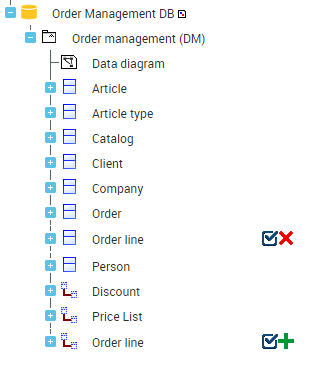 When a selected entity cannot be transformed, the editor will indicate the reason.
You can refuse a modification by clearing the corresponding box.
9. Validate results by clicking Next.
This transformation is definitive and will be taken into account by the next synchronization.
On completion of denormalization, you can see that the "Order line" association that replaces the entity is now mapped with the "Order line" table.
If an object is protected, it is not possible to select it during denormalization.Logical Denormalization Wizards
Transform association to entity
This denormalization enables transformation of an n-ary association, whatever its multiplicities, to an entity. An association of multiplicity '*,1' is created between this entity and the entities of the association.
Before
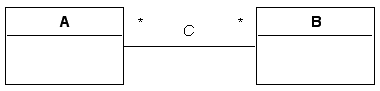
After
Transform entity to association
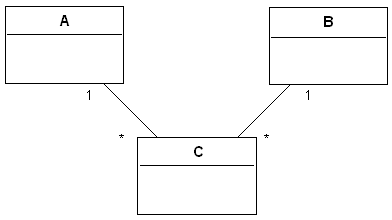
This denormalization enables transformation of an entity with n binary associations, of which opposite roles are of multiplicity '1', to an association. A new n-ary association of multiplicity * is created between these entities.
Before
After
Transform generalization to association
This denormalization enables transformation of a generalization between two entities to an association. An association of multiplicity *,1 is created between the two entities and the generalization is deleted.
Before 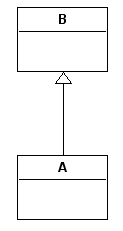 | After 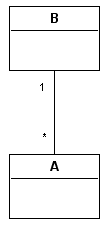 |
Transform association to generalization
This denormalization enables transformation of an association 1,* to a generalization. A generalization is created between the two entities and the association is deleted.
Before | After |
Vertical partition of an entity
This denormalization enables division of an entity into several entities. The attributes, associations and generalizations are shared between the entities.
Before 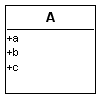 | After 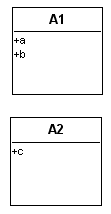 |
Horizontal partition of an entity
This denormalization enables duplication of an entity.
Before | After 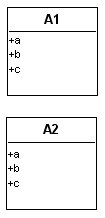 |
Horizontal partition and synchronization in Logical > Physical mode
Consider a "Catalog" entity. After horizontal partition, this entity gives two entities "Catalog-1" and "Catalog-2".
After synchronization of the Logical > Physical mode, the two entities have a table as mapping.
If you display properties of mappings, you will note that both are bidirectional, meaning that entities and table are updated in both directions of synchronization.
If you carry out logical modifications on these entities and then re-run synchronization, the editor displays a signal on the target table; it does not know which entity to take to carry out updates.
When you select an entity, this is kept as reference entity (for example Catalog-1). The other entity will be kept in one direction only, in other words Catalog-2 could be updated in the logical model but will have no impact on the table.
Merging of entities
This denormalization enables merging of entities.
Before | After |
Merging of ascending entities
This denormalization enables merging of an entity with its parent entity: all attributes and links are transferred to the parent entity and the child entity is deleted.
Before 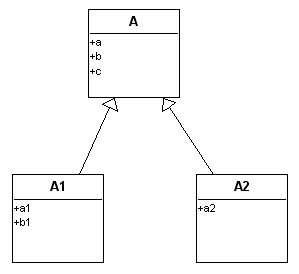 | After 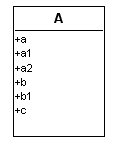 |
Merging of descending entities
This denormalization enables merging of an entity with its child entity: all attributes and links are transferred to the child entity and the parent entity is deleted.
Before 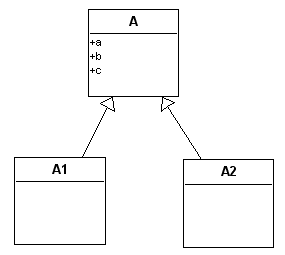 | After 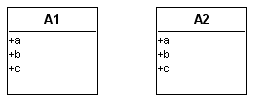 |
Copy/paste of attributes
This denormalization enables transfer of attributes of an entity or association to other entities or associations.
Before 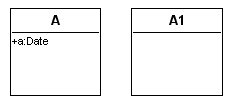 | After 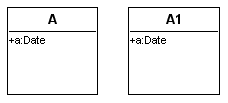 |