Saving your Work
How you save your work depends on the type of workspace in which you are working.
Saving your work (public workspace)
In a public workspace your work is automatically saved and dispatched in the repository as soon as the window on which you are working is closed.
There might be a 30 second delay in the time display update.
You can save (and dispatch) the modifications you are performing on the current page, i.e. anticipate the automatic save.
To save (and dispatch) your work performed on the current page:
1. In your HOPEX desktop, click Main Menu  .
.
.2. Select Save.
Your modifications are saved and published in the repository.
 Hover the cursor over Save to see the update. Note that there might be a delay in the time display update.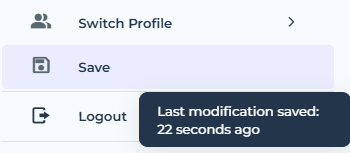
Saving your work (private workspace)
In a private workspace, you can regularly save your modifications in your workspace. These modifications are not saved in the repository. To save your modifications in the repository, you must dispatch your work.
For more details on private workspaces and particularly on your work dispatch, see Repository and Workspaces
To save the modifications you have made in your private workspace since the last save:
1. In your HOPEX desktop, click Main Menu .
.2. Select Save.
Your modifications are saved in your workspace.