Report Structure
Parameters
The parameters define the input data used for the report, that is to say the object groups and the way they interact in the report. They vary according to the report template.
E.g.: a “Deployment” type report links the “To Deploy” parameter defining the deployed elements (such as applications, technical infrastructures, etc.) with the “Location” parameter defining the target sites.
 Each report template parameter defines a multiplicity indicating whether it is possible to connect more than one value for the said parameter to a given report. If multiplicity is 1 or 0..1, only one parameter value can be connected.
The definition of input parameters is not mandatory.
Chapters
A report can contain several chapters, displayed on separate pages. Each chapter covers one set of data that may or may not be represented in a graphic format.
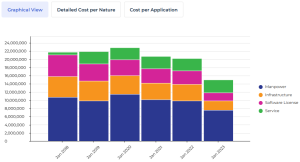
Example: on an application portfolio, the “Cost report” includes three chapters that show:
- a graphical view of costs over time (bar chart)
- the details of costs by nature (table)
- the details of costs by application (table)
For more details on the functional content of each report, refer to the “Reports” chapter of the documentation specific to the Solution.
The details of the report parameters and chapters are viewable in the report properties.