Object Name Restrictions
Length
An object name maximum length is limited to 255 characters.
Allowed characters
The characters authorized in object names are the same as those authorized in concept names:
A B C D E F G H I J K L M N O P Q R S T U V W X Y Z
a b c d e f g h i j k l m n o p q r s t u v w x y z
à á â ã ä å ç é è ë ê ì í î ï ñ ò ó ô ö ù ú û ü ÿ ý
0 1 2 3 4 5 6 7 8 9
* ( ) / = + % ? $ _ & €
, ; - :
You cannot use & , ; - : characters as the first character.
 See Concept names.
Limitation
Object names can contain upper/lowercases, although the system does not take into account letter cases and accents.
Examples of words considered the same:
• Smith and smith
• Knobel and Knöbel
• Éclair and Eclair
• pale and pâle
Name of an Object (Local/Short or Long)
Certain types of objects in HOPEX have a local name, specific to a given context. This mechanism allows another object to use the same name, but in a different context.
The “long” name includes the local name (or short name) preceded by the object owner name (the owner being the context in which the object is defined).
It is possible for example to use:
• different conditions with the same name in different processes.
• different “Enter Order” operations with the same name in two different processes. You can for example have operations:
• “Enter Order” in the “Normal Order Delivery” process
• “Enter Order” in the “Urgent Order Delivery” process
The operations carry the same local name while being different. They can have a different description or send different messages.
Examples of object types with local names are: Application, Diagram, Operation, Service, Message, Collaboration, Package, Class.In the Property pages:
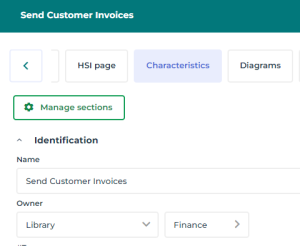
• the Characteristics page shows separately the Name of the object and its Owner
This name is also called Local Name or Short Name of the object.
Example: The Name of the process is “Send Customer invoices”, its Owner is the “Finance” library.
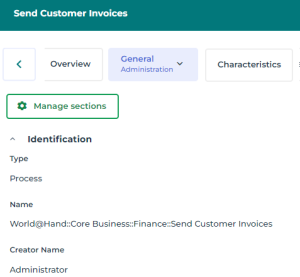
• the General page, Administration subpage shows the long name of the object. The first part of this long name refers to the object owner.
Example: The long name of the “Send Customer invoices” process is “World@hand::Send Customer invoices”.
The first part of this long name refers to the owner.
The first part of this long name refers to the owner.
To change the object owner:
 In the object Properties > Characteristics page, use the Owner field drop-down menus.
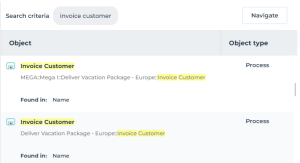
The search and the object names
When the full-text search on an object returns two objects with the same name (local/short name):
the result displays the object name (short/local name)Its (long) name with context is indicated below.
For example, when two processes have the same short name, you can select it according to its context.
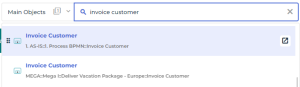
Display in the extended results: