Object History
The history is used to:
• obtain the list of objects which you have recently accessed
• display the latest modifications performed on each object
• compare objects modified between two dates
Prerequisites for history display
Log must be activated so the history page appears. Logging is activated by default.
 For more details, see Repository log.
Accessing the History of Viewed Objects
The history contains all the objects you have accessed (e.g.: display of their properties pages) or modified.
To access the history of viewed objects:
1. In the HOPEX toolbar, open the Search field.
The Recent Objects list displays the last five viewed objects.
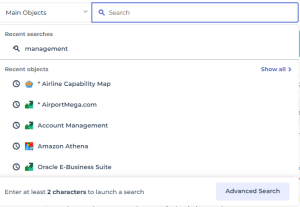
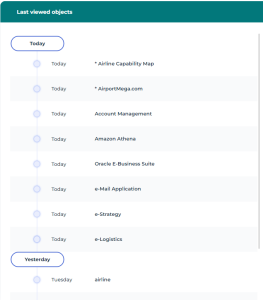
2. Click Show all to access the entire list.
3. The full list of your recently viewed objects displays in chronological order.
Accessing the History of an Object
The history of an object displays:
• the object creation date and its author
• the object last modification date and its author
• all modifications made for the object in chronological order
• the author of modifications
• which attributes were modified
• the date of each modification
You can compare the attribute values and links of an object between two dates.To display the history of an object:
1. Right-click the object and select Manage > History.
With the HOPEX Customizer profile, in the object properties, select General > History.The chronology of the object modifications is displayed.
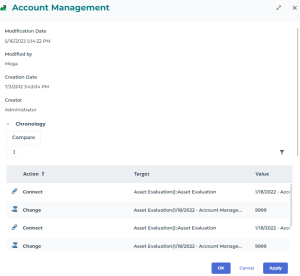
2. Click Compare to compare the attribute values and links of an object between two dates.