Managing your Page
When your customization is complete, you can:
• dispatch your page
The customization of the page applies to all of the objects of the same type.
• save your page as a draft and dispatch it later on
Dispatching your page
Once your customization is complete, you can dispatch your page or your draft.
Work Item
The dispatch is performed through a Work Item. All the customizations included in the same Work Item follow the same lifecycle.
You can:
• use a Work Item already created and still open, or create a Work Item.
• close the Work Item or keep it open for other customizations.
E.g.: you can use the same Work Item to group all the customizations related to the same object type.
To dispatch your page or your draft:
1. (If you have saved a draft) Display the draft: access the customized property page of an object of the type concerned and click Customize > Draft of the ‘Name of the page>' page.
2. In the customized property page, click Confirm.
3. In the Work Item field:
• use a Work Item: use the drop-down menu to select the Work item.
• create a Work Item: enter a name
4. (If needed) To close the Work Item, select Close the Work Item.
As long as the Work Item is not closed, it can be reused to add other modifications.
5. (Optional) In the Description pane, enter the description of the Work Item content.
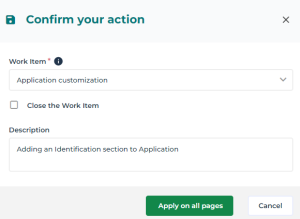
6. Click Apply on all pages.
The page is customized on all the objects of the same type.
Managing a draft
When a draft has been created, you can either:
• dispatch it
• delete it
• save it to keep it in edit mode
• reopen it to modify it
To modify a draft:
1. Display the draft: access the customized property page of an object of the type concerned.
2. Click Customize > Draft of the ‘<Page name>' page.
3. Modify the draft.
4. If the customization:
• is not complete: click Save draft.
• is complete: click Confirm.

To delete a draft:
1. Display the draft: access the customized property page of an object of the type of objects concerned.
2. Click Customize > Draft of the ‘<Page name>' page.
3. In the draft page, click Delete Draft .
The draft is deleted.
 Any created attributes are deleted.