Data Processed by the Excel Import/Export Wizard
Wizards dedicated to data exchange between Excel and your HOPEX repositories are also subject to standard data read/write rules.
These rules, presented in this chapter, concern :
• Data access, see Product view,
• Data protection, see Managing non-modifiable data,
• Managing relationships with multiple target objects, see Managing multiple relationships,
• Rules for updating the repository during an import, see Updating the cell content.
Product view
The MetaClasses, MetaAssociations and MetaAttributes appearing in the Excel worksheet reflect the view of the metamodel. Only concepts that are available with the product, the profile and the options you have selected are displayed.
 For more details, see Extending the Visibility (Metamodel or Advanced Features).
Managing non-modifiable data
For export, MetaAttributes that cannot be modified by the user appear in a grayed column in the Excel page.
It is possible to export properties that cannot be modified, such as calculated attributes (for example "Creation date" MetaAttribute), but it is not possible to import these. The wizard indicates that you do not have permission to update these properties.
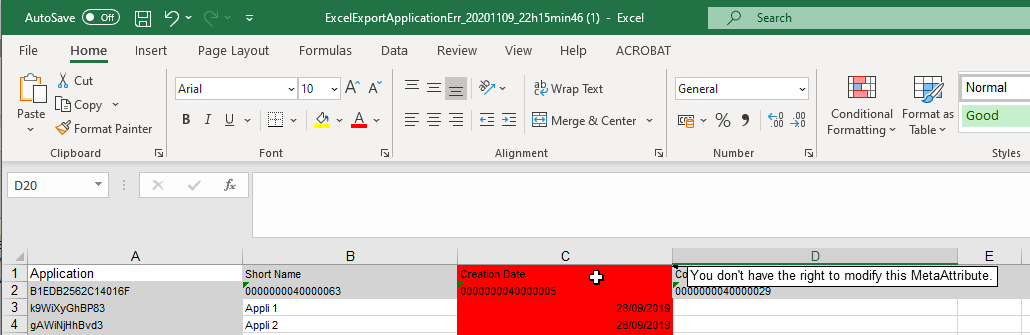
Whether it be an export or an import, the first two lines of an Excel worksheet are reserved for file configuration. Ensure that no data is entered in these first two lines.
Managing multiple relationships
You can use some MetaAssociationEnds with cardinality equal to 1 to easily import some objects and their links.
In the HOPEX MetaModel, a relationship represents a MetaAssociationEnd. Some MetaAssociationEnds have a cardinality greater than 1, it means that an instance can have several links of the same type.
For example, an Application may be composed of several Microservices.
In this case, the Excel import/export file presents each instance on different lines of the same cell.

After importing a file of this type, instances and their links are created.
Updating the cell content
In addition to MetaClasses and MetaAttributes, the export wizard supports:
• links and link attributes
• MetaAssociationEnds
For more details, see Managing multiple relationships.• queries
• macros
An Excel import allows you to create new objects and modify existing ones. The following rules apply:
• A new object is created if the name used does not already exist in the repository,
• If a cell is empty, it has no effect on the repository,
• the #reset string is used to delete the property or relationships associated with the cell.
In the case of a relationship, #reset can be followed by new links.