Using Questions of “Panel” Type
The Panel-type question is a question group. It enables you to:
• group questions together
 You may drag & drop questions from the tool box or drop existing questions.
• create questions based on question motives that are specific to a trade (for example audit or testing).
The "Motivation" list allows you to select the contexts of use of this panel, i.e. when questions specific to one of these types of objects must be inserted in the questionnaire (e.g. Control or test steps). The Specific check box must be selected.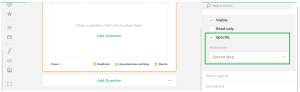
Using Calculated Expressions
HOPEX enables to create expressions to calculated automatically an answer from other answers.
The answer obtained is in read-only mode.Examples of calculated expressions
1) You may compute the total cost by multiplying a unit cost by the quantity.
When assessing risks, you can compute and display the inherent (or gross) risk. To do so you need to take into account the user questions regarding impact and likelihood.
Creating a calculated expression
To create your expression:
 In the Expression field corresponding to the calculated answer, use curly brackets to access question values.
Example 1: {question1} * {question2}
Example 2: ({price}*{quantity}) * (100 - {discount}
You may use functions such as: if(), today(), age(), min(), max(), count(), avg().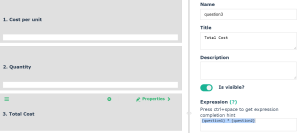
Managing digits after the decimal separator
If you use the “decimal” display style, you can define the number of digits you want to display after the decimal separator.
To do so, use the following fields:
• Display style (and specify “"Decimal”")
• Maximal fraction digits
• Minimum fraction digits
Using Questions of “Object” Type
You can create questions that allow to select HOPEX objects from a drop-down list.
To do so, you must create a question of Object type.
You may modify the following parameters:
Object type
In the right pane of the questionnaire editor, select an object type from the list of assessable object types.
To add an object type to the default list, you may:• connect the relevant MetaClass to the “Answered Element” MetaClass.
• regenerate the GraphQL Rest API schema applicable to assessments. For more information, see the video “Create custom schema”.
Collection computing mode
If you selected an object type from the drop-down list, the collection computing mode must be positioned to “Object type”.
It is possible to select to other values:
• Macro
• GraphQL query
Authorize multiple selection
Enables to authorize object multiple selection from the drop-down list of “Object” type questions.
Authorize object creation
Enables to authorize object creation from a drop-down list when entering an answer to the question.