Managing Conditions on Questions
You may want to hide questions or make a question mandatory, which means you want to condition it.
You may for example hide a question while a user has not answered the previous one.
 Conditions are not taken into account when the rendering is tabular.
Defining a Condition on a Question
To condition a question:
1. Select the question.
2. Go to the Conditions section and complete relevant sections, for example Make the question visible if, which enables to create complex conditions to control question visibility.
Defining Validation Criteria
You may define validation expression to ensure that respondents follow a specific business logics.
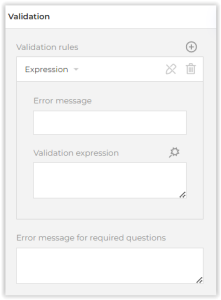
You may:
• define a Validation expression (to specify a condition to be met) ( icon for edition)
icon for edition)• define a Maximum Length (for "single-line input" question types)
• enter an Error message for required questions
You may for example specify that the respondent has the right to select up to two check boxes in his/her answer. If the user selected more, the text entered in Required Error Text is displayed.