Defining Assessment Template Visibility
Assessment Template Visibility Rules
The current profile can view and use the assessment templates:
• which are connected to it
• which are not connected to any profile
If no assessment template is connected to the current profile, the profile can view and use all the assessment templates.
 An assessment template can be considered “Inactive”. In this case, it is never displayed to the user.
Connecting Profiles to an Assessment Template
To connect profiles to an assessment template:
1. In the navigation bar, click Administration > Assessment > Assessment Templates.
2. In the properties of the assessment template, expand the Profiles section.
3. Connect one or more profiles.
If an assessment template is not connected to any profile, this template can be viewed and used by all the profiles.Connecting Assessment Templates to a Profile
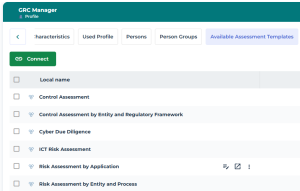
To specifically connect assessment templates to a profile:
1. In the properties of a profile, select Available Assessment Templates.
2. Connect one or more assessment templates.