Action Plan Execution
During the execution, an action plan takes different states. Passage from one state to another is a step in a procedure executed by an org-unit.
The execution of action plans and their associated action is managed by workflows.
Two workflows are proposed to manage different steps of an action plan:
• A Bottom-Up workflow, which corresponds to the case where an action plan is created by any user. The new action plan must be validated by an approver before being implemented.
• A Top-Down workflow, which corresponds to the case where an action plan is created by an "action plan manager".
A third workflow is proposed to manage the actions associated to an action plan.
Bottom-up Action Plan Workflow
A Bottom-Up workflow corresponds to the case where an action plan is created by any user.
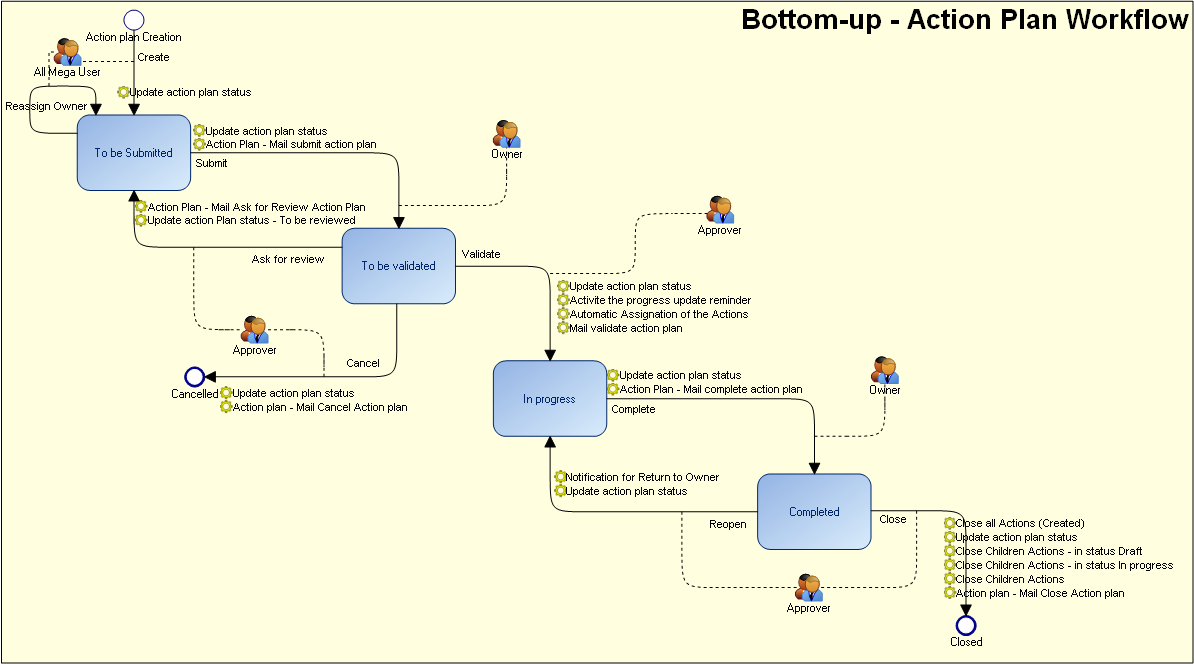
Creating the action plan
When the action plan is created, it is in "To submit" state.
By default, the action plan creator is the action plan Owner. Having specified the characteristics of a new action plan, the creator can:
• Propose the action plan.
In this case, the user defined as "Approver" receives a notification mail, and the new action plan appears with status "To Begin" in his/her tasks list.
Preparing the action plan
The action plan "Approver" user can:
• Validate the action plan, which then takes status ""In Progress". Actions can be created. For more details, see Managing Actions.
• Cancel the action plan which takes status "Canceled".
Executing the action plan
After execution of actions relating to the action plan, the "Owner" can:
• Terminate the action plan which takes status "Closed". To do this, all action plan actions must be terminated. For more details, see Managing Actions.
The "Approver" user is notified of the action plan termination request.
Closing the action plan
After having consulted action plan follow-up reports, the "Approver" user can:
• Close the action plan, which retains "Closed" status and disappears from the task lists of creator, approver and owner.
• Reopen, for additional actions. The action plan again takes status "In Progress".
Top-down Action Plan Workflow
The Top-Down workflow corresponds to the case where an action plan is created by an "action plan manager".
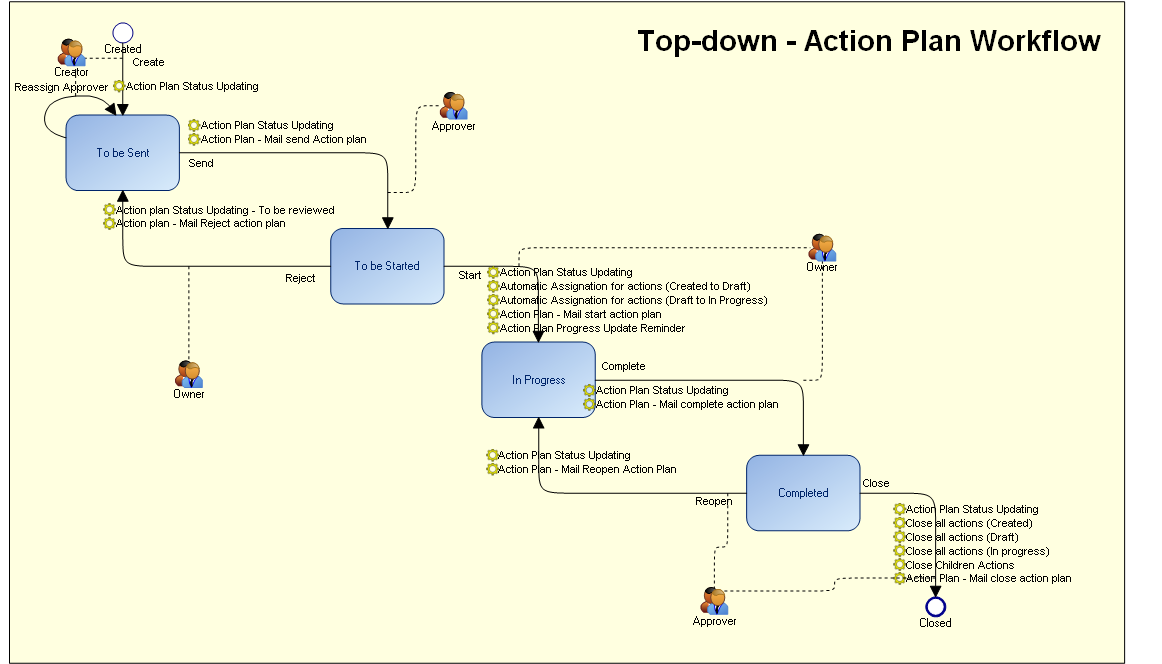
Creating the action plan
When the action plan is created, it is in "To be sent" state.
By default, the action plan creator is the action plan Accountable . Having specified the characteristics of a new action plan, the creator can:
• Send the action plan.
In this case, the user defined as "Approver" receives a notification mail, and the new action plan appears with status "To Begin" in his/her tasks list.
Preparing the action plan
The action plan "Approver" user can:
• Start the action plan, which then takes status "In Progress". Actions can then be created. For more details, see Managing Actions.
• Reject the action plan which takes status "Rejected".
Executing the action plan
After execution of actions relating to the action plan, the "Owner" can:
• Terminate the action plan which takes status "Completed". To do this, all action plan actions must be terminated. For more details, see Managing Actions.
The "Approver" user is notified of the action plan termination request.
Closing the action plan
After having consulted action plan follow-up reports, the "Approver" user can:
• Close the action plan, which retains "Closed" status and disappears from the task lists of creator, approver and owner.
• Reopen, for additional actions. The action plan again takes status "In Progress".
Action Workflow
An action plan is executed when the associated actions are executed.
Actions can then be created as soon as the action plan state is “In Progress”.
When all actions of an action plan have been published and accepted, the action plan can be implemented.
The action plan takes status "Completed” only if all its attached actions are closed.
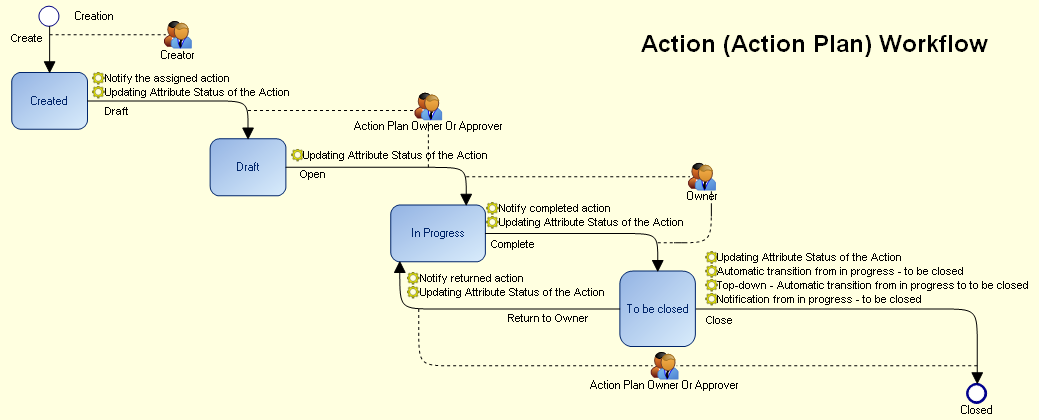
Action Creation
When the action A created, it is in "Created" state.
By default, the action creator is the action owner. Having specified the characteristics of a new action, the creator can declare the action as Draft. In this case, the user defined as "Approver" receives a notification mail, and the new action appears with status "Draft" in his/her tasks list.
Action preparation
When an action has been proposed, the action plan "owner” or “approver", or the action "owner" can:
• Open the action, which takes status "In Progress".
Action execution
Having studied action execution possibilities, the "Owner” can:
• Complete the action.
A notification is sent to the user defined as "action plan owner or approver".
Action termination
After studying characteristics of the action, the action plan “owner” or “approver" can:
• Close the action.
In this case the user defined as "Owner" receives a notification and the action takes status "Closed".
• Return to responsible user, for supplementary actions.