Presentation of the State Machine Diagram
A state machine is the set of states and transitions between states that define the life cycle of an object that is variable over time.
The state machine diagram enables representation of the sequence of states that an object can take in response to interactions with the objects (internal or external to the studied system) in its environment.
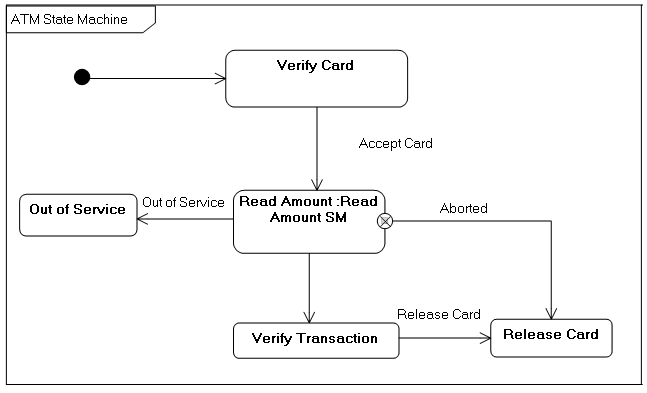
Example of state machine diagram
The diagram below describes possible behaviors of an automated teller machine:
Creating a State Machine Diagram
A state machine diagram is created based on a state machine.
You can create a state machine using a package, class or component.
To create a state machine diagram with HOPEX IT Architecture from Design (UML) navigation menu:
1. From the navigation sub-menu, click status.
2. Select machine stream that interests you and click New Diagram.
3. State Machine Diagram.
The diagram opens in the edit window.
The diagram is initialized by creation of a region. A region is part of a composite state or state machine which contains states and transitions and of which execution is autonomous.