Nodes
Nodes enable modeling of activity steps. There are different node types in HOPEX:
Object nodes
Actions are the basic steps of behavior represented by the activity.
Coordination of actions is by control flows and data flows.
Creating an Action
To create an action in an activity diagram:
1. In the diagram object insert toolbar, select the button corresponding to the action type then click the work plan.
The dialog box for adding an action of the selected type opens.
 The insert toolbar offers three main types of actions.
2. Specify its name and click Add.
Modifying the Action Type
In the Characteristics property page of the action, you can modify the action type. It can be:
• Calling an operation of another object
• Creating an object
• Destruction of an object
• Local execution of an operation of the object
• Sending a signal from the object
• Terminating the object
• etc.
Parameter nodes
The parameter nodes of an activity describe the inputs and outputs of this activity.
They transmit parameters to the activity via flows which they send and receive.
Control nodes
A control node coordinates the flows between nodes of an activity.
A control node can be of initial, final, decision, merge, fork or join type.
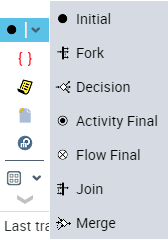
Control node types
Initial
An initial node indicates where the control flow starts when the activity is invoked. An activity can have several initial Nodes.
Final
When a token reaches a final node an activity, all flows of the activity are stopped. Conversely, a final Node a flow destroys tokens that arrive, but has no effect on other tokens of the activity.
Decision
A decision makes a choice of one flow from among several possible output flows. Output flows are selected according to their guard conditions.
Merge
A merge fusion (merge) groups several alternative input flows into a single output flow. It is not used to synchronize concurrent flows, but to accept a single flow from among several.
Fork
A fork separates a flow into several concurrent flows. Tokens arriving at a fork are duplicated through the output flows.
Join
A join synchronizes multiple flows. The flow is triggered when all input flows are available.
Object nodes: Input, Output and Exchange Pins
To specify input values of an action and return values, we use object nodes called input and output pins. The action can only start when a value is assigned to the input pin. Similarly, when the action is completed, a value must be assigned to the output pin.
Input pin
An input pin supports input values consumed by an action that it receives from other actions.
Output pin
An output pin supports output values produced by an action and supplies these values to other actions through flows.
Exchange pin
An exchange pin is used to represent data exchanged between two actions.
Flows
Passage from one node to another is represented by a flow.
Control flow
A control flow starts an action node when the previous node is completed. Objects and data cannot be transmitted by a control flow.
Object flows
An object flow enables transmission of data or objects from one Node to another within an activity.