Logical Application System Environment Description
 A logical application system environment presents a logical application system use context. It describes the service interactions between the logical application system and its external partners, which allows it to fulfill its mission and ensure the expected functionalities.
A Logical Application System Environment can be described by two types of diagram.
• A scenario of logical application system environment flow diagram is used to describe the exchanges inside the described logical application system environment in a specific context.
 For more details on scenarios of flows diagrams, see Using a flow scenario sequence diagram.
• A logical application system environment diagram, used to represent the service interactions between the internal logical application system, its users and the partner logical systems.
For more details on application system environment diagrams, see Using the Logical Application System Environment Diagram.Example of logical application system environment
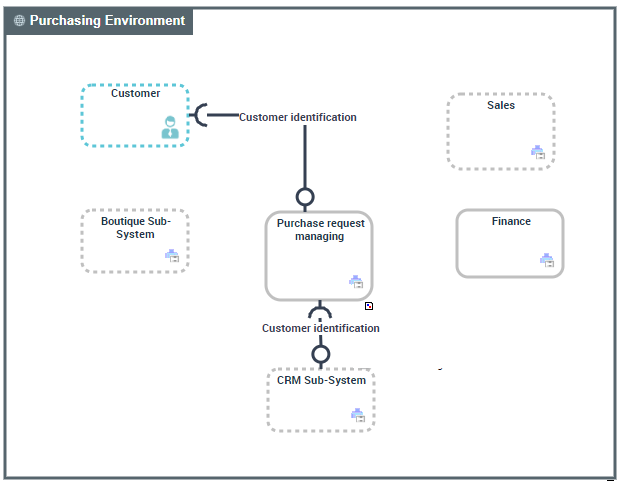
A logical application system environment diagram describes the service interactions between the main internal components of the environment described and the external components.
Purchase requests are formulated by users in conditions specified by “Sales” and “Marketing” services.
The internal logical application system "Purchase request processing" uses a logical "Delivery" application system that is external to the described environment.
 s
sLogical application system environment diagram
Accessing the list of logical application system environments
To access the list of logical application systems environments form Inventories navigation menu:
1. Select Software > Logical Software Architectures.
The list of logical application systems appears.
2. Open the Environment page of the logical application system of your choice.
The list of logical application system environments appears.
Creating a logical application system environment
To create a logical application system environment:
1. From the Inventories navigation menu, select Software > Logical Software Architecture.
2. Open the Environment page of the logical application system that interests you and click New.
The Creation of Logical Application System Environment window appears.
3. Enter the Name of your application system environment and click OK.
The new logical application system environment appears in the list.
Logical application system environment properties
The Characteristics properties page for a logical application system environment provides access to:
• its Name,
• its Owner, by default during creation of a logical application system environment, the current library.
• the text of its Description.
For more details on other property pages proposed by HOPEX IT Architecture, see HOPEX IT Architecture properties pages content.Using the Logical Application System Environment Diagram
A logical application system environment is used to represent the service interactions between the internal logical application systems, its users and the partner logical application systems.
A logical application system environment diagram includes:
• logical application systems that represent the logical application systems internal to the described environment.
In the example, this is the logical application system "Purchasing Requests Processing".
A logical application system is an assembly of other application architectures, logical applications and end users, interacting with application components to implement one or several functions.• partner logical application systems that represent the logical application systems external to the described environment.
In the example, this is the logical application system "Delivery".
A partner logical system is a logical application system external to the environment of the described logical application system. The partner logical system can be a service supplier or a service consumer with respect to components of the logical application system.• Org-Units and Position types that represent the user category of services provided by the environment.
• Service interactions between the components representing requests for services.
A Service Interaction represents an interaction for service purpose between entities in a specific context inside or outside a company. These entities can be enterprise org-units, applications, activities or processes, as well as external org-units. The content of this interaction is described in a service interface.For more details, see Creating a Service interaction.