Using a Scenario of Application System Flows
 For more details on the use of a scenario of flows, see Using a Scenario of Application Flows Diagram.
A scenario of application system flows represents the flows exchanged between certain elements of the application system in a given context. The elements represented are:
• application systems,
• applications,
• Microservices
• organization org-units,
• internal or external local application data stores,
• input or output application ports.
The interactions offered between these elements:
• flows that carry a content,
• flow channels that group a number of application flows on a single link,
• application data channels that represent the interactions between the application data stores.
The scenario of application system flows below describes the interactions between a client and the eCommerce application.
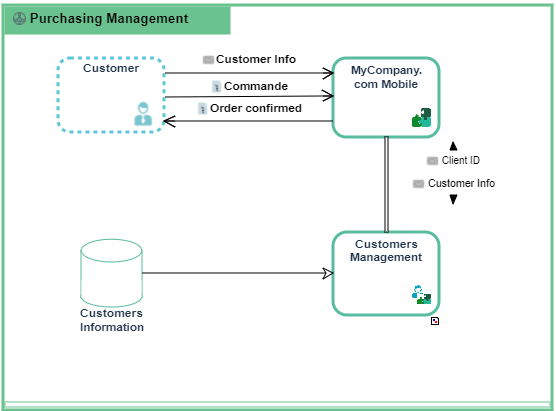
Example of scenario of application system flows for "Purchasing Requests Processing".
To create a scenario of application system flows diagram:
1. Open the Diagrams page of the application system of your choice and click Create a diagram.
2. Select Structured Diagram > External Data Flows.
The Scenario of application system flows diagram appears.
Adding an org-unit to the Scenario of Application System Flows
An org-unit is represented by an Org-Unit or by a Position type.
 An org-unit represents a person or a group of persons that intervenes in the enterprise business processes or information system. An org-unit can be internal or external to the enterprise. An internal org-unit is an organizational element of enterprise structure such as a management, department, or job function. It is defined at a level depending on the degree of detail to be provided on the organization (see org-unit type). Example: financial management, sales management, marketing department, account manager. An external org-unit is an external entity that exchanges flows with the enterprise. Example: customer, supplier, government office.A position type represents a status assigned to an individual or a group of individuals with the aim of defining an organization or a hierarchy.
To add an organization unit:
1. In the scenario of application system flows object toolbar, Org Unit.
2. Click in the frame of the described application system.
An addition window prompts you to choose the org-unit name you wish to use:
3. Select the org-unit that interests you and click OK.
The actor appears in the diagram.
To create a new org-unit, enter his name and click OK.Adding a scenario of application system flows
An application is a software component that can be deployed and provides users with a set of functionalities.To add an application:
1. In the scenario of application system flows object toolbar, click Application.
2. Click in the frame of the described application system.
An addition dialog box prompts you to choose the application that you want to use (for example "eCommerce purchase").
3. Select the application and click OK.
The application appears in the diagram.
In the same way you can add:
• an application system
An application system is an assembly of other application systems, applications and end users interacting with application components to implement one or several functions.• a microservice.
A microservice is a software component that can be deployed autonomously, but which does not directly provide an end user service. It can interact with other application services, applications or application systems. This is a deployable software component that uses software technologies. For example: an authentication service, a PDF file printing service.If the component we have added in the scenario of application system flows is already described by a scenario of flows, a new section is created in the Characteristics property page of the component.
For more details, see Reinitializing components in a scenario of flows.