Specifying the behavior of a task in a System Process
Complying with BPMN standard, a process can have different behaviors. With HOPEX Business Process Analysis, these behaviors are available for organizational processes, operations, system processes and tasks.
Behaviors
Behaviors proposed are:
• Transaction: a transaction is a set of coordinated activities leading to a consistent, and verifiable outcome.
• Loop: a loop is a process step that is repeated as long as a condition is true.
• "Do while": the condition is evaluated before the first execution.
• "Do until": the condition is evaluated after the first execution. In this case, the process step is executed at least once.
The predicate enables specification of the loop execution condition.
• Ad hoc: steps of an ad hoc process are not controlled or sequenced in a particular order. Their performance is determined by the performers of the process.
• Multiple: the process is repeated a predefined number of times, evaluated only once before it is carried out. Execution type can be specified:
• "Parallel": all executions carried out simultaneously.
• "Sequential": executions carried out one after the other.
• Compensation: a compensation defines the set of activities that are performed during the roll-back of a transaction to compensate for activities that were performed during the normal flow of the process.
To describe for example that a system process is executed by a loop:
1. Open the Characteristics property page of the process.
2. In the Details section, in the Loop field, select the loop type corresponding to the process behavior and add the condition text.
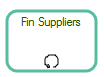
Shape of the process is modified to display the symbol of the loop.
Task type
To specify the type of a task:
1. Open the Characteristics property page of the process.
2. In the Details section, click the arrow at the right of the Task Type box.
A list of task types appears.
• Call Process: task used to call a second process while executing the current process.
• Receive: elementary task which waits for arrival of a message from a participant external to the process. When the message has been received, the task is completed.
• Send: task that sends a message to a participant external to the process. When the message has been sent, the task is completed.
• Manual: task executed without the help of a automatic execution engine of a process or IT application.
• Business Rule: execution task of a business rule with a rules engine which processes input data and returns calculation results.
• Script: task executed by a process execution engine. The designer defines a script in a language that the engine is able to interpret. When the task is ready to start, the engine executes the script. The task is completed when script execution is completed.
 Shape of the process is modified to display the symbol associated with the task type.
Modeling Tasks of a System Process
The functional analysis phase describes the system processes implemented in the different use cases of an application or service.
A system process diagram specifies the sequence flow of tasks to be executed so that the user can check that the application satisfies its requirement.
Functional Modeling Example
The system processes used for a project functional analysis are stored in a package.
In the example of the purchase request processing automation project, system processes are stored in the "Urgent Purchase Requests" package .
 A system process is the executable representation of a process. the events of the workflow, the tasks to be carried out during the processing, the algorithmic elements used to specify the way in which the tasks follow each other, the information flows exchanged with the participants.
Display the diagram describing a step in the system process
To open the diagram describing in detail a step in the system process:
1. Right-click the system process, for example "Consult Stock Levels" to open its pop-up menu.
2. Select System Process Diagram.
The diagram associated with the process opens.
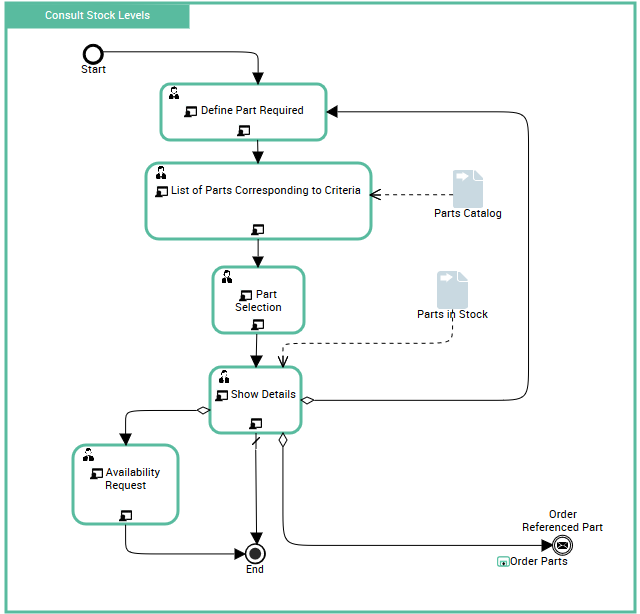
Consulting stock levels begins by display of a screen enabling identification of the required part. The list of parts found in the catalog is presented in the next screen.
When the user has selected the required part, information on details is displayed. From this screen, it is possible to obtain information on another part, make an availability request for the part, or indeed order the part.
Modeling Tasks of an IT Service
The phase of detailed analysis of system components impacted by the project consists of detailed modeling of the operation of IT services.
In the context of the urgent order request processing automation example, the service for comparing prices is represented by a system process.
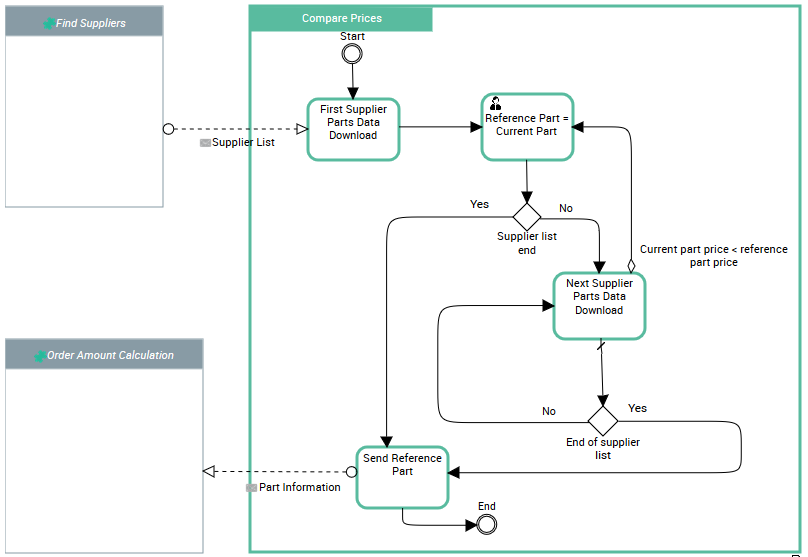
This diagram describes the algorithm of the "Compare Prices" service, which should return the reference of the lowest-priced part.
The list of suppliers of the required part is given at input. The part proposed by the first supplier in this list becomes the reference part. Assuming the supplier list is not empty, data concerning the required part is then analyzed. If the price of the current part is lower than the price of the reference part, the reference part becomes the current part.
When the complete list of suppliers has been analyzed, information concerning the reference part is sent to the "Order Amount Calculation" service.