Realization of Concept
Using the “Realization" concept, you can connect logical or physical view elements with dictionary elements.
The realization can be defined on the realized object (concept) or the realizing object (logical or physical data), and extended to the components of the realized and realizing objects.
Note that it is also possible to connect business information with other business information.
Defining the Object that Realizes a Concept
To define the object that realizes a concept in HOPEX Data Governance:
1. Click the Glossary > Business Dictionaries navigation menu.
2. In the edit area, click the Concepts tab.
3. Select the concept concerned and display its properties.
4. In its properties window, click the Relationships > Realizations page.
5. In the Realizer Objects tab, click New.
The business realization creation wizard appears.
6. Specify:
• the object type that realizes (logical or physical data)
• the name of the object concerned
7. Click Add.
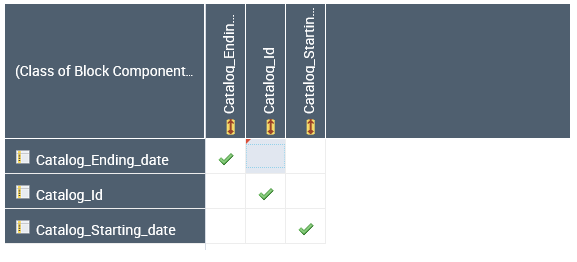
The realizer object appears in the concept properties. When you select this object, a matrix appears in the next section. It displays the components of the object that realizes (the class) in rows and the components of the realized object (the concept) in columns.
From this matrix you can define which components of the class (eg. Attributes) realize which concept components.
From this matrix you can define which components of the class (eg. Attributes) realize which concept components.
Concept realization graph
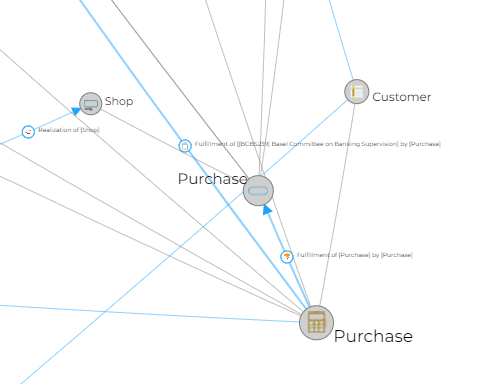
The realization graph lets you visualize which architectural elements are used to implement a concept.
To access this report:
1. Open the properties of the concept.
2. Click the Reporting page.
3. In the report list, select the Realization Graph Report.
The example below shows the objects that implement the "Purchase" concept.
Note that realizations of structural components of concepts specified as parameters are also displayed.
Defining the Concept Realized by a Class
To specify the concept realized by a class:
1. Click the Architecture navigation menu then Data Dictionaries.
2. In the edit area, click the Classes tab.
3. Select the class that you want to connect to a concept and open its properties.
4. Click the Realizations page.
5. In the Realized Objects tab, click New.
The Add an Owned Realization dialog box appears.
6. In the Object type field, select "Business information realization" and click Next.
7. In the MetaClass field, select "Concept".
8. In the Business information realized field, select the concept you are interested in.
9. Click Add.
The realized object appears in the class properties. When you select this concept, a matrix appears in the next section. It displays the components of the object that realizes (the class) in rows and the components of the realized object (the concept) in columns.
From this matrix you can define which components of the class (eg. Attributes) realize which concept components.
From this matrix you can define which components of the class (eg. Attributes) realize which concept components.