Physical Denormalization
Physical denormalization applies to database objects represented by tables, columns, keys and indexes.
Running Physical Denormalization
To denormalize the physical formalism:
1. Right-click the database and select Denormalize.
A wizard presents all customizations possible on database objects.
Physical denormalization example
It is possible to arrange that a table is partitioned into two separate tables, either to separate columns of the two tables (vertical partition), or to duplicate information in a table in two others (horizontal partition).
Consider the example of an order entry. This order entry is represented by an entity at the logical level, and gives a table at the physical level. Suppose that order entry has to be managed differently at technical level, depending on whether it is a telephone or Internet order. This change can be integrated in the physical model without having to modify the logical model in parallel. To do this, we arrange that the entity representing order entry is partitioned into two tables; one for telephone orders, the other for Internet orders. By integrating this modification from the wizard, the partition becomes automatic at each synchronization, and the two models remain consistent.
To create a horizontal partition such as that described above:
1. Right-click the "Order management" database that contains this entity and select Denormalize.
A wizard opens.
2. Select the Physical denormalization.
3. Click Next.
4. In the Select the denormalization type field, select "Horizontal partition of table".
5. Click Next.
6. In the editor tree, select the table you wish to duplicate, in this case "Order".
7. Click Next.
Denormalization options appear. Mapping transfer and source object deletion are activated by default. This means that the "Order" table will be deleted and the link with the "Order" entity will be transferred to the two tables.
Specify the number of partitions, in other words the number of tables created. The tool creates two tables by default.
8. Click Next.
The editor displays changes produced by this denormalization. You can see that the "Order" table will be deleted and that two new tables will be created.
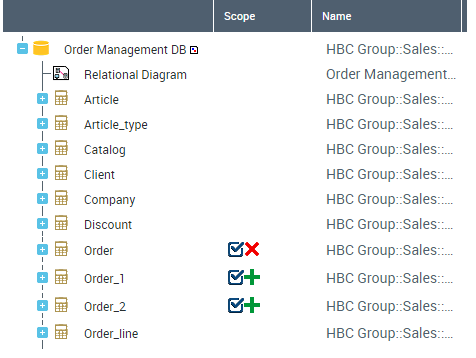
9. Validate results by clicking Next.
This transformation is definitive and will be taken into account by the next synchronization.
On completion of denormalization, you can see that the two new tables are now mapped with the "Order" entity.
 Denormalization here applies to the physical model. The synchronization that will take this customization into account must therefore be run in the same direction, in other words from logical model to the physical. It is not valid in the other direction.
List of Physical Denormalization Wizards
Vertical partition of a table
This denormalization enables division of a table into several tables. Columns are shared between the tables obtained.
Only columns that are not part of a key can be distributed between tables.
Before  | After 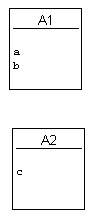 |
Horizontal partition of a table
This denormalization enables duplication of a table. The two tables obtained contain all columns of the original table.
Before | After 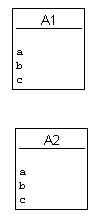 |
Merging of tables
This denormalization enables merging of tables.
Before | After |
Primary keys option
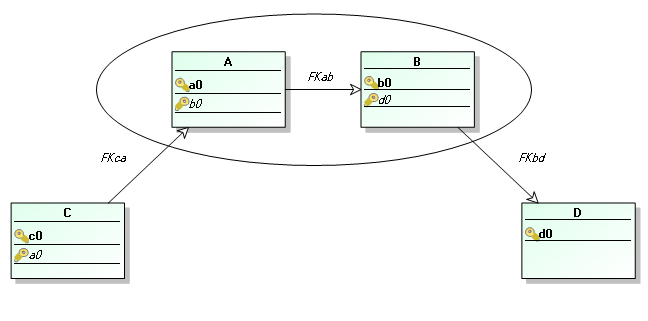
When you run merging of tables, an option allows you to determine the primary key of the merge table: you can select one of the primary keys of the source tables or merge all primary keys of the source tables.
When you select a primary key for the merge table, only those foreign keys that reference this primary key are transferred. Foreign keys that reference primary keys that are not transferred are not taken into account.
Therefore in the following example, if you merge tables A and B and keep the primary key of table A, the primary key of B disappears at merge. Nor is foreign key FKab transferred since it references primary key B. The other foreign keys, FKca and FKbd, are transferred in the relational diagram.
Transform foreign key to table
This denormalization enables transformation of a foreign key to a table. A new table and two new foreign keys are created. The original foreign key is deleted.
Before 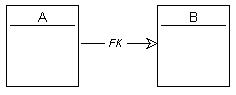 | After 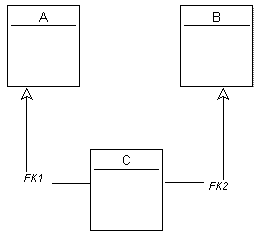 |
Transform table to foreign key
This denormalization enables transformation of a table to a foreign key. The table and its two foreign keys are deleted and a new foreign key is created.
Before | After |
Copy/paste of columns
This denormalization enables transfer of columns of one table to another.
Before 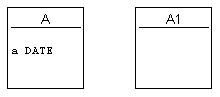 | After 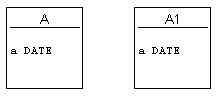 |