Report DataSets
A Report DataSet is a data table created using repository objects, on which instant reports can be generated.
HOPEX Data Governance provides different types of Report DataSets.
Creating a Report DataSets
To create a Report DataSet
1. Click the navigation menu, then Reports.
2. In the navigation pane, click Other Reports.
3. In the edit area, click My Report DataSets.
4. click New.
5. Specify:
• the name of the report
• the holder (optional)
• the definition of the Report DataSet, on which the report is based
6. Click OK.
Example of a Report Dataset
Definition of terms used
This type of Report DataSet has a list of terms as input parameter.
Using selected terms, you can, for example, create a "matrix" type instant report that presents the list of concepts that use the terms in question.
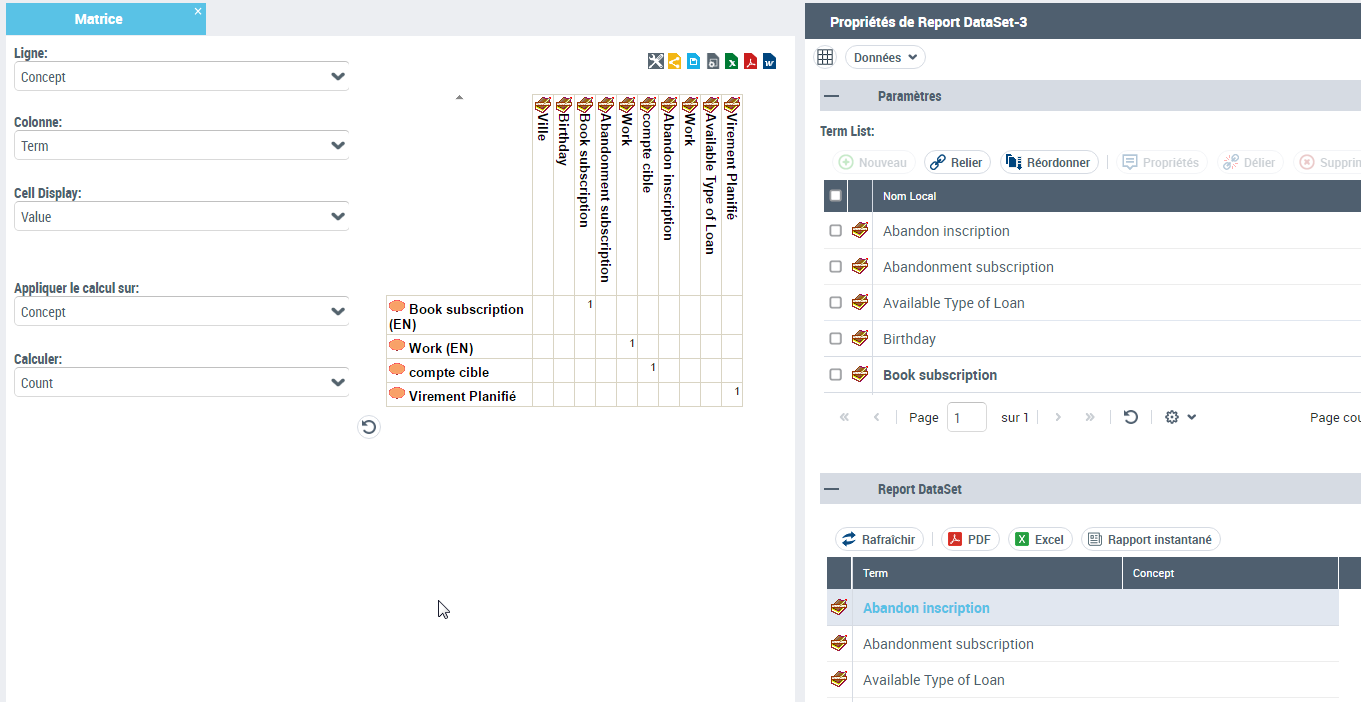
To create an instant report for this type of Report DataSet:
1. Create a "Term definition" Report DataSet type.
 See above Creating a Report DataSets.
2. Open the properties of the Report DataSet.
3. Display the Data page.
4. (If needed) In the Parameters section, click Add and select the input parameters, here the terms.
5. (If needed) In the Report DataSet section, click Refresh.
6. In the Report DataSet section, click Instant Report.
7. Select the required instant report, here a matrix.
8. Click OK.
Business dictionary x Concept Matrix
A concept can be referenced by one or more business dictionaries.
This Report DataSet has a list of business dictionaries as input. It is used to create a "Matrix" type business report that lists the concepts referenced in the selected business dictionaries.
To create an instant report for this type of Report DataSet:
1. Create a "Business Dictionary Matrix x Concepts" type Report DataSet.
See above Creating a Report DataSets.2. Open the properties of the Report DataSet.
3. Display the Data page.
4. (If needed) In the Parameters section, click Add and select the input parameters, here the terms.
5. (If needed) In the Report DataSet section, click Refresh.
6. In the Report DataSet section, click Instant Report.
7. Select the required instant report, here a matrix.
8. Click OK.