Creating a Process Diagram using the AI Assistant
Prerequisites
AI service
The AI Assitant is based on an AI service hosted by MEGA.
 Ensure that the HOPEX server can access the following service URL: https://bpa-ai.saas.mega.com/api/bpmn_ai_creator.
Module installation
The AI-Driven Process Modeling module must be imported.
Creating a diagram using the AI Assistant
To create a process diagram using the AI Assistant:
1. Select the Processes navigation menu > List tab.
2. Click the AI Assistant button.
The diagram creation window opens.
 You can also create a Process diagram from the homepage > Quick Access > Actions tab > Create a process diagram using AI Assistant.
3. Enter the name and the description of the process.
 See Description Examples.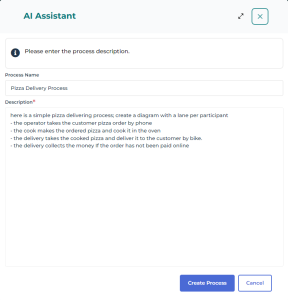
4. Click Create Process.
The diagram is automatically generated.
5. Click Edit diagram to correct or keep on designing the diagram in graphical mode.
Description Examples
The way the process is described depends on your specific needs.
• You need to create a generic process for either normalized/standardized processes or where an established framework exists on the market:
Generate a Process for the creation of a Bank Account.
Create an "Internal Audit" Process.
• You need to design a more specific process. The process described must be simple, you can add participants, operations, and gateways for example.
Here is a simple pizza delivering process. Create a diagram with a lane per participant.
- The operator takes the customer's pizza order by phone.
- The cook prepares the pizza and bakes it in the oven.
- The delivery person picks up the cooked pizza and delivers it to the customer by bike.
- The delivery person collects the payment if the order has not been paid online.
Note that you can precise "a lane per participant" to clearly differentiate them.