Creating a satisfaction questionnaire
With HOPEX you can create a satisfaction questionnaire to assess the communication channels used by the persona at each step of the customer journey.
To create a satisfaction questionnaire:
1. From the navigation bar Customer Journey > Communication Channels, select a communication channel.
2. Select the Questionnaire Templates property page.
 You can display (or hide) property pages using the
  button.
 3. Click the New button.
4. Enter the name of the questionnaire template and click OK.
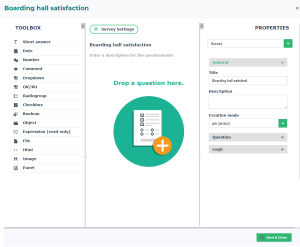
The questionnaire creation interface appears.
5. Via the toolbox, insert questions.
6. Click the Save and Close button to complete the creation of the questionnaire.