Control Environment Report
You can choose to display the following elements for a chosen control:
• the risk context
• process categories
• process
• Applications
• Org-Units
• business lines
• the strategic objects impacted by the risk (objectives)
• risk consequences (associated risks)
• preventive controls designed to remediate the risk

• incidents
• action plans and actions
Access path
Control properties (Reporting > Control Environment)
Report parameters
|
Parameters
|
Constraints
|
|---|---|
|
Control
|
Mandatory
|
|
Control context (process category, process, application, entity, business line)
|
Optional
|
|
Mitigated Risks
|
Optional
|
|
Deficiencies
|
Optional
|
|
Action plans
|
Optional
|
|
Risk context (process categories, processes, applications, entities, business lines)
|
Optional
|
Creating a control environment report
To display a control environment report:
1. In the control properties, select the Reporting > Control Environment page.
2. In the Parameters section, select the object types you want to display:
• Control contexts
• Mitigated risks
• Issues
• Action plans
• Risk contexts
3. In the Report Display field, specify whether you want to display the risk environment objects:
• in a horizontal fashion, or,
• in a circular fashion (based on the selected risk)
4. Click Refresh.
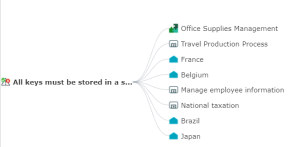
Using this diagram, you can:
• fold/unfold the branches
• open the properties page of the selected object.
Example