Process Impacts
This report displays an overview of a process and its constituting elements, for example:
• processes
• operations
• applications
• technologies
• risks
• controls
• incidents
• Action Plans
• sites
• servers (deployed)
• data centers
• facilities
Path
To access this report:
1. In the navigation bar, select Processes.
2. Expand the hierarchy of process categories/processes and open the process properties.
3. In the Reporting page of a process, select Reports > Process impacts.
Illustration
Bow-Tie Analysis
Report parameter
|
Parameter
|
|---|
|
1 Process
|
Report example
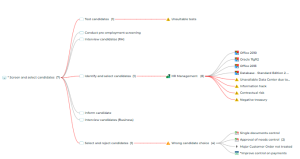
To view information about an impacted element:
 Hover the mouse over this element to display a tooltip.
To display elements of a branch:
Click the number which is displayed next to an item.The tree expands.
 A red link indicates that there are risks in the branch.