12. Miscellaneous
12.1. Licensing
Products and solutions of HOPEX platform are protected by Must licenses. Must licenses can be shared between multiple users.
Must licensing is not server-based (there is no Windows process for a license server). At runtime with HOPEX Web Front-end, a set of files are generated dynamically by service account.
However, a domain user (Active directory) is required for:
• HAS Instance Manager.
• User running the Desktop Administration Console: system administrator, functional administrator.
• User running the Desktop Windows Front-end: developer, functional administrator, user associated to a scheduled task.
To obtain a license, contact your sales representative. A UNC will be requested and a .must license file (locked on this UNC) will be sent with installation instructions.
12.2. Full search and indexing
Solutions of HOPEX platform can use full search. A parameter at data repository and/or system repository level enables to activate indexing. There are 2 levels of indexing:
• Full indexing: the data repository/system repository is scanned, and index files are created in a subfolder of the data repository/system repository.
• Incremental indexing: the log (internal) of the data repository/system repository is scanned and index files are updated in a subfolder of the data repository/system repository.
12.3. Mail system
A mail server needs to be configured so that mail notifications can be used within workflows.
SMTP parameters (server, port, proxy...) can be configured for the installation using the Administration console.
12.4. Multi-language
The HOPEX Platform supports multilingualism for:
• User interface language: controls the display of the menus, pages, etc. Six languages are provided: English, French, German, Italian, Spanish, Portuguese.
• Input Data language: enables data entry in several languages for the objects (name, comment, …). Up to 30 languages are supported.
12.5. Reporting
There are several report capabilities:
|
Category
|
Format
|
Export
|
Comment
|
|
Report
|
HTML
|
RTF, XLS, PDF
|
Generate a report based on a HTML template
|
|
MS Word
|
RTF
|
RTF
|
Generate a report based on a Word template
|
|
Instant Report
|
HTML
|
RTF,
XLS,
PDF
|
From a list or dataset generate various charts (pie, histogram…) or tables
|
You need to have a software that can read the defined export format. For instance:
• Microsoft Office or Open Office for RTF, XLS
• Adobe Reader for PDF
12.6. Preventing destabilization due to memory saturation
By default, the “Prevent logging when low memory” option is activated: additional user connections are blocked when the system approaches memory saturation. Users trying to connect receive a notification that access is unavailable and that they should contact their administrator.
This helps prevent unexpected HOPEX shutdowns due to insufficient memory.
12.6.1. Calculation rules
• Single server: if the available commit memory drops below 3 GB, new user connections are blocked.
• Cluster: if the active instance has less than 3 GB of available commit memory, other servers in the cluster are checked. If no server has more than 3 GB available, new connections are blocked.
12.6.2. How to disable the memory saturation option
If needed, the memory saturation option can be disabled to allow user connections even as memory nears saturation.
To disable the memory saturation option:
1. Open the HAS Console.
2. Select Modules > Module Settings.
3. Click Edit UAS settings.
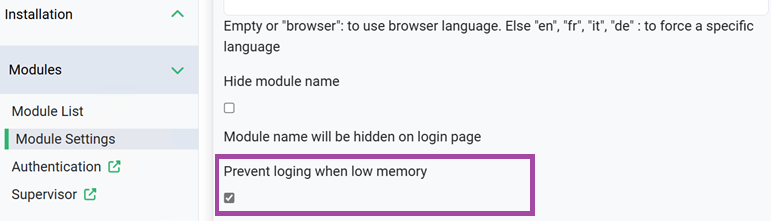
4. Clear Prevent logging when low memory.
5. Click Save.