4. Communications and Protocols
4.1. Overview
The elements that compose the architecture interact with each other using:
• HTTP(S) for all web interaction and across server's interaction.
• Socket IP across the modules within the same server
The High-level communication stack is summarized by the following schema:
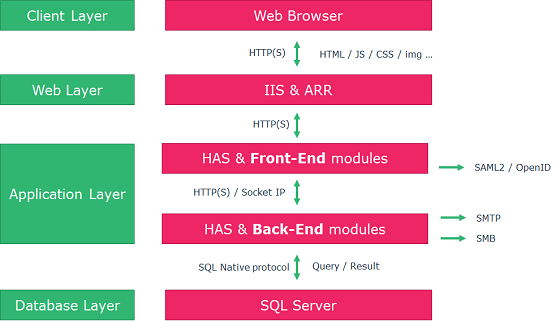
Figure 4 HAS Communication Stack
The full schema of communications and protocols used is shown below:
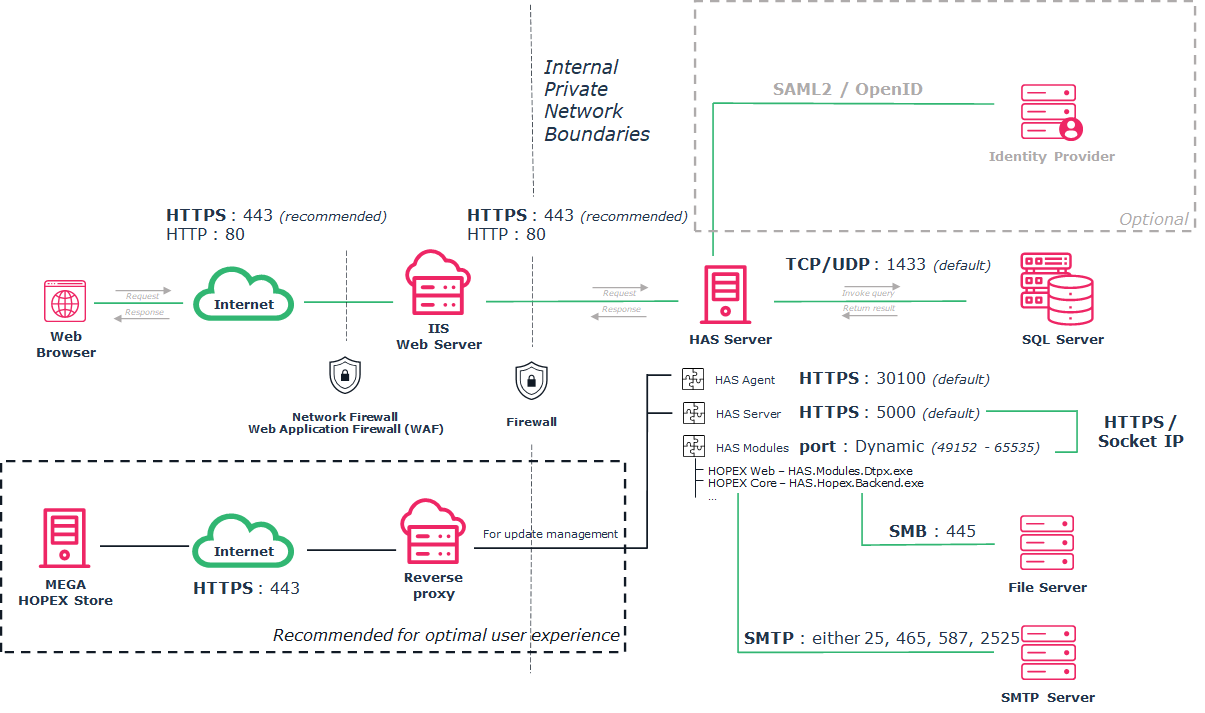
4.2. Detailed protocols and ports needed
4.2.1. List of ports
|
|
Protocol
|
Port(1)
|
Network
Bandwidth(2)
|
Latency(2)
|
|---|---|---|---|---|
|
Web browser
|
HTTP
HTTPS
|
80
443 (recommended)
|
60 kbits/s average
512 kbits/s peak
|
100Ms
|
|
IIS Web Server
|
HTTP
HTTPS
|
80
443 (recommended)
|
1 Gbit/s
|
|
|
HAS Instance Manager
|
HTTPS
|
30100
(To be opened in cluster deployment)
|
1 Gbit/s
|
|
|
HAS Server
|
HTTPS
|
5000
(to be opened
if IIS is on another server
or If cluster deployment)
|
1 Gbit/s
|
|
|
HAS Modules(3)
|
HTTPS
|
49152 – 65535
(Internal port - not to be opened)
|
1 Gbit/s
|
|
|
HAS Module HOPEX Back-End(3)
|
Socket IP
|
49152 – 65535
(Internal port - not to be opened)
|
1 Gbit/s
|
1 Ms
|
|
File Server
|
SMB
|
445
|
1 Gbit/s
|
1 Ms
|
|
SQL Server
(Native client)
|
TCP/UDP
|
1433
|
1 Gbit/s
|
1 Ms
|
|
SMTP Server
|
SMTP
|
25, 465, 587, 2525
|
1 Gbit/s
|
1 Ms
|
|
HOPEX Store
|
HTTPS
|
443
|
1 Gbit/s
|
|
(1) Port number may vary depending on IT policies. Given values are the default one.
(2) Recommended values for optimal performance
(3) The Dynamic port range used between HAS Server and the module is used only within the Server (localhost). No communication across servers is done with this port range. For more information: https://support.microsoft.com/en-us/help/929851/the-default-dynamic-port-range-for-tcp-ip-has-changed-in-windows-vista
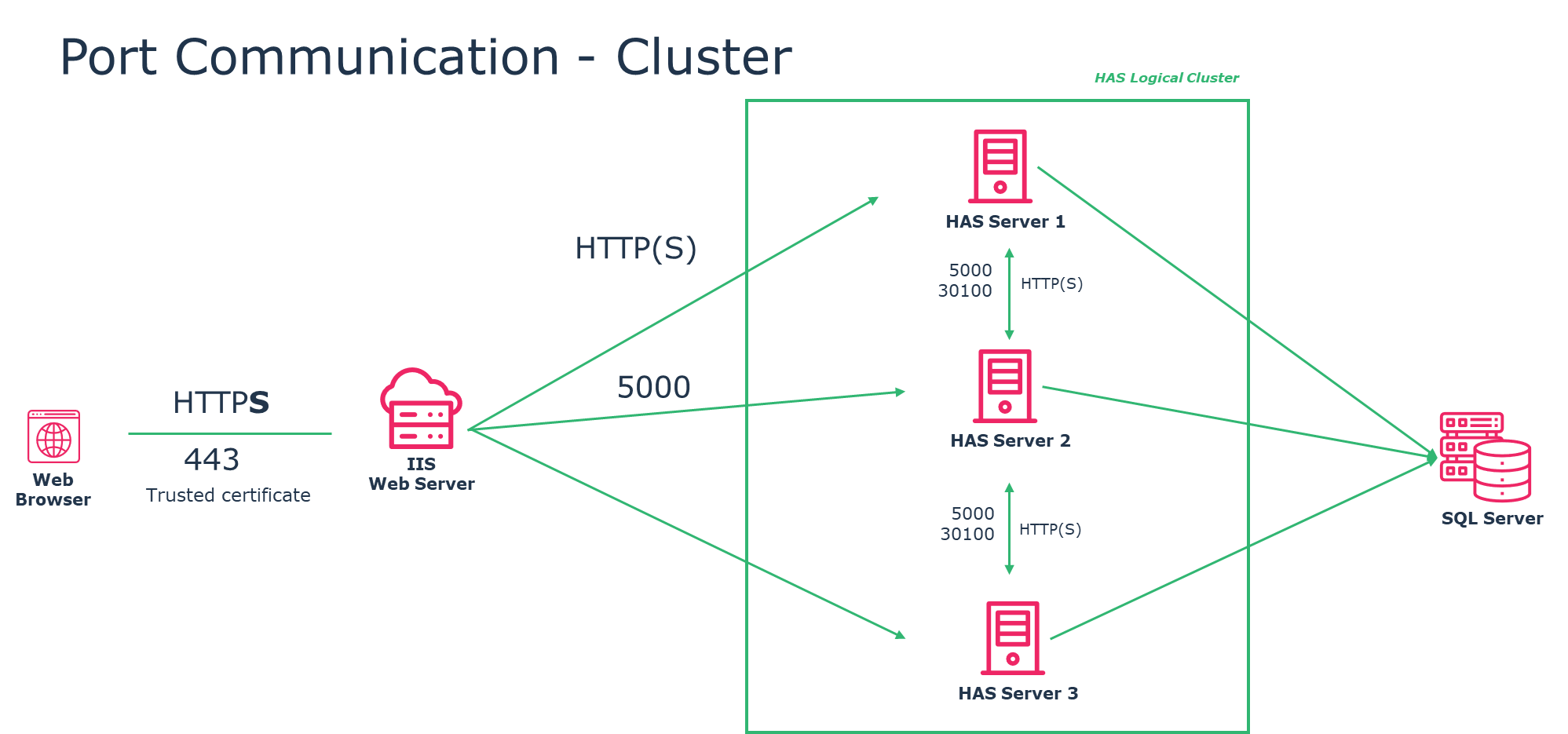
4.2.2. Communication flow for each port
Here is the port used between servers:
|
Server source
|
Port
|
Server target
|
|---|---|---|
|
Web Browser
|
80 or 443
|
IIS
|
|
IIS
|
5000
|
HAS Server
|
|
HAS Server (internal calls)
|
49152 – 65535
(Windows Dynamic
port range)
|
HAS Server (internal calls)
|
|
HAS Server 1 (Cluster node)
|
30100
5000
|
HAS Server 2 (Cluster node)
|
|
HAS Server … (Cluster node)
|
30100
5000
|
HAS Server ... (Cluster node)
|
|
HAS Server
|
1433
|
SQL Server
|
|
HAS Server
|
445
|
File Server
|
|
HAS Server
|
25
|
SMTP Server
|
|
HAS Server
|
443
|
HOPEX Store
|
|
HAS Server
|
443
|
IIS
|
For cluster deployment apply the rule for each node of the cluster: