Recording Architecture Decisions
As part of an architecture arbitration, you can record the decisions made about applications. HOPEX provides a set of predefined decisions: migration, deployment and investment decisions, as well as a “general” decision type for decisions dealing with other issues.
You can create a decision directly from the decision types provided, or from a SMART analysis.
Decisions resulting from SMART analyses are automatically recorded and archived in the relevant application properties. The Governance page of an application's properties shows the history of decisions validated manually or through analysis.
Decision Types
HOPEX provides several types of decision:
• Cloud Migration Priority (high or low migration priority)
• Cloud Migration Type (replatform, repurchase, etc.)
• Deployment (accepted or postponed)
• General Decision (accepted or not)
• TIME Decision (eliminate, invest, migrate or tolerate).
Cloud Migration Type and TIME Decision values can be determined through the corresponding SMART analyses.
Recording a Decision from a SMART analysis
SMART analyses are a tool for evaluating application portfolios, to support architecture arbitration decisions.
After evaluating the applications, the analysis provides recommendations that the user can accept or reject. If accepted, the decision is automatically recorded on the application.
For more information on SMART analyses, see SMART Analyses.
Entering a Decision on an Application
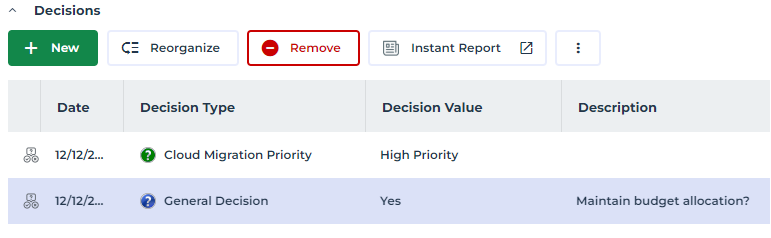
For migration or deployment decisions, the decision title is clearly defined by its type, e.g. “Cloud Migration Priority”, with its value (“High” or “Low”).
For “general” decisions, a description should be entered in the form of a question, e.g. “Maintain budget allocation?”, to which the chosen value (“Yes” or “No”) will be applied.
To enter a decision on an application :
1. Open the application properties.
2. Click the Governance page.
 If the page is hidden by default, click the Show/Hide button and select Governance.
3. Click the New button.
The decision creation window appears.
4. In the Comment field, enter a description if required.
5. Select the type of resolution and its value, e.g. “Cloud Migration Priority: High Priority”.
6. Click OK.
The decision appears with its date, type and value.