Workflow Participants
Creating workflow participants enables definition of the persons associated with a workflow transition.
 A workflow participant enables definition of the set of persons that can be assigned to a workflow transition in the framework of execution of a workflow instance.
A workflow transition connects a source workflow status to a target workflow status. A person associated with a workflow transition for a given workflow status can trigger the workflow transition, passing the workflow instance from the current source workflow status to the target workflow status, which then becomes the current status. By this action, the person informs that the operation expected of them has been executed.This set of persons can be defined at workflow configuration or calculated at workflow execution.
You can create a workflow participant:
• directly in the workflow definition diagram.
 For more details, see Creating a participant in a workflow definition diagram.
• in the properties of the workflow transition.
For more details on workflow definitions, see Workflow Transitions.• in the properties of the workflow status.
For more details on workflow statuses, see Creating a participant from a workflow status.Creating a participant in a workflow definition diagram
To create a workflow participant:
1. In the workflow definition diagram, click the Workflow Participant button in the diagram insert toolbar, then click in the diagram.
2. In the dialog box that opens, enter the participant name and click Finish.
The workflow participant appears in the diagram.
Creating a participant from a workflow status
Specifying participants on the workflow status enables:
• factorization and avoiding specification of participants on each output transition of the same workflow status.
• on an initial workflow status, indication of who has the right to start the workflow
Associating persons with participants
When the participant has been created, you can connect it to persons. The persons associated with a participant can trigger transitions between two workflow statuses.
To connect persons to a workflow participant:
 In the properties page for the workflow participate, specify an implementation macro.An implementation macro on a workflow participant enables calculation of a set of persons at workflow execution.
When creating a macro, a wizard will help you initialize its content. Macro content is initialized with the list of parameters that can be used to determine the list of persons.
HOPEX supplies different macros enabling definition of the set of persons likely to trigger workflow transitions.
To use a macro in the framework of a participant:
1. In the properties dialog box of the participant, select a macro from the drop-down list.
2. Click Apply.
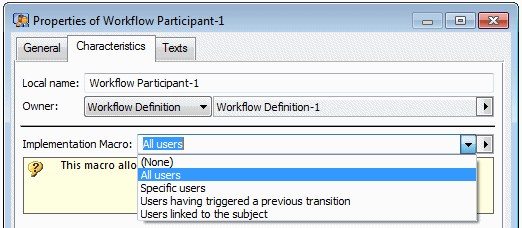
A new dialog box appears, depending on the selected macro.
IntelliSense is available here. Enter <Ctrl> + <space> to display possible parameters.• All users: all persons are selected.
• Assigned person to subject with specific business role: enables specification of a list of business roles. Below is an example of parameterization:
[BusinessRoles]
1=~5tM5w)1JTPoM[Data Owner]
2=~pcRgRnQkILWE[Data Designer]
3=~MtM5L42JTb1N[Data Quality Manager]
4=~0CxUrKPKTToC[Data Steward]
5=~D5V5GZH5Nbk2[Data Scientist]
• Specific users: enables explicit specification of a list of persons. You can connect roles, persons or profiles.
• Users linked to the subject: enables listing of users via a query applied to the workflow subject.
If the workflow subject is a design task, you can define a query that will find project managers of the project associated with the design task.
The query must be specified in the _Parameterization text, under section [UsersSet], as in the example below:
[UsersSet]
QueryFromSubject = ~llC2RbmyELaC[Action Plan Approvers]
• Users having triggered a previous transition: enables specification of person(s) who triggered the previous transition.
The previous transition must be specified in the _Parameterization text, under section [UsersSet], as in the example below:
[UsersSet]
ProvidingTransition = ~n1uG9GqiBD60[Approve]
• Person Membership of EA Project with specific Business Role: enables specification of a list of persons from the workflow subject (for EA projects only). The persons involved are those who have a role in the EA project and whose role is specified in the _Parameterization text.
• Creator of Subject Workflow: enables specification of the person who created the object which is subject of the workflow.
• Creator and all Information Asset Responsibility Except Data Chief Officer: used in HOPEX Information Architecture, it enables specification of a list of persons who are assigned to the workflow subject (Design validation). It sends all persons except the Data Chief Officer an email to inform them on the workflow transitions performed for the object they are in charge of.