3 Inheritance
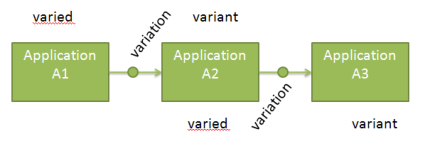
The variation mechanism is used to inherit from varied objects. To understand the inheritance we first define the vocabulary:
- Variation: the mechanism allowing varying instances. This mechanism is embodied by a MEGA object of type Variation.
- Variant: any instance created from another existing instance.
- Varied: any instance used to create a variant.
Based on those definitions, a variant object of A1 can be a varied of A3.
3.1 Inheritance Setting
To be inherited a sub-object must be connected to an inheriting association. Such association is set thanks to the Tool Variation operator. This operator is linked to the selected association and the following values must be set:
- Minor to Major Behavior
o Abort: there is no inheritance if the sub-object is a major object (yellow folder in the MEGA explorer)
o Deep: the inheritance is applied if the sub-object is a major object (yellow folder)
- Major to Minor Behavior
o Abort: there is no inheritance if the sub-object is a minor object (green folder)
o Deep: the inheritance is applied if the sub-object is a minor object (green folder)
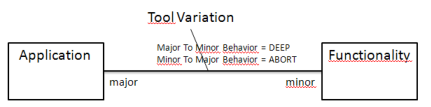
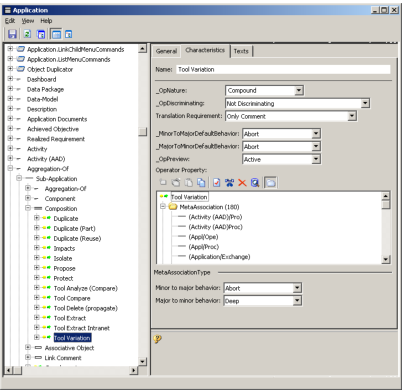
The following figure shows this operator set for the Composition metaassociationtype. In that case, all associations linked to this type behaves the way defined for the operator else the operator is directly set in the association.
For this example, a component application is inherited but a aggregated application is not inherited.
3.2 Substitution
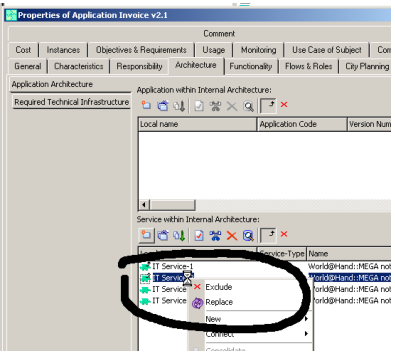
To be removed or replaced a sub-object must be inheritable but also substitutable. The inheritance allows only to grab the sub-object of the varied instance. It does not allow to replace or remove. To do that, the sub-object type must be declared as substitutable. This is done inheriting from the Substitutable Object metaclass.
In the following example, the IT Service concept is declared as substitutable. Then, all services inherited in an application can be removed or replaced.
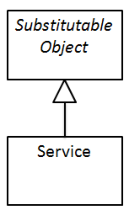
When the replacement and removal is available, all listview of the property pages showing inherited elements allows to perform the removal and the replacement.
For example, the Functionality concept is not substitutable. The property page of an application shows only the inheritance (small black arrow).
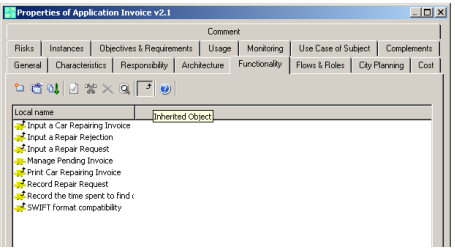
The Service concept is substitutable, there is an additional button in the listview of the application property page. The red cross allows to show/hide excluded services.
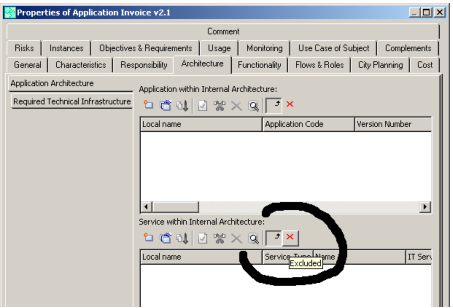
To remove/replace, the popup menu shows two dedicated commands. The Replace command is available only if there is some objects to be replaced AND some other to do the replacement. The last one must be defined in the variant object and not be inherited.