Shape Storage
A shape is a drawing stored in a file with extension ".MGS". Format of this file is the property of MEGA International. Certain shapes are used to represent methodological concepts used in HOPEX diagrams. Others are for decorative purposes only.
Shapes provided by HOPEX
HOPEX provides several sets of shapes used to represent the objects in diagrams:
• pictures (icons)
• pictures.7220
• pictures.7600 (corresponding to HOPEX V1R3 pictures)
• pictures.9000 (corresponding to HOPEX V4 pictures)
• pictures.15000 (corresponding to HOPEX V5 pictures)
Each set of shapes is sorted by categories:
• Art
• Background
• Method
The shapes provided by HOPEX are stored in:
<Hopex Application Server>\ <name of the HAS instance>\.shadowFiles\hopex.core\<module version>\Mega_Std
E.g.: C:\ProgramData\MEGA\Hopex Application Server\5000\.shadowFiles\hopex.core\15.7.0+6548\Mega_Std
The structure is as follows:
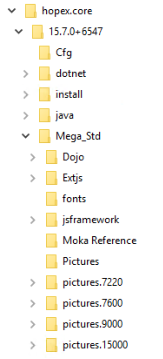
Do not modify or replace these shapes since they will be deleted and reinstalled from one version of HOPEX to another.
Customized shapes
To customize the shapes provided by HOPEX you must first install HOPEX Application Server Customization module.
To install HOPEX Application Server Customization module, see Importing a Module into HOPEX documentation.
Your customized shapes (.MGS) must be stored in the following folder:
<Hopex Application Server>\ <name of the HAS instance>\.shadowFiles\has.custom\<module version>\hopex.core\Mega_Std
E.g.: C:\ProgramData\MEGA\Hopex Application Server\5000\.shadowFiles\has.custom\15.2.0+13\hopex.core\Mega_Std
Your shapes overload the shapes provided by HOPEX.
For detailed information regarding customization, see HAS Custom - Managing customization lifecycle module documentation.