Tabular Entry Mode Concepts
Tabular entry diagram configuration uses concepts presented in the following MetaModel.
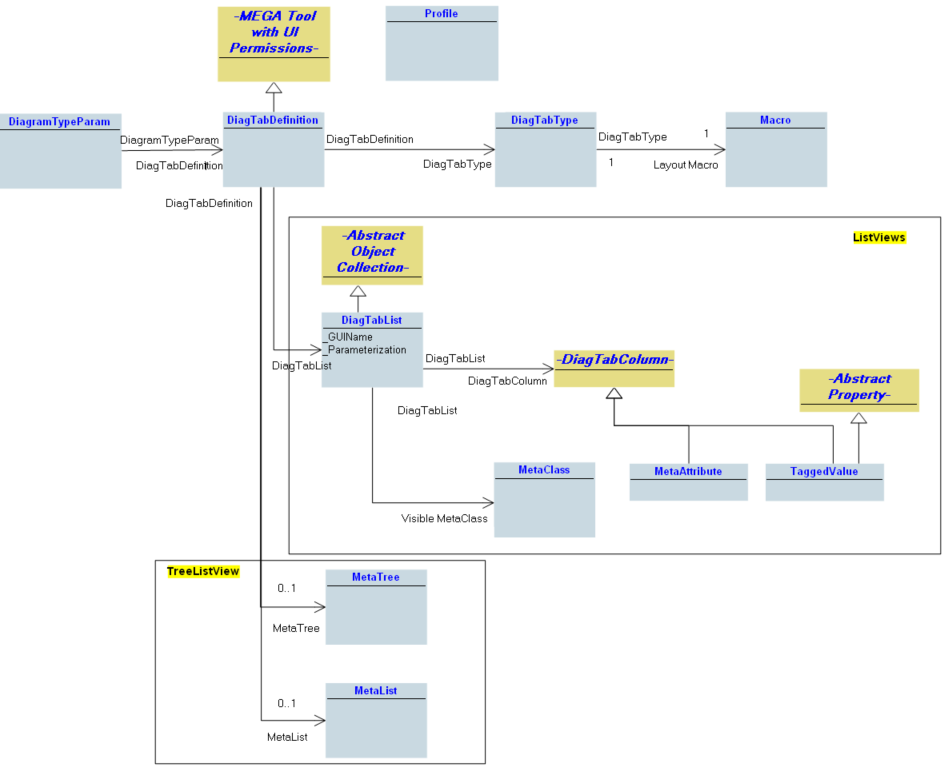
Configurations of a diagram type are carried by a DiagramTypeParam associated to multiple DiagTabDefinitions.
DiagTabDefinitions apply to specific profiles. The DiagTabDefinition description is based on the following concepts:
• DiagTabType: used for diagrams whose presentation is calculated by a macro
• DiagTabList: used to describe the fields of a tabular entry diagram
• MetaTree and MetaList: used to describe the fields of a tree tabular entry diagram
To specify that a diagram can be edited with tabular entry mode, proceed as follows:
1. Create a DiagTabDefinition and link it to a diagram type
3. Create the presentation macro, see "Creating the layout macros", page 103
4. Depending on the type of diagram, specify the fields corresponding to:
• a tabular entry diagram, see Specifying a tabular entry structure;
• a tree tabular entry diagram, see Specifying a tree entry structure.