DiagTabColumn Parameterization
DiagTabColumns are used to customize the columns of the tabular diagram table.
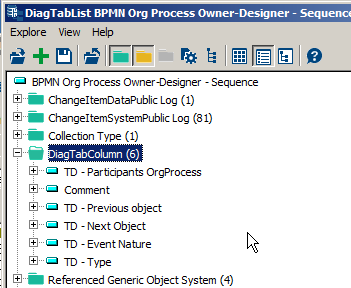
List of DiagTabColumns conected to a DiagTabList
The columns may be associated to:
• a MetaAttribute; “Comment” for example, in this case, the MetaAttribute must be connected to the corresponding DiagTabList,
• or a MetaAssociationEnd or a Path; in this case you have to create a dedicated TagguedValue and specify a set of parameterizations to describe the way it works:
• If the link between the row object and the column object is direct, see Direct links;
• If an intermediate object exists between the row object and the column object, see Indirect link;
• To customize your column presentation and tools, see Specific cases.
Direct links
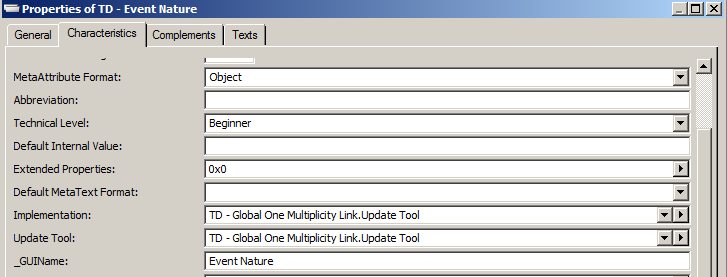
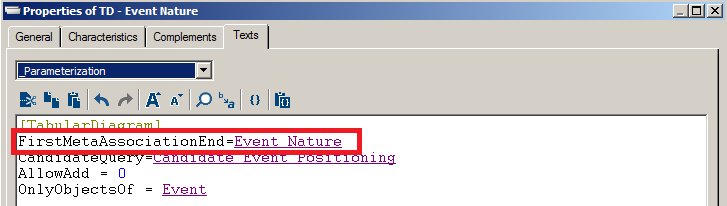
For example, the “TD - Event Nature” DiagTabColumn represents the link between an event and its nature.

To specify the parameters of a direct link between the row object and the column object:
1. Open the Characteristics property page of the TagguedValue object and, in the Implementation and UpdateTool fields, connect one of the following macros:
• ~3Von8cy1NniM[TD - Global One Multiplicity Link.Update Tool] if link multiplicity is equal to “1”,
• ~mBKk9WGUTbQP[TD - Direct Relation UpdateTool], if link multiplicity is different from“1”.
2. Open the Texts property page of the TagguedValue object and, in the _Parameterization section, use the [TabularDiagram] command to specify the link used for column calculation.
Indirect link
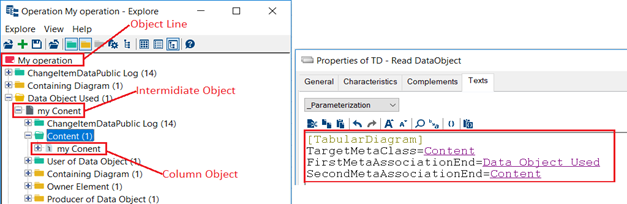
To specify the parameters of a link with an intermediate object between the row object and the object column:
1. Open the Characteristics property page of the TagguedValue object, in the Implementation and UpdateTool fields, connect the ~mBKk9WGUTbQP[TD - Direct Relation UpdateTool] macro;
2. Open the Texts property page of the TagguedValue object, in the _Parameterizations section, use the [TabularDiagram] command to specify:
• the FirstMetaAssociationEnd that refers to the link between the row object and the intermediate object,
• the SecondMetaAssociationEnd that refers to the link relating the intermediate object and column object,
• the TargetMetaClass to specify the type of the column object.
Specific cases
If you want to manage cases different from those previously shown, you need to create your own macro for Implementation and UpdateTool.
To customize your columns presentation and tools with a set of key elements:
1. In the Texts property page of the TagguedValue object, use the [TabularDiagram] command in the _Parameterization section.
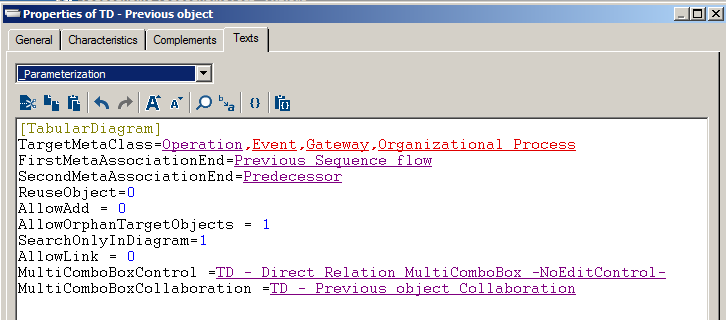
The table below shows the parameterization and the corresponding functionalities provided for DiagTabColumn objects.
Parameterization | Functionality |
|---|---|
TargetMetaClass | Takes a set of MetaClasses separated with “,” as an argument. Used to specify the type(s) of column objects. |
FirstMetaAssociationEnd | Takes a MetaAssociationEnd as an argument. Used to specify the link between: - the row object and column object when the link is direct -the row object and the intermediate object when the link is indirect. |
SecondMetaAssociationEnd | Takes a MetaAssociationEnd as an argument. Used to specify the link between: - the row object and column object when the link is direct, or - the row object and the intermediate object when the link is indirect. |
AllowAdd | Takes “0” or “1”. Used to specify if the user can create a new element in the column. |
AllowLink | Takes “0” or “1”. Used to specify if the user can create a new element in the column. |
MetaTest | Takes a MetaTest as an argument. Used to exclude a column according to a condition. |
CandidateQuery | Takes a MetaTest as an argument. Used to exclude a column according to a condition. |
OnlyObjectsOf | Takes a MetaClass as an argument. Indicates that the column will be available only to this specified MetaClass. For other types it will be disabled. |
ReuseObject | Takes “0” or “1”. Used when the link is indirect. Enables to specify whether the intermediate object is reused or whether we create a new one on any Create or Connect operation. |
SearchOnlyInDiagram | Takes “0” or “1”. Used to limit a DropDownList to elements that already exist in the diagram. For example the Previous Item and Next Item object cannot suggest objects which are not in the diagram. |
NewParticipants | Takes “Internal” or “External”. Used to specify the type of participant to create or connect but it is useful when the column groups Participants. |
MultiComboBoxControl | Takes a macro as an argument. Used to specify the multicombobox control in the column. The ~b8KkWhBUTPLP[TD - Direct Relation MultiComboBox] specific macro is used in all existing tabular diagrams. This macro takes into account all the key elements mentioned earlier. However you can specify your own macro. |
MultiComboBoxCollaboration | Takes a Query as an argument. It is mandatory when you have a multicombobox control. There are some configurations you will need bring to your query, see MultiComboBoxCollaboration Parameters. |
DiagTabColumn Parameterization
MultiComboBoxCollaboration Parameters
To specify a multicombobox controlled by a query in a column:
1. Connect the macro ~fLJGeQ4YTfjH[TD - MultiComboBox Collaboration.Collection Implementation] in the Collection Implementation field,
2. Set the Collection Permission.
3. Define the ~hQxd6kwcTTW9[TD - Global Collaboration UIManager] macro as UIManager for the query if you have creation permission.
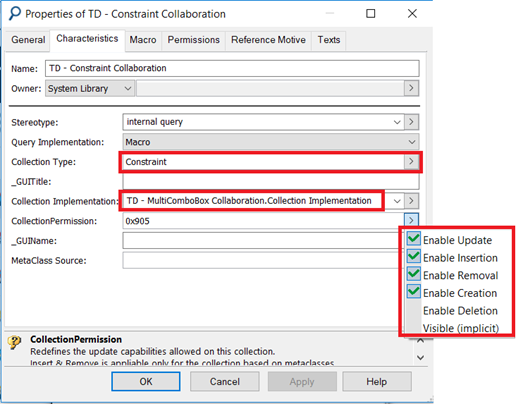
Example of MultiComboBoxCollaboration parameterization