5 Macro parameterization
To access macros stored in the repository:
1. Display the Utilities navigation window.
2. Expand the Macros folder.
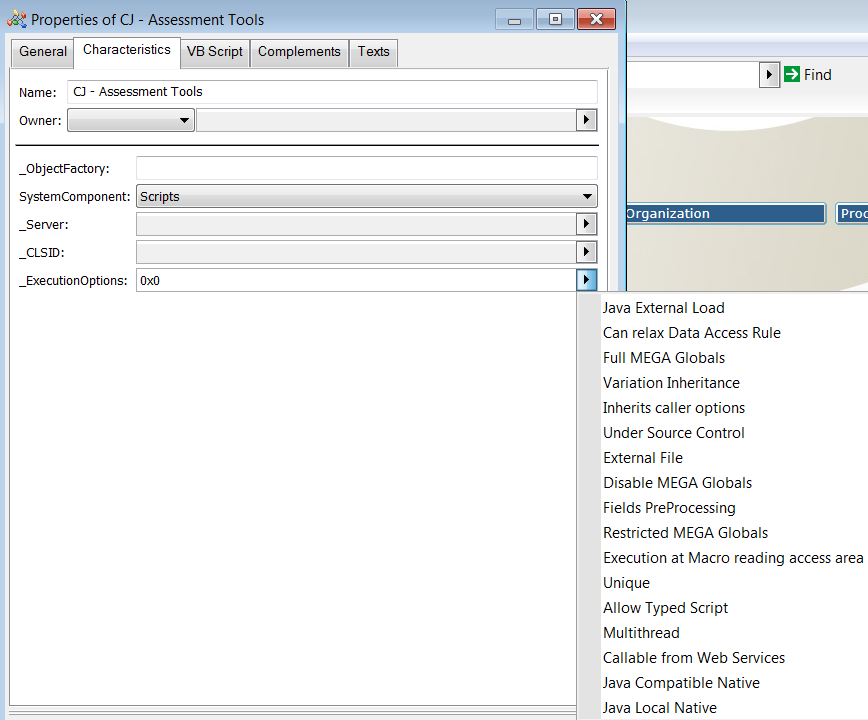
The Characteristics tab of the macro Properties enables definition of macro execution specificities.
The end user can parameterize the macro to define specific behaviors. The parameterization is made on the _ExecutionOptions macro attribute.
 |
This parameterization is important since it may improve performances of the full application.
|
The following options are available:
Full MEGA Globals: This parameter activates the global variables such as MegaRoot, MegaDB, MegaToolkit, MegaEnv, MegaSite. The access to the MegaRoot is implicit. This parameter is deprecated. It is highly recommended not to use it. Setting this attribute to this property means that your macro is not compatible with HOPEX Web applications.
Variation inheritance: This parameter is set if the GetCollection and GetSelection contained in the macro must retrieve both the direct objects retrieved from a MetaAssociationEnd and the objects obtained from inheritance with the variation mechanism.
Inherits Caller Options: This applies if the current macro has been called by another macro. In that case, the current macro inherits from the variation rights defined on the calling macro. As a sample, if the calling macro has the Variation inheritance value set, then the called macro has the Variation inheritance value set.
External File: The macro is stored in an external VBS file.
Disable MEGA Globals: This option defines that the use of MEGA Globals is forbidden. This is the recommended behavior. The use of Globals does not work with the Web applications.
Fields PreProcessing: This option enables to use directly the fields (MetaAttribute, MetaAssociationEnd) on an object without using GetProp and GetCollection. This option is not really recommended since it is time consumed and decreases the performances. This option is now deprecated.
Restricted MEGA Globals: This option enables the use of two MEGA globals: MegaEnv and MegaToolkit. This parameter is deprecated. It is highly recommended not to use it. The use of Globals does not work with the web applications.
Execution at Macro reading access area: This option defines at which confidentiality level the macro must be executed. The macro contains code and algorithm. The MEGA Philosophy concerning confidentiality is to compute algorithm as if you can access to all the objects in order to have the good result and to hide the confidential objects only for display. Therefore, if the macro is dedicated to display data, this option does not need to be used but as soon as the macro contains algorithm, it is highly recommended to ask for the following question : “do I need to access to all the data to have a coherent result ?”. If the answer is “yes”, this option must be activated.
For more information, see Confidentiality section.
Unique: This parameter is used for performance purpose. If your script has no global, you may require to instantiate it only once. In that case, the script is loaded only once and executed as much as requested.
Allow Typed Script: This option gives you the availability to type the objects inside your script. For example, in standard, if you declare a function you can write:
Function MyFunction( oMegaObject)
Dim myObject
End Function
If this option is set, you can type the objects inside your code as the following:
Function MyFunction( oMegaObject As MegaObject )
Dim myObject As MegaObject
End Function
The interesting point concerning that is that you can use the intellisense on object.
Multithread: This option is available only for Java Macro. If this option is set, it means that the java component works in multhreading that is to say the component may be called at the same time by several threads.
Java Compatible Native:
Java Local Native:
Java External load (until 740): This parameter is for Java debugging purpose. This parameter can be set only if the Macro is a Java plug-in. It launches a new MEGA process which enables to take into account the new compiled version of the Java plug-in without restarting MEGA (Once a Java plug-in is loaded, replacing the jar file has no effect, you must stop and restart MEGA to get the effect of the new java plug-in version).
Under Source Control (until 740): This option is dedicated to MEGA R&D Team and cannot be used by the end user.