12 Coding recommendations & Performances
12.1 Coding recommendations
12.1.1 Handling Identifiers
 |
You must make reference to an object using its absolute identifier rather than its name: in this case the code is most highly optimized and resists renaming of the instance as well as change of language.
|
An absolute identifier is a unique identifier that can be assigned to any instance, characteristic, or link in HOPEX.
However, an absolute identifier is less readable than a name, which is why the MEGA Script Editor offers the possibility of using fields rather than the name of the MEGA object.
Each MEGA instance is identified uniquely by its absolute identifier. This identifier is a 64-bit key, represented by MEGA in the form of a 12 character string.
Objects that define the MEGA metamodel (MetaClasses, MetaAssociations and MetaAttributes amongst others) are also MEGA objects; and they therefore have absolute identifiers.
Obtaining identifiers
A data item representing a MEGA object is implicitly considered as an identifier. In particular, an identifier enables positioning in a collection. For example, if "OperationID" variable contains an operation identifier, it can be used to execute a search in a collection of operations as follows:
|
VB Script
|
Set myOperations = ...
' myOperations is a collection of operations. OperationID = ...
' OperationID is the identifier of an operation.
Set anOperation = myOperations(operationID)
If anOperation.Exists Then
OperationID = anOperation.GetID ' the variable keeps the same value.
End If
|
|
Java
|
MegaCollection mgcolOperations = mgobjProject.getCollection("Operation");
// mgcolOperations is a collection of operations.
Object objOperationID = mgobjProject.getCollection("Operation").get(1).getID();
// objOperationID is the identifier of an operation.
MegaObject mgobjOperation = mgcolOperations.get(objOperationID);
if (mgobjOperation.exists()) {
objOperationID = mgobjOperation.getID();
// the variable keeps the same value.
}
|
The GetID function obtains the identifier of an object in its internal format.
|
The value returned by the GetID function is only meaningful within the same executable. This value cannot be generalized and must not be used globally.
|
The GetPropID and GetCollectionID functions are used to obtain the identifier (not the value) of an object or a MetaAssociationEnd accessible from an instance. These values are persistent and independent of language (in the context of a multilingual repository for example).
|
VB Script
|
Ope.GetProp("Name")
Ope.GetProp(Ope.GetPropID("Name"))
' These last two lines are synonymous.
|
|
Java
|
String strName = mgobjOperation.getProp("Name");
strName = mgobjOperation.getProp(mgobjOperation.getPropID("Name"));
strName = (String) mgobjOperation.invokePropertyGet("Name");
|
Note that GetProp (like GetCollection) accepts a name or identifier as parameter. The Item function also accepts name or identifier as parameter:
|
VB Script
|
Set myOperations = oProject.GetCollection ("Operation")
' the code finds a collection of operations.
Set anOperation = myOperations.Item("operation-1")
|
|
Java
|
MegaCollection mgcolOperations = mgobjProject.getCollection("Operation");
//the code finds a collection of operations.
MegaObject mgobjAnOperation = mgcolOperations.get("operation-1");
|
The object type for an instance is obtained with the GetClassID function.
Using fields
This consists of replacing the character string containing the name by a character string starting with escape character '~', followed by the absolute identifier, then by the object name between square brackets.
Field display with standard editor
Set myproject= oRoot.getCollection("~qekPESs3iG30[Project]").Item("~7qv3W01mCz10[MyProject]")
Field display with scriptSet editor
The script editor masks the field code and displays the name only, underlined.

In the properties dialog box of a macro, the VB Script tab enables edit of VB Script of the macro. The  Hide/Show Fields button enables display of fields used in the macro, according to"ScriptSet" mode or to "standard" mode.
Hide/Show Fields button enables display of fields used in the macro, according to"ScriptSet" mode or to "standard" mode.Fields can be used in different functions such as: GetCollection, GetProp, SetProp, Item, GetMacro, GetObjectFromID.
Using standard functions available to convert and compare identifiers
Using the MegaField function
To represent a MEGA field identically from one editor to another, the MegaField function builds the field corresponding to the identifier of an object.
|
VB Script
|
myprojectField = myproject.MegaField
Set operations = Project.Item(myprojectField).getCollection("Operation")
|
|
Java
|
String strProjectField = mgRoot.getCollection("~qekPESs3iG30[Project]").item("My Project").megaField();
MegaCollection mgcolOperations = mgRoot.getCollection("~qekPESs3iG30[Project]").item(strProjectField).getCollection("Operation");
|
Using directive fields
Fields can also be used to invoke methods of a MegaObject. This type of MEGA script cannot be used directly and must be transformed in order to be executed. This transformation is controlled by the Fields directive in the MegaContext command invoked below.
'MegaContext(Fields) - field interpretation activation
'MegaContext(Fields,Batch) - field interpretation and global DBRoot deactivation
When the "Fields" context is activated, the VB script is pre-interpreted so that its fields can be replaced by expressions compatible with VB Script syntax. MetaClasses, MetaAttributes and MetaAssociationEnds can then be pasted in the script in the form of fields rather than the corresponding object names.
Example:
The following code that does not use fields:
for each ope in myOperations
print ope.Nom
next
can be replaced by the following which uses them:
'MegaContext(Fields)
for each ope in myOperation
print ope.Name
next
When this script is opened with an editor that does not process MEGA fields (for example Windows Notepad, the fields appear in their storage format.
'MegaContext(Fields)
for each ope in myOperation
print ope.~210000000900[Name]
next
This file cannot be directly executed by the script interpreter. The MegaContext(Fields) option enables transformation of this code to a script acceptable by the script interpreter. For information, this transformation is limited to moving an opening square bracket: the code below can therefore be executed.
'MegaContext(Fields)
for each ope in [~gsUiU9B5iiR0myOperation]
print ope. [~210000000900Name]
next
12.1.2 How to speed up queries in API code by using Absolute Identifiers
The way you use to write queries in API code may affect the performance of the query.
The following information shows how to raise performance in queries used inside the code (Java or VB) by simply changing names to absolute identifiers.
Example:
|
VB Script
|
root=getRoot
s=Timer
for i=1 to 10000
set res = root.getSelection("Select [Application] Where [Defined-Service].[Operation].[Organizational Process]='World@Hand::BPMN Notation Diagrams:: Purchasing:: Purchase Goods & Services:: Contract Negotiation'")
next
e=Timer
print "Query without IdAbs: " & (e-s)*1000 & "ms"
s=Timer
for i=1 to 10000
set res = root.getSelection("Select ~MrUiM9B5iyM0[Application] Where ~ltSTdNNHjqj0[Defined-Service] in (~TsUiT9B5iyQ0[IT Service] WHERE ~hqUiTCB5iK72[Operation].~mrUiaCB5iCB2[Organizational Process]='~W3qoNsjV91e6[Contract Negotiation]')")
next
e=Timer
print "Query with IdAbs: " & (e-s)*1000 & "ms"
|
|
Java
|
Date dCurrDateS1 = new Date();
for (int j = 1; j <= 10000; j++) {
MegaCollection mgcolTest = mgRoot.getSelection("Select [Application] Where [Defined-Service].[Operation].[Organizational Process]='World@Hand::BPMN Notation Diagrams:: Purchasing:: Purchase Goods & Services:: Contract Negotiation'");
}
Date dCurrDateS2 = new Date();
mgRoot.callFunction("~U7afnoxbAPw0[MessageBox]", "Query without IdAbs: " + (dCurrDateS2.getTime() - dCurrDateS1.getTime()) + "ms");
dCurrDateS1 = new Date();
for (int j = 1; j <= 10000; j++) {
MegaCollection mgcolTest = mgRoot.getSelection("Select ~MrUiM9B5iyM0[Application] Where ~ltSTdNNHjqj0[Defined-Service] in (~TsUiT9B5iyQ0[IT Service] WHERE ~hqUiTCB5iK72[Operation].~mrUiaCB5iCB2[Organizational Process]='~W3qoNsjV91e6[Contract Negotiation]')");
}
dCurrDateS2 = new Date();
mgRoot.callFunction("~U7afnoxbAPw0[MessageBox]", "Query with IdAbs: " + (dCurrDateS2.getTime() - dCurrDateS1.getTime()) + "ms");
|
The environment is Demonstration with MEGA 2009 SP5 CP6 R6.
We execute (a lot of times, 10000 times) the same query and then we will print the elapsed time.
The first query uses the names for MetaClass, MetaAssociationEnds, and the name for the source object.
The second query replace names with Absolute Identifiers (in the MegaField format).
The first cycle of queries took 20312,51 ms to be executed (about 20 seconds), the second cycles took about 16796,885 ms to be executed (a little bit more than 1 second and half).
By using idabs for the query we gain about the 25% in performances.
Remember (for the entry point) that MEGA accept a megaField when you can put a name.
To get the megaField of an object (its Id) just write myObject.megaField (you can use also .megaUnnamedField, in this case the name of the object will be replaced by a X, for the system it is the same).
In complex reports where you do a lot of queries the execution time of the report can benefit from queries with Identifiers.
This approach can also be implemented for imbedded queries in HTML descriptions for websites.
Not only it is interesting as far as peformance is concerned, it is also more maintainable (as written text for names of MetaClasses, MetaAssociationEnds and MetaAttributes is not stable in the long term).
12.1.3 Browsing repository (collection use)
There is no other way than browsing through the repository the information you want to handle in your code.
|
However, be aware that browsing the repository is time consuming (e.g.: finding objects, listing related objects).
|
You must pay particular attention to write optimized code.
|
Do not ask several times the same information to the repository.
Do not ask an information you do not need to the repository.
Take advantage of indexes in your browsings.
|
Here are examples of good vs bad :
Example 1:
- Bad: count is called as many time as there are elements
for (int i = 1; i <= mgobj.getCollection(…).count(); i++) {
...
}
- Good:
int iCount = mgobj.getCollection(…).count();
for (int i = 1; i <= iCount; i++) {
...
}
Example 2:
mgidSearchedId is the object identifier that you find via a MetaAssociationEnd from another object
Bad: browsing all the items of a list when you are interested in only one item and you know how to identify it by an indexed attribute
int iCount = mgobj.getCollection(…).count();
for (int i = 1; i <= iCount; i++) {
MegaObject mgobjChild = mgobj.getCollection(…).get(i);
if (mgobjChild.sameId(mgidSearchedId)) {
mgobjSearched = mgobjChild;
// my code
}
}
Good:
MegaObject mgobjSearched = mgobj.getCollection(…).get(mgidSearchedId);
if (mgobjSearched.exists()) {
// my code
}
Example 3:
You have an identifier in Hexadecimal format (Base 16) and you want it in Base 64 (or any other variant enabling to retrieve the identifier in any other format)
Bad: searching for an object to retrieve information you already have in another format.
strId = mgRoot.getObjectFromId(strHexaIdentifier).getProp("~310000000D00[Absolute Identifier]");
- Good:
strId = mgToolKit.getString64FromId(strHexaIdentifier);
12.1.4 Writing code rules
Writing code rules regarding GUIs
For web compatibility:
• do not use:
o Java GUIs in MEGA code
o VB (Visual Basic) GUIs in MEGA code
• use HOPEX forms to execute your own GUIs, with:
o Property pages
o Wizards
For detailed information on Property Pages and Wizards, see HOPEX Power Studio > Customizing the user Interface > Forms.
|
Web compatibility: using Java or VB (Visual Basic) GUIs in MEGA code would launch the GUIs on HOPEX server instead of the Web client and block HOPEX server.
|
Writing code rules regarding Performance
Calculated MetaAttributes:
• browsing an excessive number of objects is forbidden
• do not over consume resources
Release objects:
• Java: release objects instead of using the default garbage collector, enter:
yObj.release()
• VB Script:
Set myObj = Nothing only if the process may take a long time.
Do not use GetObjectFromID, instead use:
myRoot.GetCollection(« ~MrUiM9B5iyM0[Application] »).Item(AppID)
Use of field with IdAbs is mandatory:
• the field format is: absolute identifier followed by the object name:
~MEsJ0p5rATw0[AllStoppedWorkflows]
• to retrieve the field form an object, enter:
|
VB Script
|
sID = myObject.megafield
|
|
Java
|
sID = myObject. megaField();
|
When the object name is not required, to improve performance, use megaUnnamedField:
|
VB Script
|
sID = myObject. megaUnnamedField
|
|
Java
|
sID = myObject.megaUnnamedField();
|
Use variables to store objects
12.1.5 Confidentiality
Objects in HOPEX may be confidential.
A macro does not give you acces to confidential objetcs:
GetProp(MyProp , « display ») sends back ****
GetCollection sends back a collection with the confidential objects but you cannot access to any properties
According to the macro parameterization, scripts are executed at:
• the macro confidentiality level : algorithm
• the user confidentiality level: displayed information
When creating a macro, always keep in mind the confidentiality issue.
The macro must give a valid result.
Examples:
• Regulation rule: the organizational process cannot include more than five operations
• Properties: display the name and comment of an organizational process operations
• Matrix: displays the relations between the organizational processes and IT Services through operations
Example1: Regulation rule
Regulation rule: the organizational process cannot include more than five operations
For example:
• The organizational process P1 includes six operations: Op1, … , Op6.
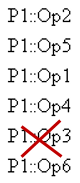
• User U1 can see P1 but Op3 is confidential
• User U2 can see P1 and all of its operations
• Script:
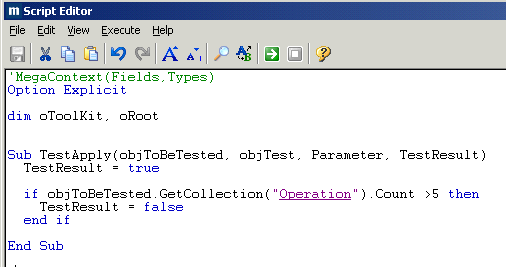
When the above script is executed with:
• U1 view, the procedure execution result gives:
5 ≤ 5 -> TestResult = true
The regulation rule is valid and displays that the organisational process respect the rule.
• U2 view, the procedure execution result gives:
6 > 5 -> TestResult = false
The regulation rule is not valid and displays that the organisational process does not respect the rule.
Results are different for user U1 and user U2
This script is not correct: the rule must give the same result for all the users.
To configure the macro related to the organizational process
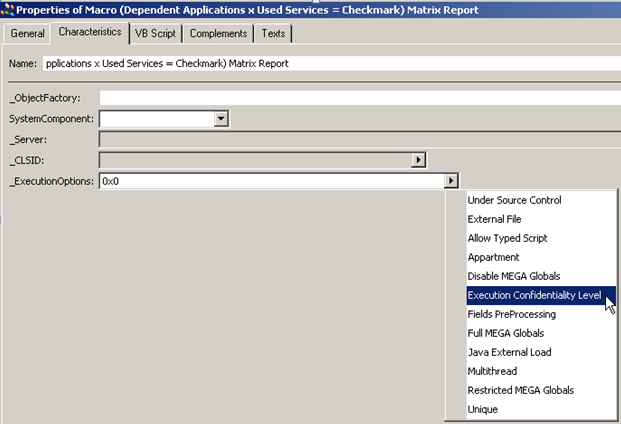
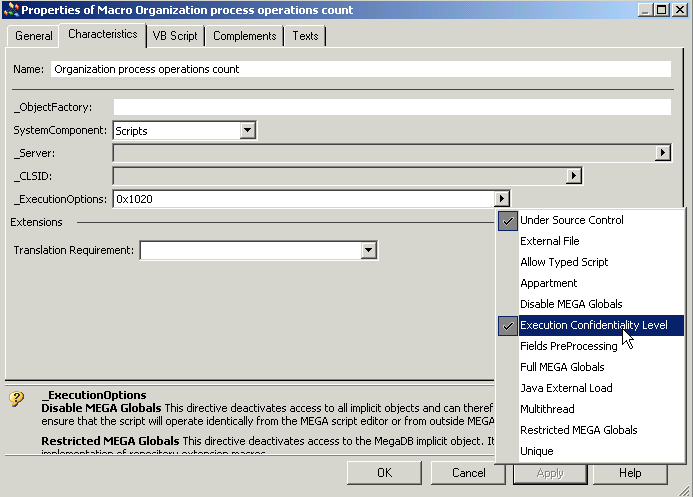
1. In the macro Properties window, Characteristics tab, set _ExecutionOptions to “Execution Confidentiality Level”.
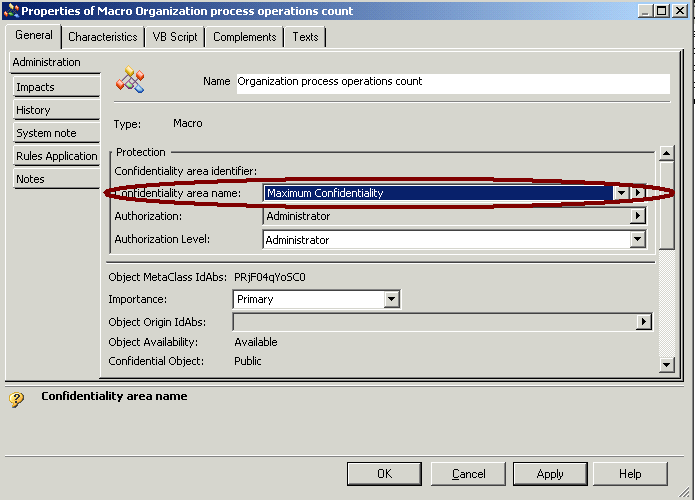
2. In the macro Properties window, General tab, Administration sub-tab, set the macro Confidentiality level to “Maximum confidentiality” level
3. Enter the code:
The code is executed as if the end user had the maximum confidentiality level.
When the above script is executed with U1 view, the procedure execution result gives:
6 > 5 -> TestResult = false
For both users, the regulation rule fails and displays that the organisational process does not respect the rule.
Example2: Properties
|
When no algoritm is needed, execute the macro at the user confidentiality level.
|
To display the name and comment of an organizational process operations
1. In the Script Editor, enter the following code:
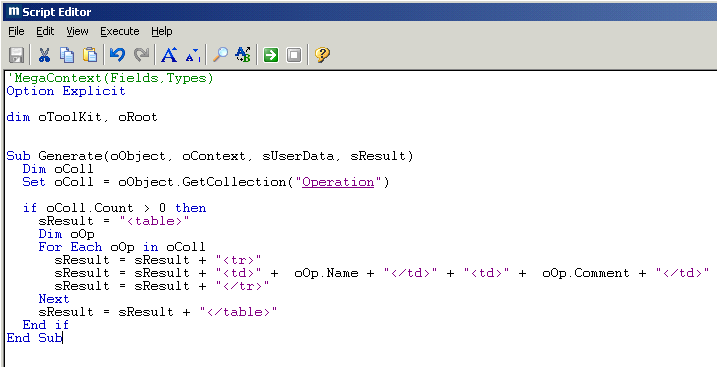
When the code is executed at the maximum confidentiality level, with user U1, the result is wrong as Op3 is confidential for U1.
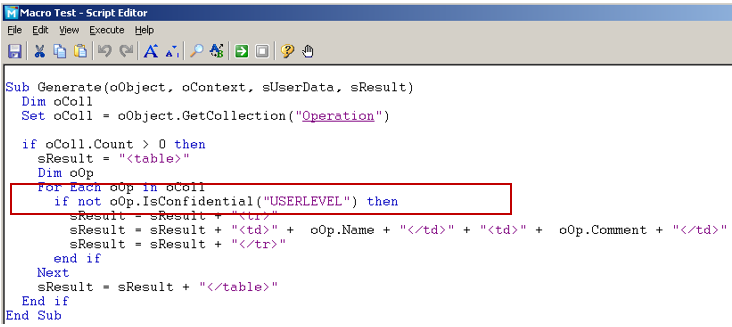
2. For the confidential objects not to be displayed use IsConfidential(“UserLevel”).
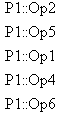
The result is good, Op3 is not displayed:
Example2: Matrix
When algorithm is required, execute the macro at the maximum confidentiality level and take into account the confidentiality with the IsConfidential(“USERLEVEL”) function.
All the Operations have the operation type “Decision”.
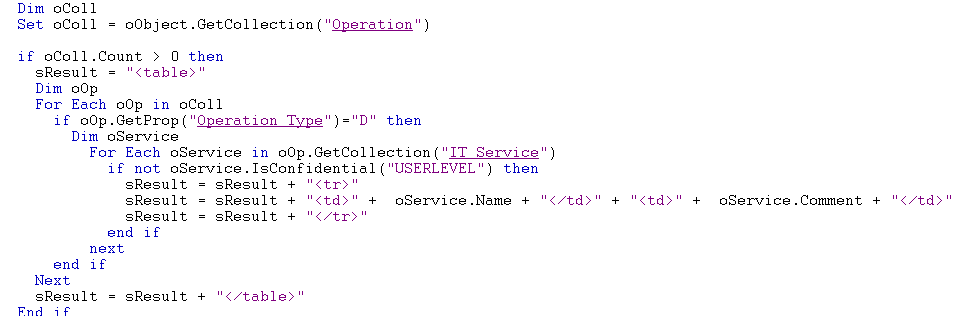
The purpose is to display the IT Services linked to the organizational process through the operations of Decision type.
1. In the Script Editor, enter the following code:
2. When the code is executed:
o at the User level, with the user U1
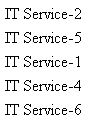
The result is wrong.
Even if Op3 is confidential, the “IT Service-3” IT service linked to P1 should be displayed.
o at the Maximum confidentiality level, with the user U1,
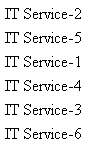
The result is correct. Even if Op3 is confidential, the IT service “IT Service – 3” linked to P1 is displayed.
12.2 Performances
This section gives some advices to improve code performance. For these recommendations to be useful the code algorithmic needs to be well written. These recommendations are mainly useful for code handling a large amount of data. They concern:
• access to HOPEX data
• language code
The way the code access data can determine the overall performance of the process. Each query to the repository costs in term of performance so it is better to do the minimal queries or to use cache systems.
12.2.1 Navigating through the metamodel with APIs
If you need to access to metamodel data (MetaClasses, MetaAttributes, MetaAssociations,…), you must know that this kind of data is rather static and HOPEX offers a metamodel cache to improve navigation performance. Specific APIs are available to access the metamodel, see Accessing the metamodel description using APIs section.
|
When navigating through the metamodel, use these APIs (instead of standard APIs) to avoid access to repository and improve application performance.
|
To:
• get a different view on the metamodel, use:
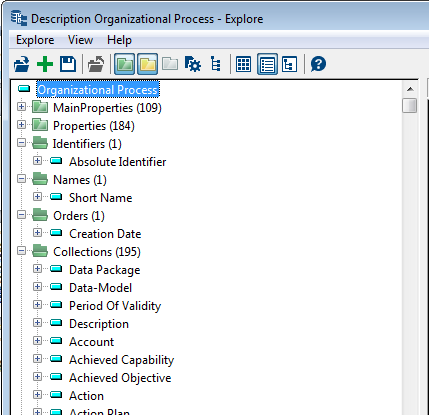
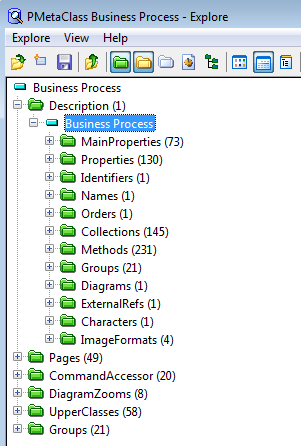
getroot.GetClassDescription("~gsUiU9B5iiR0[Organizational Process]").GetTypeObject().Explore
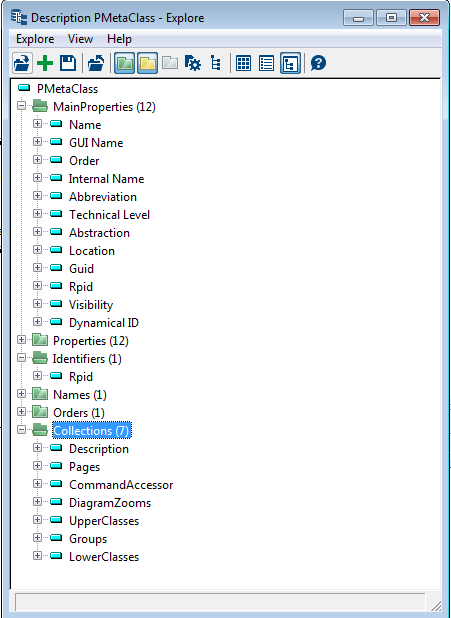
• access the Organizational Process MataClass, enter:
getroot.GetCollection(("~gsUiU9B5iiR0[Organizational Process]").GetTypeObject.Explore
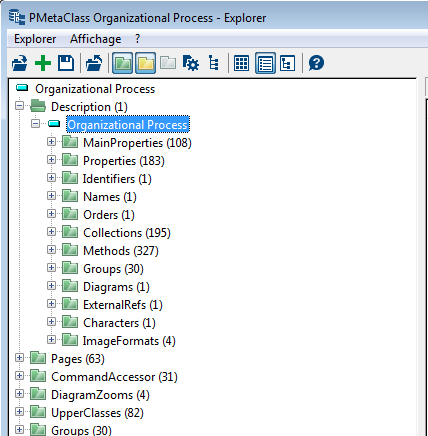
• get a full description of the MetaClass, use GetClassdescription:
getroot.GetClassDescription("~gsUiU9B5iiR0[Organizational Process]").Explore
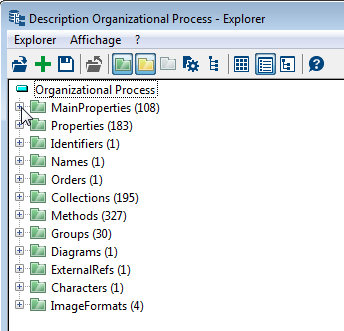
• get a description of the MetaClass only, use GetCollectionDescription
getroot.GetCollectionDescription("~gsUiU9B5iiR0[Organizational Process]"). Explore
• navigate from an occurrence, use GetTypeObject or GetClassObject:
GetRoot.GetObjectFromID("~TK0gySBDCjl0[1. Training Program]").GetTypeObject.explore
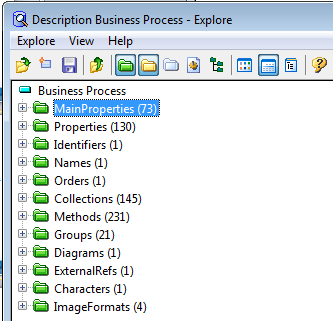
GetRoot.GetObjectFromID("~TK0gySBDCjl0[1. Training Program]").GetClassObject.explore
|
VB Script
|
for each oUpperClass in oRoot.getClassDescription(oMetaClass.GetId).UpperClasses
set oUpperClass = oRoot.getObjectFromId(oUpperClass.GetId)
for each omoAnalysisParameter in oUpperClass.Getcollection ("~8yHXTTuE31W0[Report Parameter]")
set ocAnalysisTemplate.Insert = omoAnalysisParameter.Getcollection ("~kyHXAOuE3jN0[Parameterized Report Template]")
next
next
|
|
Java
|
MegaObject odMetaClass = oRoot.getClassDescription("~" + sClassId);
MegaObject odCollDescrip = odMetaClass.getCollection("Description").get(1);
|
12.2.2 Navigating through data with APIs
This case is the most often encountered.
Megafield usage
A megafield is a string containing the absolute identifier of an object followed by its name. It identifies a unique object. The name between the brackets is optional and can be replaced for example by “[X]”.
Example of megafield:
~MEsJ0p5rATw0[MyApplication] is the same as ~MEsJ0p5rATw0[X]
The megafield can be built manually or retrieved using the api megafield available on MegaObjects:
|
VB Script
|
Java
|
|
id = mgObject.MegaField
|
id = mgObject.megaField();
|
|
Returns ~MEsJ0p5rATw0[MyApplication]
|
|
|
id = mgObject.MegaField()
|
id = mgObject.megaUnnamedField();
|
|
Returns ~MEsJ0p5rATw0[X]
|
|
If you do not need the name, choose always the second one which improves the performance (it does not compute the name of the object).
|
The usage of megafields is compulsory for all Mega APIs.
|
Example:
mgObject.getProp("~310000000D00[Absolute Identifier]")
is better than
mgObject.getProp("Absolute Identifier").
This is the same for all Mega APIs (getProp, getCollection, etc.).
Searching an object
It is not recommended to use GetObjectFromId function. If you know exactly the MetaClass which instantiates what you are looking for, prefer writing this:
getCollection("~MrUiM9B5iyM0[Application]").item("~MEsJ0p5rATw0[MyApplication]");
When searching for an instance with its name, do not use a query with getSelection API, but the following code which uses dedicated indexes:
getCollection("~MrUiM9B5iyM0[Application]").item("MyApplication");
Manipulating identifiers
To compare the identifiers of two objects do not convert them in the same format and then compare them. Prefer the usage of the sameID API. With this one you can use whatever identifier (absolute identifier, hexa identifier or getId). It is available on MegaObject and it can be used as follows:
mgObject.sameID("~MEsJ0p5rATw0[MyApplication]");
If you have two identifiers, you can use the sameID API available on the MegaToolkit:
mgToolkit.sameID("MEsJ0p5rATw0","B1EDB2562C14016F");
If you have an identifier in a given format and you need it in anther format, do not go to the MegaObject and ask for the good identifier format. Instead use the APIs available on the MegaToolKit that allow converting identifiers:
getString64FromID(myID);
getStringFromID(myID);
getIDFromString(myStringID);
generateID();
Loops
In almost all the algorithms we can find loops that allow navigating through objects. If a code like this is needed:
for (int i = 1; i <= mgobj.getCollection(…).count(); i++) {
...
}
or
while (i <= mgobj.getCollection(…).count()) {
i++;
...
}
Be careful to store the count of the collection before using it in the loop. Otherwise the count function will be evaluated at each loop.
Prefer syntax like this:
int iCount = mgobj.getCollection(…).count();
for (int i = 1; i <= iCount; i++) {
12.2.3 Deactivating/Reactivating repository log, undo, locks, CRUD test
For performance optimization, you can deactivate/reactivate the following actions in a macro:
• repository log
• undo
• locks
• CRUD test
Use the following method respectively:
mgobjRoot.BatchModeEnter "RepositoryLog=Stop", "RepositoryUndo=Stop","RepositoryLock=Stop","UIPermission=Stop"
// Processing
mgobjRoot.BatchModeLeave "RepositoryLog=Start", "RepositoryUndo=Start","RepositoryLock=Start","UIPermission=Start"
12.2.4 Optimizing the macro of a dynamic data access rule
Dynamic rules for reading or writing data access (permissions) are defined by a macro.
To optimize your macro execution performance, instead of using ERQL queries, use the following methods, which benefit from an efficient session cache:
• oObject.IsInCurrentAssignment, to check if a Business Role (e.g. Risk Manager) is assigned to the current person.
oObject.IsInCurrentAssignment ("Object=idAbsObject, Location=idAbsLocation, Role=idAbsRole, RoleQuery=idAbsQuery, LocationQuery=idAbsQuery, ObjectQuery=idAbsQuery")
The parameter idAbsRole is mandatory, except if the method is called from a Business Role object. The value can be the keyword “Any”.
If idAbsObject is set, the method checks if the Business Role is assigned for this object. The value can be the keyword “Any”.
If ObjectQuery is set, the method checks if the Business Role is assigned to an object from which the query result (the query takes the assigned object as parameter) includes the given idAbsObject.
If idAbsLocation is set, the method checks if the Business Role is assigned at this location. The value can be the keyword “Any”.
If LocationQuery is set, the method checks if the Business Role is assigned at a location from which the query result (the query takes the assigned location as parameter) includes the given idAbsLocation.
• oObject.IsInCurrentAssignedLocation, to check if a Business Role (e.g. Risk Manager) is assigned to the current person at a specific location.
oObject.IsInCurrentAssignedLocation("Role=idAbsRole, Object=idAbsObject, RoleQuery=idAbsQuery, ObjectQuery=idAbsQuery, LocationQuery=idAbsQuery")
Same parameters as oObject.IsInCurrentAssignment, except “idAbsLocation” parameter, which is set with the oObject on which is called the method.
• oObject.IsInCurrentAssignedObject, to check if a Business Role (e.g. Risk Manager) is assigned to the current person for a specific object.
oObject.IsInCurrentAssignedObject ("Role=idAbsRole, RoleQuery=idAbsQuery, Location=idAbsLocation, LocationQuery=idAbsQuery, ObjectQuery=idAbsObject")
Same parameters as oObject.IsInCurrentAssignment, except “idAbsObject” parameter, which is set with the oObject on which is called the method.
Macro example: macro of the “Incident - Reading.Implementation” Data Access Rule
Option Explicit
'------------------------------------------------------------------------------'
'-------------------------------------------------------------------------------
Sub GetAttributeValue(ByVal mgIncident, ByVal vMetaAttributeId, ByRef Value)
Dim mgColOrgUnit
Dim mgOrgUnit
Value = "0"
If mgIncident.SameId(mgIncident.GetProp("~(10000000v30[_Creator]"), mgIncident.GetRoot.CurrentEnvironment.GetCurrentUserId) Then
Value = "1"
ElseIf mgIncident.IsInCurrentAssignedObject("Role=~XnhUqvd(HztR[Declarer]") Then
Value = "1"
Else
Set mgColOrgUnit = mgIncident.GetCollection("~p0b9Go4tH9eC[Declarant's Entity]")
If mgColOrgUnit.Count = 0 Then
Value = "1"
Else
For Each mgOrgUnit In mgColOrgUnit
If mgOrgUnit.IsInCurrentAssignedLocation("CollectionFromLocation=~(yYIf)afGHsC[Org-Unit and all its tree]","RoleQuery=~TiS9GRoANzf5[Business Role is LDC]") Then
Value = "1"
Exit For
End If
Next
End If
End If
End Sub
12.2.5 Avoiding processes to go slower: Tracking down non released instances
Some behaviors concern codes dealing with many object instances. The process seems to be slower as it progresses. In most cases, it is due to a large amount of living MegaObjects.
As a reminder, the following code:
MegaOject mgObj = mgRoot.getObjectFromId("xxxxxxxxxxx");
instantiates a MegaObject class and connect it to the HOPEX repository object. As long as the java instance is not destroyed, the reference to the MegaObject still exists. If a lot of these references lives at the same time, they are notified each time a modification is made in the repository. So the more you have this kind of references in memory the more slowly the process goes.
|
To solve the problem, release explicitly the instances as soon as you do not need them anymore.
|
|
This is to be done while coding. To release java instances a posteriori, see Processes going slower: releasing non released instances procedure.
|
To release an instance, enter:
|
VB Script
|
Set mgObject = Nothing
|
|
Java
|
mgObj.release();
|
This problem concerns MegaObjects or MegaCollections but also all Classes provided by MEGA (MegaEnvironment, MegaRoot, MegaToolkit…).
Especially in Java, beware of unsuspected instantiations.
For example, the following code:
String codeTemplate = mgRoot.currentEnvironment().resources().codeTemplate("xxxxxx", "");
instantiates two objets: one for the currentEnvironment and one for the resources.
These two objects should be released and you should replace the above code by the following one:
MegaCurrentEnvironment mgCurrEnv = mgRoot.currentEnvironment();
MegaResources mgRes = mgCurrEnv.resources();
String codeTemplate = mgRes.codeTemplate("xxxxxx", "");
mgRes.release();
mgCurrEnv.release();
|
Releasing all objects is really something important in big programs.
|
To help you to find the non-released objects in your java code, HOPEX provides a class called “com.mega.modeling.api.util.MegaDebugLivingInstances”. It is located in mj_api.jar.
com.mega.modeling.api.util.MegaDebugLivingInstances
To use this class:
1. Indicate in your code, the moment from which you want to start monitoring the Mega Classes instances. To do that, enter:
MegaDebugLivingInstances.activate();
Since V5 CP5, all objects where Keep or Release has not been explicitly called will be reported. The behavior has been changed as the purpose of this tool is to find all objects without explicit Release.
If you need the previous behavior where implicit released objects through garbage collector are not reported, start this tool with:
MegaDebugLivingInstances.activate(Mode.AllRelease);
2. You can use three APIs:
MegaDebugLivingInstances.getLivingInstancesCount();
This function allows knowing the number of living instances. It retrieves an integer.
MegaDebugLivingInstances.getLivingInstances();
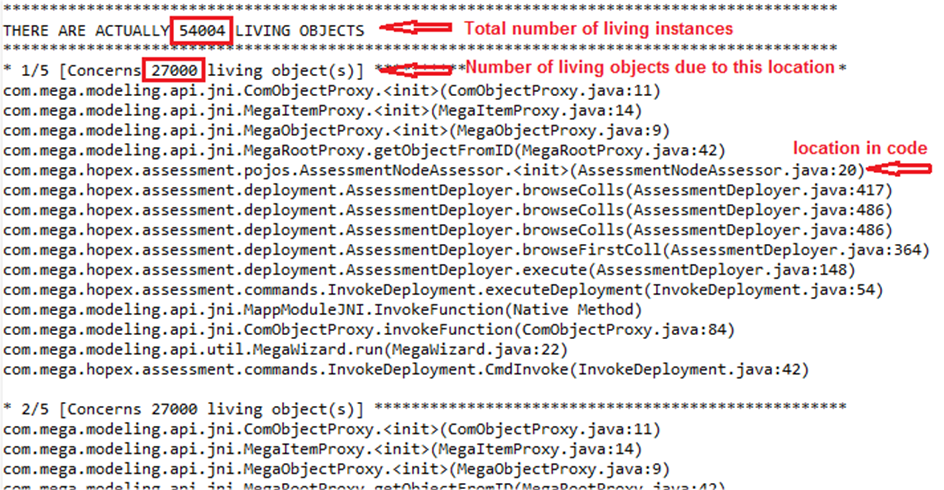
This function allows retrieving, as a string, the exact locations in your code and the number of instances still living due to this location.
MegaDebugLivingInstances.dumpLivingInstances("c:\\livingObjects.txt");
This function allows dumping, in a specified file, the exact locations in your code and the number of instances still living due to this location.
Dump example:
 **************************************************
 |
Using this class can slow down the main code so consider using it only during conception phase.
|
Batch mode
When entering a part of code which will handle a lot of data, it is recommended to disable some notifications for better performances. To do that, use the following API:
mgRoot.currentEnvironment().enterBatchUpdate();
To enable notifications use the following API:
mgRoot.currentEnvironment().leaveBatchUpdate();
Objects Creation
If you know the name of the occurrence you want to create, specify it as a parameter of the create API:
getCollection(…).create("My Name");
This prevents the system to allocate a temporary computed name to the object. This computation can be a cause of slow performance. This is especially useful when creating a lot of objects.
If the objects you are creating are supposed to be linked to a main object, you should not have a code like this:
MegaObject myObject = getCollection(…).create();
myMainObject.getCollection(…).add myObject;
Prefer the following code which is optimized to do a create link operation:
MegaObject myObject = myMainObject.getCollection(…).create();
This is really compulsory when dealing with concepts having namespace (most of the objects). These two technics can be composed to be more efficient.
12.2.6 Processes going slower: releasing non released instances
You can release all at once a set of Java instances of ComObjectProxy (MegaObject, MegaCollection, MegaRoot…) without needing to track all of the objects, and release each of them one by one.
To do so, use the following class, which enables to collect and release the objects concerned:
com.mega.modeling.api.util.MegaManageLivingInstances
| |
This is to be done a posteriori only, when founding out that java instances are not released. To release java instances while coding, see Avoiding processes to go slower: Tracking down non released instances procedure.
|
To use this class:
1. In your code, indicate when you want to start collecting Mega instances: call the following method:
com.mega.modeling.api.util.MegaManageLivingInstances.startCollectReferences();
2. Call the mass release method using the following API:
com.mega.modeling.api.util.MegaManageLivingInstances.releaseReferences();
3. Indicate when you want to stop collecting Mega instances: use the following API:
com.mega.modeling.api.util.MegaManageLivingInstances.stopCollectReferences();
|
• Be accurate when defining the different calls, as any object instantiated after the start will be released at the release call without any distinction.
• Do not forget to stop the collect.
• Do not use this procedure with code that calls successively wizards or callFunction/callMethod, as in Web Front-End the collection will not be performed correctly due to suspensions that implies several different java threads preventing from collecting the right reference.
|
Advice:
The best way is to:
• call the start right after a loop start,
• call the stop after the loop
• call the release at the right end of an iteration:
startCollectReferences();
for(init;condition;incr/decr){
// code to be executed
releaseReferences();
}
stopCollectReferences();
Tips:
You can also use other APIs to put the collection in stand-by/continue:
com.mega.modeling.api.util.MegaManageLivingInstances.suspendCollectReferences();
com.mega.modeling.api.util.MegaManageLivingInstances.resumeCollectReferences();
These APIs enable to isolate Java objects so as not to release them. These APIs are effective only after a:
startCollectReferences();
Advantage:
The main advantage is that you do not need to modify any code: you only need to insert the three calls at the right place. So it is especially efficient with legacy code. You can even nest the startCollectReferences/stopCollectReferences.
Best practice:
Use this class for existing code: do not use this class while coding, but rather while detecting performance issues on existing code, so as to avoid rewriting working code.
The best way is to breakdown all of your Java objects and apply the release when needed.
Use case 1: mass generating questionnaires in an assessment session
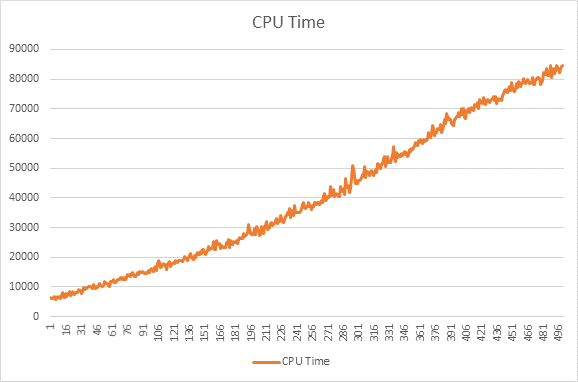
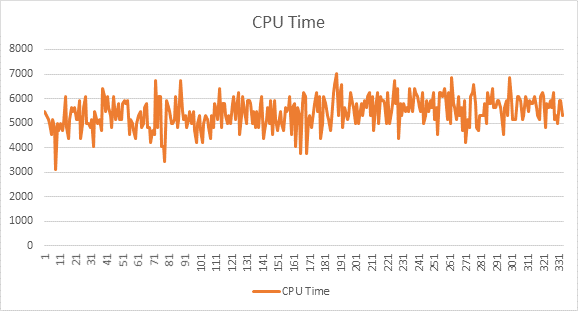
The time to generate 500 questionnaires:
• before using this class: 45 min
• after using this class: 9 min
Moreover the generation time is stable.
Before:
After:
Use case 2: workflow action enabling mass transitions
The time to perform the mass transition of 500 questionnaires:
• before using this class: 2 hours
• after using this class: 17 min
Moreover the CPU is stable.
12.2.7 Navigating through the technical data with APIs
Technical data is stored in the system repository.
• Data must be stable, i.e.:
o serialized in a file
o loaded on demand from the file
o when a data often changes, there is no point in tagging it as “technical data”
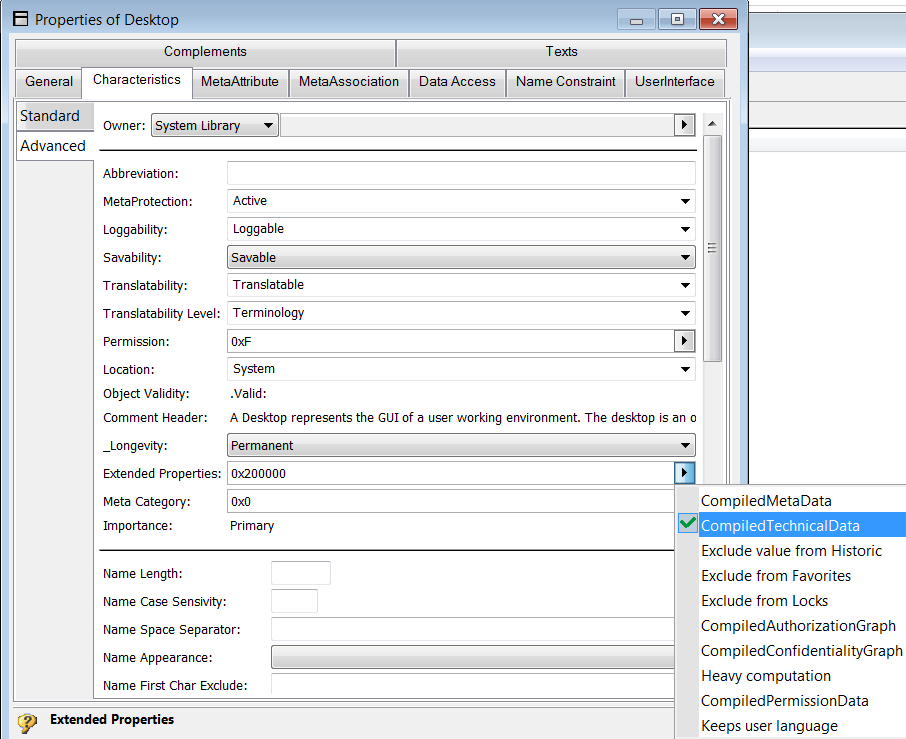
• To navigate through the data, use the scanner as follows:
o Define a scanner class
o Define public member that can be reused by the caller
o Caller uses ScanCollection to retrieve a collection from a specific MetaAssociationEnd
o Callee defines onItem procedure called for each data available in the collection
|
VB Script
|
Class ScannerReportTemplate
Public mgResource
Public mgToolkit
Public mgData
Public mgFunction
Public mgName
Public mgMetaclassidabs
Public mgbTrouve
Public mgIdAttribute
Public mgFirstIdAbs
Public coont
Public Sub OnItem(Context, Id)
mgFirstIdAbs=Id
mgbTrouve =true
Select Case mgFunction
Case 1
mgData=Context.targetProperty(mgIdAttribute & ":T" )
Case 2
mgData = mgResource.name(Context, "~Z20000000D60[Nom court]")
End Select
Context.Abort
End Sub
End Class
Function GetShortNameRT(idDepart,mgRoot As MegaRoot)
Dim mgScanner
Set mgScanner = New ScannerReportTemplate
Set mgScanner.mgResource = mgRoot.CurrentEnvironment.Resources
Set mgScanner.mgToolkit = mgRoot.currentEnvironment().toolkit()
mgScanner.mgFunction = 2
dim idLink
dim listAttributes
idLink = "~kyHXAOuE3jN0[Rapport type parametre]"
‘ T means the information is on the target object and not on the link
listAttributes ="~Z20000000D60[Nom court]" & ":T"
mgScanner.mgbTrouve = false
mgScanner.mgResource.ScanCollection idDepart ,idLink , mgScanner ,1 , listAttributes
if(mgScanner.mgbTrouve ) then
GetShortNameRT= mgScanner.mgData
else
GetShortNameRT= null
end if
end function
|
|
Java
|
public class MyScannerEvent extends MyScanner implements CollectionScanner {
private List<Event> m_lEvents = Collections.synchronizedList(new ArrayList<Event>());
public MyScannerEvent(final MegaRoot megaRoot, final MegaResources megaResources, final MegaToolkit megaToolkit) {
super(megaRoot, megaResources, megaToolkit);
}
public void OnItem(final MegaCollectionScannerContext context, final Object endId) {
Event event = new Event();
event.setMacroId(Util.getIdAbsBase64(this.getMegaToolkit(), endId));
event.setEvent(context.property(VocLinkDesktopLinkMacro.MA_EventType));
synchronized (this.m_lEvents) {
this.m_lEvents.add(event);
}
public List<Event> getListEvents() {
return this.m_lEvents;
}
public void setListEvents(final List<Event> listEvents) {
this.m_lEvents = listEvents;
}
}
‘Caller
MyScannerEvent myScannerEvent = new MyScannerEvent(this.getMegaRoot(), this.getMegaResources(), this.getMegaToolkit());
ScannerProperties spEvent = new ScannerProperties();
PropertiesForObject.addPropertiesForDesktopEvents(spEvent);
this.getMegaResources().scanCollection(objDesktopID, VocDesktop.MAE_EventBehaviorMacro, myScannerEvent, CollectionScanMode.synchrone, spEvent.getAllProperties());
desktop.setEvents(myScannerEvent.getListEvents());
|
12.3 Log error management
In standard, HOPEX logs all the errors in the megaerr file.
To get the stack written on the log file, you must not use try…catch in your code.
However, if you want to send back an unrecoverable error, use the MegaException class.
public void myMethod(final String sParam) throws MegaException
{
if (sParam.equals("bad"))
{ throw new MegaException("Bad param", Mode.APPLICATIF);
}