Defining Technology Properties
To access technology properties:
 In the list of repository technologies, select the required technology and click the Properties button
  of the edit area.
The Properties window displays the following pages.
Characteristics
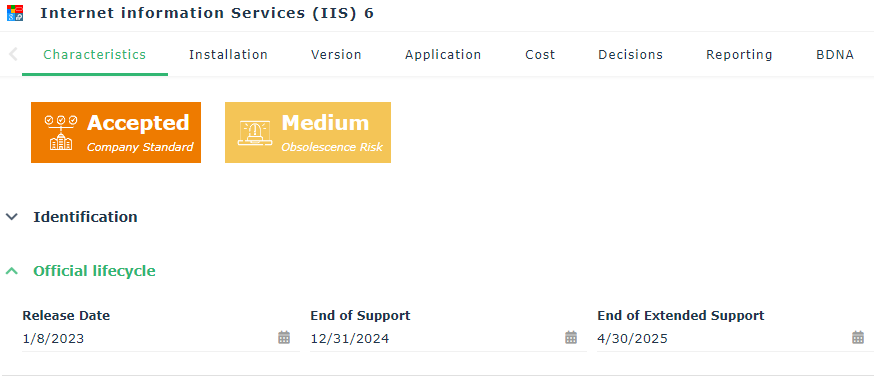
The Characteristics page presents indicators on technology:
• Company Standard: indicates the organization's policy for using technology. See Validating a Technology.
• Obsolescence Risk: its value is a function of the interval time between the current date and the technology's end-of-support date (or extended end-of-support date). The shorter the interval, the higher the risk:
|
Interval current date / end of support
|
Obsolescence risk level
|
Indicator color
|
|---|---|---|
|
Less than 12 months
|
Very high
|
 |
|
Between 12 and 24 months
|
High
|
 |
|
Between 24 and 30 months
|
Medium
|
 |
|
Between 30 and 36 months
|
Low
|
 |
|
More than 36 months
|
Very low
|
 |
|
Unknown
|
Unknown
|
Gray
|
See also: Defining Technology Life.
In the Characteristics page you can specify:
• Identification of the technology:
• the Name of the technology
• the internal Code
• the Vendor
• The Company standard: this attribute indicates the organization policy regarding the usage of a technology or technologies of a vendor. It is specified by the Chief Technology Officer.
 See also Validating a Technology.
• a Comment.
• the Official Life Cycle of the technology, with its publication and support end dates.
The end of support date can be imported from BDNA or specified manually. See also: Technology Support Alert.
• Technology Type: IT service, operating system, platform, DBMS. A technology can be connected to one or to several technology types.
New technology types can be created by the functional administrator only.• Responsibility: this is the person or persons responsible for the technology:
• the management controller responsible for financial aspects of the technology
• the local correspondent who is the main referrer for the technology
This business role is not associated with a specific desktop.• Gantt Chart presenting the technology life cycle. This is the life cycle within the organization; it can differ from the official life cycle specified by the supplier.
For more information on the object life cycle and its Gantt chart, see Viewing Application Life (Gantt Chart).
For more information on the technology official life cycle, see BDNA properties in HOPEX.
• associated Attachments.
Version
Application
This page allows you to connect the technology to existing applications. For each application you can indicate:
• Total expenses for the year
• Capital expenditure (CAPEX)
• Operating expenses (OPEX)
Cost
In this page you can define costs linked to the technology. The definition of costs of a technology is the same as for an application. See Managing Application and Application System Costs.
An analysis report summarizes costs of the technology. See Costs Report.
Reports
The Reports page accesses analysis reports available on the technology.
Costs Report
Summarizes technology costs, by cost nature and by year.
Gantt Chart
Displays technology life cycle steps. See Defining Technology Life.
Gantt Chart with Conflicts
This report presents possible conflicts between the technology life cycle and the life cycle of the applications that use it.
Rules Application
Displays modeling rules in cases where a rule is active.
Overview
Displays a summary of technology characteristics.
BDNA
This page displays properties imported from BDNA. See Displaying BDNA properties in HOPEX.
See also Importing Technologies from BDNA.
IT-Pedia
This page displays properties imported from BDNA. See Importing Technologies from IT-Pedia.