Using UCF Import
UCF Import Prerequisites
Internal Control directors or IRM Managers can download UCF content (authority documents, citations and controls) and update it.
To be able to import this content to HOPEX UCF, you must have:
• HOPEX IRM (or HOPEX Internal Control as a minimum) AND HOPEX UCF
• a UCF account and API key
• a Shared List with the Authority Documents you want to import.
 For more information, see Unified Compliance Framework.
• parameterized UCF options in HOPEX UCF
In the UCF Common Controls Framework, information is generally available in English. If you want to use HOPEX UCF with HOPEX user data language other than English, you must:
• set up your data language of interest (example: if you want to use HOPEX with French as data language, make sure to set up French as data).
• import UCF data
• repeat the operation (change data language + proceed to import) as many times as desired languages.
Parameterizing UCF Import
To parameterize UCF import:
1. In the Main menu, select Settings > Options.
2. In the Options window, expand Data Exchange > Import > UCF Common Controls Hub Integration.
3. Select the Activate UCF Import check box.
4. Enter the URL corresponding to UCF API.
https://api.unifiedcompliance.com/
5. Enter your UCF API Authentication Key.
To retrieve your API authentication key in your Unified Compliance Framework workspace:• go to Settings > API Manager > API Keys.
• Create Credentials and copy paste your API Key.
6. Click OK.
Importing Data from the Common Controls Hub
Compliance officers need to set up the UCF environment in HOPEX UCF. This consists in:
• importing relevant data from the UCF Common Controls Hub (Authority Documents, Citations and Controls)
• declaring the appropriate articles as relevant for your organization: see Defining the Applicable Regulatory Content.
To import UCF data:
1. In the navigation menu, select Environment > Compliance > Regulatory Frameworks.
2. Click Import UCF content.
3. Click Next.
4. Select the Shared List from your Common Controls Hub.
5. Click Next.
6. Select the Authority Document(s) you wish to import into HOPEX.
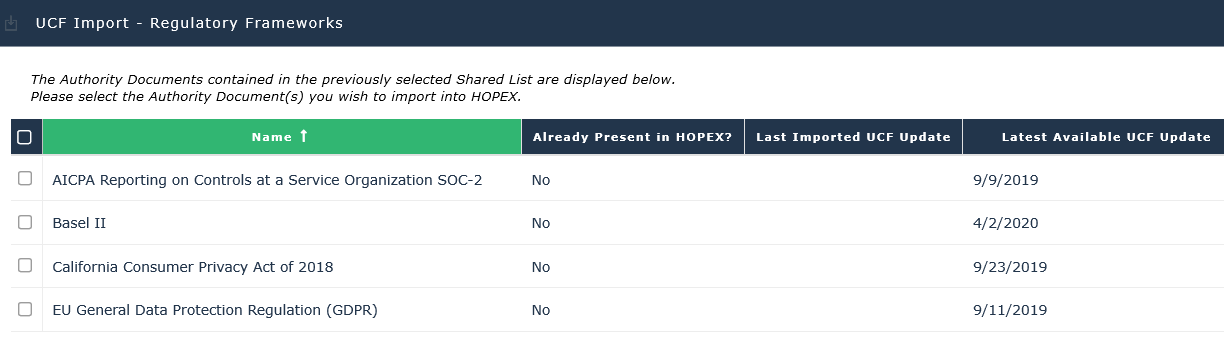 If you update an already imported Authority Document, it may be useful to compare the columns Latest available UCF updates and Last imported UCF update.
7. Click Next.