Defining the Applicable Regulatory Content
Regulatory content relevance
All the articles/sections of an imported regulatory framework are not applicable to your organization.
Compliance officers can inspect the imported regulatory frameworks and specify which ones are applicable.
Only the applicable articles and sections will appear in HOPEX registers for your stakeholders.
 The regulatory content you directly create in HOPEX is automatically considered as compliant (applicable).
Reviewing regulatory frameworks after UCF import
Once the UCF data has been imported, the following tree appears in the Environment menu available to manager profiles.
It displays regulatory frameworks (UCF Authority Documents) and features regulation articles (Citations) along their enforcing control directives (UCF Controls). It is based on the supported/supporting structure originally defined by UCF.
From this tree you can:
• review the newly imported regulatory frameworks and their content.
• specify the content applicable to your organization
Selecting relevant content for your organization
To declare regulatory content as relevant:
1. From the navigation menu, select Environment > Compliance > Control Directives.
2. Expand the tree if necessary and select the check-box corresponding to the regulatory frameworks/articles/sections you must comply with.
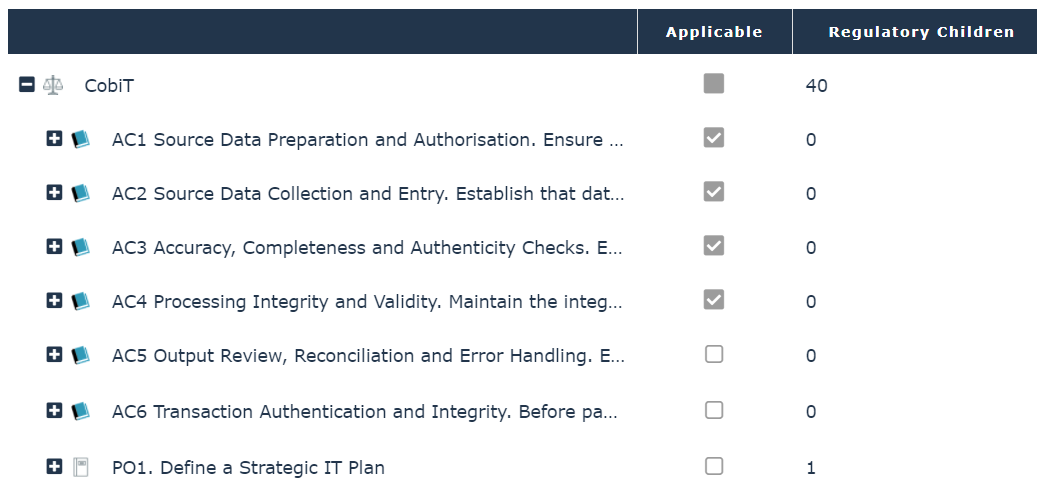 The grey square
  means that the regulatory content below has been partially selected only.
Data corresponding to the regulatory content you have selected become available to Internal Controllers in the Control Framework register. See Managing the Compliance Register.