Issue-Related Reports
Issue Follow-up Report
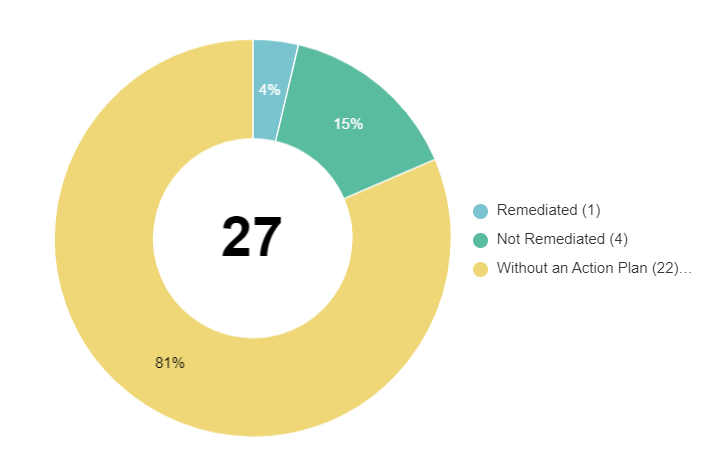
The issue follow-up report is presented in the form of a pie chart.
Access path
Analysis > Controls > Remediation > Issue Follow-Up
Result
This report distinguishes issues:
• Remediated: issues with an action plan whose status is:
• Completed
• Closed
• Non-Remediated: issues with an action plan of which status is:
• To send
• To start
• Under follow-up
• Without action plan
 For more details on generation of this report, see Generating issue follow-up reports.
Example
“Issues by Impact” Report
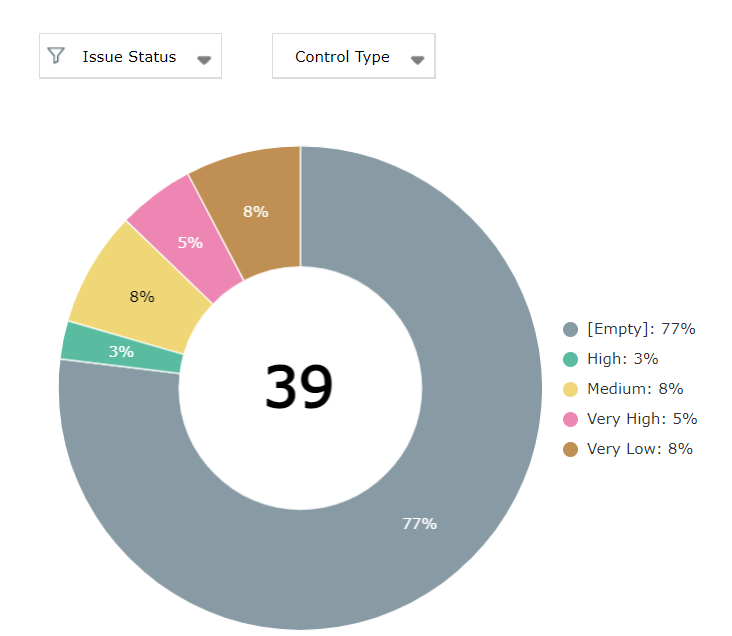
This report is a pie chart that groups issues by impact (very low, medium, high, very high)
You can filter results:
• by issue status (open, closed)
• by control type impacted by the issue.
Use case:
- You have connected a number of controls to a control type to meet specific requirements (for example, “IT Compliance”)
- This report enables you to view the issues that impact the control type of interest.
Access path
Analysis > Controls > Remediation > Issues by Impact
Result