Managing Processes
Available process types are:
• business processes

• organizational process
Accessing processes
To access the business / organizational process tree:
 In the HOPEX IRM desktop, click Environment > Organization > Processes.
Root business and organizational processes are displayed.
Process hierarchy
The hierarchy of processes/operations is as follows:
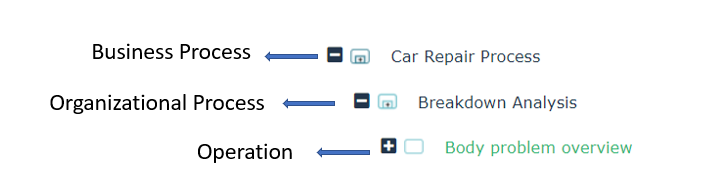
For each process of the hierarchy the following is displayed:
• Risks (directly connected to processes)
• Controls (directly connected to risks, which are in turn connected to processes)
• Controls (directly connected to processes)
The following columns are available:
• Risks (number of)
• Controls (number of)
• Last assessment
• Residual risk
• Forecast risk
• Latest compliance rate
• Control level
Specifying process characteristics
To access the characteristics of a process:
Open the Characteristics page of the process properties.The Owner is responsible for global operation of the process in terms of effectiveness, profitability and security.
Specifying process scope
A process can be linked to different objects types.
A specific page is available in the process properties for each object type:
• Risks: risks that relate to the process.
 For more details, see Managing Risks.
• Controls: controls that relate to the process.
For more details, see Managing Controls.• Incidents
• Action plans
To view regulations impacting a process, expand the Regulatory Impact section.Specifying process responsibilities
Responsibilities on a process are shared by persons with different roles.
To specify responsibilities on a process:
In the process properties, expand the Responsibilities section.You can specify the following responsibilities:
• Accountable
• Consulted
• Informed
The above responsibilities correspond to the RACI responsibilities. See Responsibilities (RACI).• Risk assessor
You can define several risk assessors on the same entity.• Control assessor
You can define several Control assessors on the same entity.Specifying sub-processes
To specify the sub-processes of a business process:
In the business process properties, expand the Sub-processes section.You can specify:
• The business process components
• The connected organizational processes
To specify the sub-processes of an organizational process:
In organizational process properties, expand the Sub-processes and Operations section.You can specify:
• organizational processes
• associated operations
Managing business continuity
These features are available with HOPEX BCM only.To access the Business Impact Analyses (BIAs) and Business Continuity Plans (BCPs) associated to a business process:
Open business process properties and select the Business Continuity page.For more details, see:To add a business process to a BCM system:
In a business process pop-up menu, select Add to BCM system.For more details, see Managing BCM Systems.To create a Business Impact Analysis (BIA) from a business/organizational process:
Open the process pop-up menu and select Create a BIA.Other sections of a process
The properties page of a process presents the following sections:
• IT assets: It resources (applications, databases and servers) are made available for process implementation.
• Entities that intervene in the process.
See Managing Entities.• Business Lines: business lines that use the process services.