Managing Currencies
Currencies are used:
• when entering incident losses
• within the framework of tests or audits when filling in expense sheets.
Two currency types should be distinguished:
• central currency

• local currencyCentral currency is the currency adopted as reference currency.
Defining Central Currency
To define central currency:
1. In the Administration application (administration.exe), login to the environment of interest to you.
2. Right-click the repository and select Options > Modify.
The repository options window opens.
3. Select the Installation > Currency folder.
The list of currencies available as standard appears on the right.
4. In the Monetary Symbol field, specify the symbol of your consolidation currency, for example "$".
5. In the Central Currency field, select your consolidation currency, for example "US Dollar".
6. Click OK.
7. Exit the Administration application.
Defining local currencies available to users
IRM functional administrator must define local currencies available to users .
(HOPEX Windows Front-End) To define the list of local currencies:
1. In the folder where HOPEX is installed, launch "Administration.exe" and connect with a user that has data administration authorization rights.
2. Select the environment then the repository on which you want to work.
3. Right-click the repository and select Options.
The repository options window opens.
4. Select the Installation > Currency folder.
The list of currencies available as standard appears on the right.
5. Then select all the currencies that will be used locally by your users.
6. Click OK.
7. Exit the Administration application.
(HOPEX Web Front-End) To define the list of local currencies:
1. Connect with the IRM Functional Administrator profile.
2. In the main menu, select Settings > Options.
3. Select the Installation > Currency folder.
The list of currencies available as standard appears on the right.
4. Select all the currencies that will be used locally by your users.
5. Click OK.
Specifying your local currency
You can choose a local currency different from the central currency.
To modify your local currency:
 In the main menu, select a currency as follows: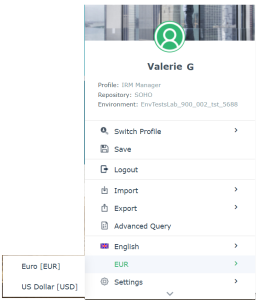
Managing Exchange Rates
To enter an exchange rate:
1. In the HOPEX IRM desktop, select Administration > Tools > Exchange Rate.
2. Click New.
3. In the window that appears, enter:
• the Currency Code To.
• the Rate of the source currency related to the final currency.
• the Rate Date Begin.
 Several exchange rate periods can be entered for the same currency. When entering expenses, the most recent exchange rate is taken into account.You must enter the exchange rate in both directions, for example:
• EUR->USD
• USD->EUR
To view an exchange rate:
1. In the drop-down lists above the table, select the source and final currencies.
2. Click Refresh.
The exchange rates for the selected currency appear.
To reverse the exchange rate, click button 