Using Realization Matrices
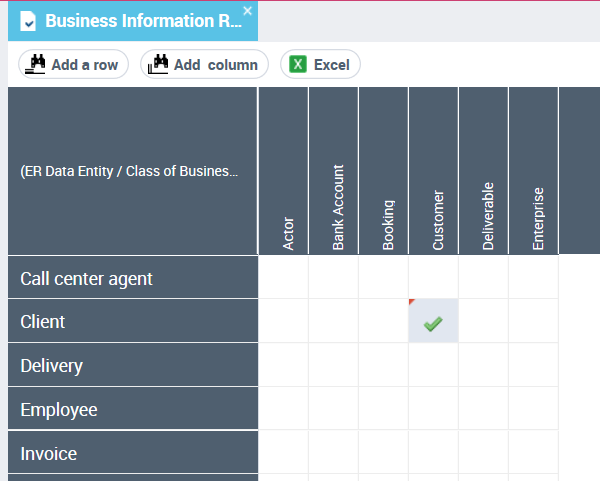
Realization matrices allow you to define and view the realization links between objects in the repository.
Example
Realization of business data by logical data
This matrix is used to specify that logical data (classes, data views, etc.) realize business information (concepts, concept types, etc.).
Realization Levels
Business function level
Realization of business data by other business data
This matrix is used to specify that business data (concepts, concept types, etc.) realize other business information.
Logical level
Realization of logical data by other logical data
Realization of business data by logical data
Realization of business information maps by logical data maps
Realization of business information areas by logical data areas
Realization of logical data areas by application data areas
Physical level
Realization of business data by physical data
Realization of business information areas by physical data areas
Realization of business information maps by logical data maps
Realization of logical and application data areas by physical data areas
Realization of logical data maps by physical data maps
 The realization of logical data (classes, data views, etc.) by physical data (tables, table views, etc.) takes place via the synchronization tool. See "Synchronizing logical and physical models".
Creating a Realization Matrix
To create a realization matrix:
1. In the Information Architecture desktop, click on the navigation menu, then on the data level concerned:
• Business information for the realization of business data
• Logical data for the realization of logical data
• Physical data for the realization of physical data
2. In the navigation pane click Data realization.
3. In the edit area, select the type of matrix to be created (if there are several) then select New.
The matrix appears in the edit area.
4. Add the data that realizes it in a row and the data realized in a column.
5. To specify that one object realizes another object, click on the cell of the matrix that connects the two objects in question.
See also: "Initializing a Business Dictionary Using Logical or Physical Data"