Importing Business Data from an Excel File
HOPEX Information Architecture provides an Excel file template so that you can import a set of existing business information into the HOPEX repository.
You can use the template to simply import a list of terms and their definitions, in order to generate a glossary, or for a more detailed description of business information, with the ability to define the relationships between concepts, their synonyms, etc.
You can also use this template to export business data from the repository.
Downloading the Excel File Template
To download the Excel template associated with the business data:
1. On the HOPEX Information Architecture desktop, click Main menu > Export > Excel.
2. In the wizard that appears, check the option "From a template".
3. Click Next.
4. In the Predefined Template File field, select "Concept Template".
5. Click twice on Next and save the created file. It contains the structure provided by the model.
Content of the Excel Template
The template contains the following sheets that interact with each other:
• Business Dictionary
• Data Category
• Term
• Concept
• Synonym
• Hyperonyme
• Component
• State concept
Term Sheet
The Term sheet allows you to import a set of terms with their name, language and definition.
It contains the following columns:
Term_Ident
This property allows you to identify the term when it is referenced in other sheets of the file. If only the Term sheet is used in the Excel file, it is not necessary to define this property.
Term_Name
This property defines the name of the term.
Business Dictionary
In this column you must indicate the name of the business dictionary in which the imported Terms, Concepts and other business objects will be created.
It is not possible to specify different business dictionary names in the same Excel file. It is also important to enter the same name in all object lines of the sheets to be imported.
Language
This property indicates the abbreviation of the language associated with the term, for example FR, EN, etc. This abbreviation is used to identify the language of the object in HOPEX.
When you click in the corresponding column, a list of languages is proposed.
Text Definition
This property contains the definition of terms and is used to create in HOPEX the concepts that correspond to the terms entered in the sheet.
The Text Definition property is to be completed when only the Term sheet is used or when the term concerned has only one definition. If the term has several definitions, they must be declared in the Concept sheet. Thus each of the concepts refers to the associated term (via its identifier declared in the Term sheet) and carries its definition in the Text Definition property of the Concept sheet (see below the example of the Concept sheet).
Example of Term sheet:

Concept Sheet
The Concept sheet allows you to link concepts to the terms defined in the Term sheet, and to give their definition.
Concept_Ident
This property identifies the concept that corresponds to the term.
Term_Ident
This property identifies the term from which the concept is derived and which is defined in the Term sheet.
Concept_Name
This property is optional; it is used for information purposes. The name of the concept is that of the associated term.
Text Definition
This property contains the definition of the term from which the concept is derived.
Example:
The sheet below gives all the concepts and definitions associated with the term "Order" (defined in the terms sheet with the identifier "T0"):
The sheet below gives all the concepts and definitions associated with the term "Order" (defined in the terms sheet with the identifier "T0"):
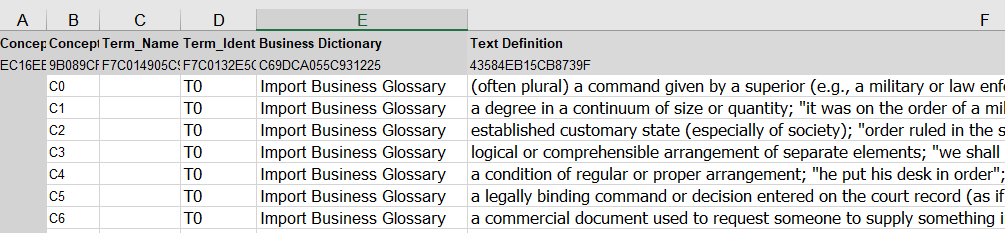
Synonym Sheet
The Synonym sheet allows you to link terms defined in the Term sheet to definitions entered in the Concept sheet, by designating the terms as synonyms of the definition (the definition being carried by a concept).
Concept_Ident
This property identifies the concept that corresponds to the term.
Concept_Name
This property is optional; it is used for information purposes. It gives the name of the concept.
Term_Ident
This property identifies the term associated with the synonym, which is defined in the Term sheet.
Term_Name
This property is optional; it is used for information purposes. It gives the name of the term.
Component sheet
The Component sheet is used to define the relationships between concepts.
Concept_Component_Ident
This property identifies the concept components.
Term_Ident
This property is to be defined if the component is to designate the term. By default the component name is initialized from the referenced concept.
Owner_Concept_Ident
This property is mandatory; it identifies the owner concept.
Referenced_Concept_Ident
This property is mandatory; it identifies the referenced concept.
State Concept sheet
The State Concept sheet allows you to import a set of concept states associated with terms.
Concept_State_Ident
This property identifies the concept state to be imported.
Term_Ident
This property identifies the associated term, which is defined in the Term sheet.
Concept_State_Name
This property is optional; it is used for information purposes. The name of the concept state is derived from the corresponding term.
Text Definition
This property contains the definition of the associated term.
StateOf_Ident
This property identifies the concept of the state. If this property is null, the concept state is created without a concept.
See also: Importing Logical Data from an Excel File.