Organization of UML Diagrams
General organization
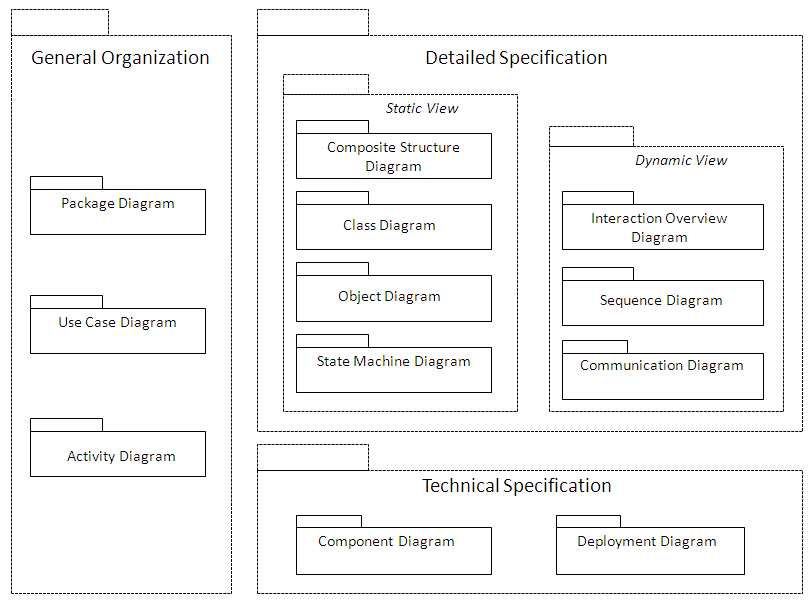
Use case diagrams show the main interactions between the system being analyzed and its environment, and indicate its main sub-systems.
Package diagrams provide a more technical breakdown of the system. Dividing a system into packages imposes some structure, as an object can only be in one package. You can begin drawing package diagrams as soon as you have identified the main components of your system (Sales, Production, Invoicing, etc.).
Detailed specification
The main diagram is the class diagram. It describes the essential semantics of the objects in the system. This is where designers will generally spend most of their time. Classes are generally discovered by iteration between class and sequence diagrams.
The state machine diagram describes the static aspects of an object: the different states it can be in and the possible state transitions. This fleshes out the class description.
The interaction diagrams describe the dynamic aspects of the system, by showing the interactions between objects. They provide a detailed description of the different scenarios in a use case. The sequence diagram specifies how a scenario progresses over time, while the communication diagram stresses the interactions between objects.
Technical specification and deployment
The component diagram describes the different technical components of an application and shows their interactions.
The composite structure diagram specifies collaborations between components or component elements in execution of a common task.
The deployment diagram is used to specify the system architecture, indicating the workstations or nodes in the information system where the different application components are to be installed.
UML diagram entry points
Diagram | Entry points |
Class diagram | Package, class, use case |
Object diagram | Class, component, package, use case |
Component diagram | Component, package |
Composite structure diagram | Component, class, collaboration |
Deployment diagram | Package |
Package diagram | Package, library |
Use case diagram | Package, Use case, Application environment (ADES) |
Sequence diagram | interaction |
Communication Diagram | interaction |
Interaction overview diagram | interaction |
Activity diagram (UML2) | Activity |
State machine diagram | State machine, , protocol state machine |
In HOPEX IT Architecture, the entry points above are accessible in Design (UML) > OO Implementation (UML) navigation pane.