Defining the Data Used by Applications
HOPEX Data Governance allows you to make an inventory of applications that use the data you have modeled.
Thanks to the HOPEX integrated platform you can use this inventory in the HOPEX solutions specific to the description of the application architecture, such as HOPEX IT Architecture or HOPEX IT Portfolio Management.
Dedicated reports allow you to visualize in which applications certain data is used. See Data Usage Reports.
Creating the Inventory of Application Assets
The inventory of application assets is carried out by the IA functional administrator.
To create an application in HOPEX Data Governance:
1. Click the navigation menu then Architecture > Data Usage.
2. In the edit area, click the Data-using Applications tab.
3. Click the Applications sub-tab then click the New button.
4. Enter the name of the application and an owner if necessary.
5. Click OK.
In the same way you can create application systems, application services, micro-services and application flow scenarios.
For more details on objects of the application architecture, see Modeling Applications and System Architectures.
Connecting Data to an Application
The Data Manager has the ability to define the data that is used by the applications.
To connect logical data to an application - or any other application asset object - you must create a data store on the application. The data store provides a mechanism for storing and consulting data through the application.
The data store references an application data area that represents the structure of the data that the application needs.
On the application, you can create internal data stores (used only within the described system) or external data stores.
These data stores can be logical (ER) or physical.
Creating a data store on an application
To create a data store on an application:
1. Open the properties of the application in question.
2. Click the Structure page.
3. Go to the section that corresponds to the type of component to be created:
• Internal components for a local data store.
• Boundary components for an external data store.
4. Select the type of data store: logical or physical.
5. Click the New button.
6. In the window that appears, select the data area referenced by the data store and click OK.
The new data store appears in the application properties.
Defining data access mode
In the data area properties you can define how to access the data (create, read, delete, etc.).
To access the properties of a data area:
1. In the application properties, click the data store icon then click Properties.
Properties of the corresponding data area appear.
2. Click the Components page.
3. Select the component and select the check boxes that correspond to the types of access in question (Creation, Read-only, etc.).
Connecting Data to an Application Flow Scenario
An application flow scenario presents the flows exchanged between the components of an application.
In the same way, an application system flow scenario represents the flows exchanged between the elements of the application system in a given context.
As for an application, connecting data to an application flow scenario involves creating a data store. The data store references an application data area that represents the data structure used in the scenario framework.
For example, below, the "Customer data" data store references the customer data structure (that can be comprised of the details of each client) used by the "Customer management" application service.
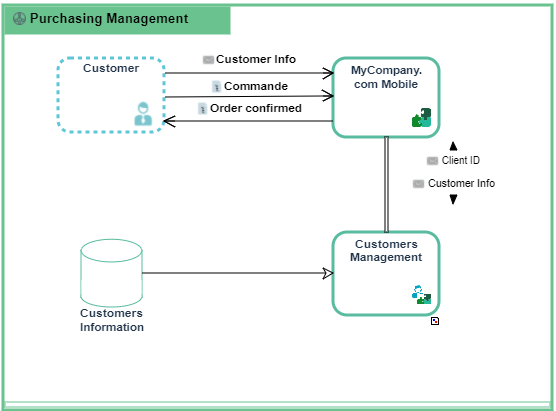
Creating a data store on an application flow scenario
To create a data store on an application flow scenario:
1. Click the navigation menu then Architecture > Data Usage.
2. In the edit area, click the Data-using Applications tab.
3. Click the Scenarios sub-tab.
4. Open the properties of the scenario in question.
5. Select the Scenario page.
6. Select the type of data store: internal or external.
7. Click the New button.
8. In the window that appears, select the data area referenced by the data store and click OK.
The new data store appears in the application properties.