Primary and foreign keys
When the keys of a database are not completely specified, you must Complete them.
Specifying Primary Keys
To specify the primary keys of the database:
 Right-click the database and select Complete keys.
The Complete keys window appears.
 When database specification is completed, the dialog box presents an empty list: no additional specification is required.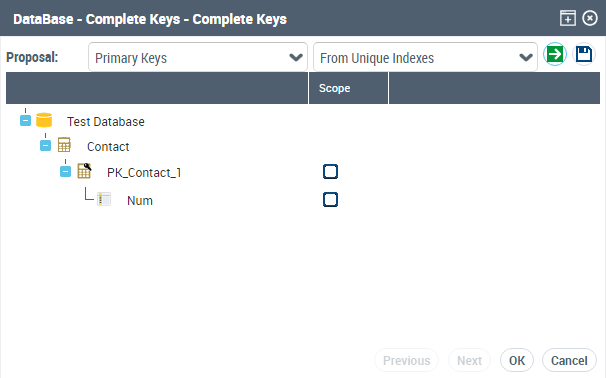
The Proposition list is used to complete the keys:
• From unique indexes: the columns that belong to a unique index are proposed as components of the primary key.
• From mandatory columns: these columns are proposed as components of a key.
• Through name comparison: if the same column name is found in several tables, the column is proposed as primary key.
Each key is proposed under the table to which it belongs.
To validate a primary key:
1. Select the check box of the Scope column corresponding to the key.
The associated columns are automatically selected by default. You can eliminate those that correspond to search criteria but are not components of the key.
2. Click the Apply button.
The Apply button removes from the list the propositions of keys explicitly accepted or rejected.
For foreign keys, two keys including the same column on the same table are incompatible: acceptance of one automatically results in rejection of the other.
It is not possible to select several primary keys on the same table: acceptance of one results in rejection of the others.
 You can complete the specification of keys in several stages. This allows you to consult the contents of the database while making your selections. To do this:
• Click the Apply button to save your modifications.
• Click the Cancel button to exit this dialog box without starting processing.
Specifying Foreign Keys
To specify the foreign keys of the database:
Right-click the database and select Complete keys.The Complete keys window appears.
When database specification is completed, the dialog box presents an empty list: no additional specification is required.The Proposition list is used to complete the foreign keys:
• From indexes
• From name comparison
If the proposition is made from indexes, it is based on non-unique indexes of the table. The reference table is indicated after the name of the key.
To validate a foreign key:
1. Select the check box of the Scope column corresponding to the key.
2. Click the Apply button.
The Apply button removes from the list the propositions of keys explicitly accepted or rejected.
If no reference table is specified, the wizard automatically proposes the selection of possible tables. Keys that do not have a reference table cannot be accepted.
On proposition of keys, several tables may be found with an identical primary key. This could for example be the case for tables corresponding to different sub-types of the same entity.
Column Primary Key of Two Tables
When the same column is the primary key of two tables, the foreign key proposition permits creation of each of these two keys.
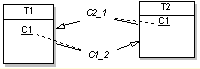
A choice is then made of which of the two keys should effectively be taken into account.
Column Primary Key of Three Tables
When the same column is the primary key of three tables, the foreign key proposition permits creation of one foreign key from a column of a table.

The key proposition permits creation of only one foreign key from table C. The other should be added in data entry of tables in the database.